Starting a podcast is an accessible way to share your expertise, yet the technical requirements often feel like a barrier to entry. With over a quarter of the adult population engaging with audio content on a weekly basis, the quality of your production directly influences how your brand is perceived. High-quality podcast equipment is no longer reserved for professional studios; it is now well within reach for businesses and individual creators alike. The gap between amateur recordings and broadcast-ready audio has narrowed significantly, thanks to advancements in digital signal processing and affordable hardware.
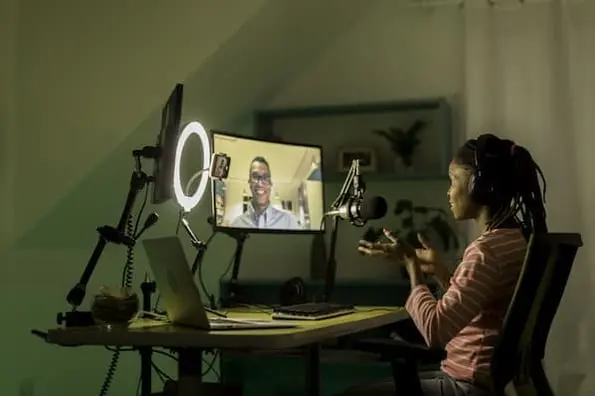
To build a show that resonates with listeners, you need a reliable setup that captures crisp, clear audio while maintaining a consistent workflow. Whether you are aiming to interview industry leaders or share internal insights, the right combination of hardware and software ensures your message is heard without technical distraction. Poor audio quality is the number one reason listeners abandon a podcast, making the initial investment in gear a critical business decision. We have organized the necessary tools into four distinct categories: recording hardware, recording software, editing tools, and hosting platforms. By understanding the role each component plays, you can build a system that scales with your ambitions.
Essential Podcast Recording Equipment
The foundation of any great show is the hardware used to capture sound. You should prioritize equipment that balances audio fidelity with ease of use, particularly if you are recording in a home or office environment. The choice of gear dictates not only the sonic character of your voice but also the flexibility you have during the recording process. Understanding the signal chain—from your vocal cords to the digital file on your computer—is essential for troubleshooting issues and achieving a professional sound.
Microphones and Interfaces
Your microphone is the most critical investment in your podcast equipment arsenal. USB microphones offer a plug-and-play experience, making them ideal for solo hosts who want to start quickly without navigating complex technical setups. These mics contain a built-in analog-to-digital converter, allowing them to connect directly to your computer’s USB port. This simplicity reduces latency and setup time, which is beneficial for creators who value speed and convenience. However, USB mics often lack the dynamic range and sensitivity of their XLR counterparts, which can limit their performance in less-than-ideal acoustic environments.
If you require more control or plan to record multiple participants, an XLR microphone paired with an audio interface is the industry standard. XLR microphones are generally more durable and offer superior sound quality, particularly in dynamic or condenser configurations. An interface, such as the Focusrite Scarlett 2i2, acts as the bridge between your high-quality XLR microphone and your computer. It provides phantom power for condenser mics, preamps to boost the signal, and analog-to-digital conversion. This setup allows for precise volume control for each input, ensuring that no voice is clipped or too quiet. The audio interface also enables you to monitor your recording through high-quality headphones, giving you real-time feedback on your sound levels.
For more complex setups involving multiple guests, a dedicated podcast mixer like the RODEcaster provides built-in processing and Bluetooth connectivity for remote interviews. These mixers often include onboard effects, such as compression and equalization, which help balance the levels of different speakers automatically. They also feature dedicated inputs for music and sound effects, allowing you to integrate these elements seamlessly during the recording phase. This reduces the need for extensive post-production mixing, saving time and effort in the editing stage.
Studio Environment and Comfort
Beyond the microphone, you must manage your recording environment. A windscreen or pop filter is essential for reducing plosive sounds—those sharp ‘p’ and ‘b’ noises that can ruin an otherwise perfect take. Plosives occur when a burst of air hits the microphone diaphragm, causing a low-frequency spike in the audio signal. A pop filter, typically a mesh screen placed a few inches in front of the microphone, disperses this air, resulting in a cleaner recording. While a windscreen can serve a similar purpose, a dedicated pop filter is often more effective for close-miking techniques commonly used in podcasting.
Studio-quality headphones are equally important, as they allow you to monitor your audio in real-time, helping you catch distortion or background noise before it becomes a permanent part of your file. Closed-back headphones are recommended for recording, as they prevent sound from leaking out and being picked up by the microphone. This isolation ensures that the audio you hear is exactly what is being recorded, without any bleed from your monitoring system. Investing in comfortable, durable headphones is crucial, as you will likely wear them for extended periods during recording and editing sessions.
Finally, an adjustable microphone arm stand removes the need to hunch over a desk, allowing for a more natural posture that translates into better vocal delivery. Desk stands can introduce vibrations from typing or movement, which can be picked up by the microphone. A boom arm isolates the microphone from these vibrations, providing a stable mounting point. It also allows you to position the microphone at the optimal distance and angle, ensuring consistent sound quality throughout the recording. Proper ergonomics not only improve audio quality but also reduce physical strain, making long recording sessions more comfortable and sustainable.
Selecting the Right Recording Software
The software you choose determines how you capture remote interviews and manage your audio tracks. The best choice depends on whether you value simplicity or the ability to isolate individual tracks for post-production editing. As remote podcasting has become the norm, the limitations of traditional communication tools have become apparent. Understanding the differences between cloud-based recording and local recording is key to selecting the right platform for your needs.
Remote Recording Solutions
Platforms like Zoom and Skype are common starting points, offering free or low-cost ways to connect with guests. While accessible, they often combine audio into a single track, which can make editing difficult if one speaker is significantly louder than the other. This mono-track recording means that any background noise, coughs, or interruptions from one participant are baked into the final file, requiring complex editing to remove. Additionally, internet connectivity issues can lead to choppy audio or dropped calls, compromising the integrity of the interview.
More specialized services like Squadcast, Riverside, and Zencastr provide local recording, meaning each participant’s audio is recorded directly on their own device before being uploaded. This results in superior sound quality and professional-grade separation of tracks. Local recording bypasses the limitations of internet bandwidth, ensuring that the audio quality is determined by the microphone and interface, not the network connection. Each speaker’s audio is captured in high fidelity, and the files are synced after the session. This approach provides editors with the flexibility to adjust levels, remove noise, and edit each voice independently, leading to a much cleaner final product.
Advanced Recording Features
For those looking for high-fidelity video and audio, Riverside stands out by offering local recording up to 4K resolution. These platforms also often include features like automated transcription and producer controls, which can significantly reduce the time spent in post-production. Automated transcription uses AI to generate a text version of the audio, which can be used for editing, creating show notes, or improving accessibility. Producer controls allow a third party to manage the recording session, ensuring that all participants are recorded correctly and that the session runs smoothly.
When selecting a service, consider the total number of guests you typically host and whether you require integrated video recording for platforms like YouTube. Some platforms have limits on the number of participants or the length of recordings, which can be a constraint for longer interviews or panel discussions. Additionally, check the storage options and export formats supported by the platform. Ensuring that the software integrates seamlessly with your editing workflow can save significant time and effort. Look for platforms that offer direct exports to popular editing software, allowing you to import your tracks with minimal friction.
Streamlining Your Editing Workflow
Once your audio is recorded, editing is where the final polish happens. While some recording platforms include basic trimming tools, professional-sounding results often require dedicated editing software. The editing process involves more than just cutting out mistakes; it includes leveling volumes, removing noise, adding music, and ensuring a cohesive flow. Choosing the right editing software depends on your skill level, the complexity of your shows, and your preferred workflow.
Editing Software Options
For beginners, free tools like Audacity and GarageBand provide the essential functions needed for simple cuts and volume adjustments. These programs are effective for shows that require minimal editing, such as solo monologues or simple interviews. Audacity is a powerful, open-source option that supports multi-track editing and a wide range of plugins. GarageBand, available on Apple devices, offers a user-friendly interface with pre-made loops and instruments, making it easy to add music and sound effects. Both tools are excellent for learning the basics of audio editing without a financial investment.
For those who need more control, Adobe Audition offers a robust suite of tools, including multi-track templates that make mixing music, intros, and guest audio straightforward. Audition’s spectral frequency display allows you to visually identify and remove unwanted noises, such as hums or clicks, with precision. Its advanced noise reduction and restoration features can salvage recordings that would otherwise be unusable. Adobe Audition is part of the Creative Cloud ecosystem, which provides seamless integration with other Adobe products, making it a popular choice for professionals who work across multiple media formats.
Advanced users may prefer Pro Tools or Reaper, which offer deep customization, extensive plugin support, and the ability to handle complex audio projects with ease. Pro Tools is the industry standard for music production and post-production, offering unparalleled flexibility and power. Reaper is a lightweight, affordable alternative that provides similar capabilities with a highly customizable interface. Both programs are suitable for creators who want to fine-tune every aspect of their audio, from equalization and compression to spatial effects and automation.
If you prefer a faster approach, tools like Descript allow you to edit audio by modifying the text in an AI-generated transcript, fundamentally changing the traditional editing process. This text-based editing method is intuitive and efficient, allowing you to remove filler words, rearrange segments, and add pauses by simply editing the document. Descript also includes features like Studio Sound, which uses AI to enhance audio quality, and Overdub, which allows you to generate voiceovers from text. This approach is particularly useful for creators who want to focus on content rather than technical editing skills.
Choosing a Podcast Hosting Service
After your episode is produced, you need a host to store your files and distribute them to directories like Apple Podcasts and Spotify. A good hosting service does more than just store your media; it provides the data you need to grow your audience. Podcast hosting is the backbone of your distribution strategy, ensuring that your content is accessible to listeners worldwide. The right host can simplify the technical aspects of podcasting, allowing you to focus on creating engaging content.
Distribution and Analytics
Platforms like Buzzsprout and Libsyn handle the technical heavy lifting of RSS feed creation, ensuring your show is available across all major listening apps. These services also offer detailed analytics, allowing you to track listener demographics, total plays, and drop-off points. This data is invaluable for understanding what content resonates with your audience. By analyzing listener behavior, you can refine your content strategy, optimize episode lengths, and tailor your marketing efforts. Analytics can also help you identify your most engaged listeners, providing insights for potential sponsorships or partnerships.
Some hosts, such as those owned by major streaming platforms, also provide built-in monetization features, including ad insertion and subscription models, which can help you turn your production into a sustainable project over time. Dynamic ad insertion allows you to insert ads into your episodes automatically, targeting listeners based on their location or interests. Subscription models enable you to offer exclusive content to paying subscribers, creating a recurring revenue stream. These features can help you build a sustainable business around your podcast, reducing reliance on traditional advertising.
Setting Up Your Studio Space
Creating a professional studio does not require a large budget or a dedicated commercial space. To optimize your room for audio, prioritize sound conditioning. Adding acoustic foam panels to your walls can significantly reduce echo and unwanted reverberation. Echo occurs when sound waves bounce off hard surfaces, creating a muddy, indistinct sound. Acoustic panels absorb these reflections, resulting in a clearer, more focused audio recording. You can also use bookshelves, curtains, and rugs to dampen sound and improve the acoustics of your space.
If you are filming your sessions, ensure your lighting is balanced and your camera is positioned at eye level to maintain a professional visual standard. Good lighting enhances the visual appeal of your video, making it more engaging for viewers on platforms like YouTube. Positioning the camera at eye level creates a natural, conversational perspective, helping to build a connection with your audience. By combining these hardware choices with intentional studio design, you create an environment that supports high-quality, consistent output. A well-designed podcast studio not only improves audio and video quality but also enhances the overall production value of your show, making it stand out in a crowded market.


