Getting Started with Clubhouse Audio Rooms
Clubhouse is an audio-first social platform where users join live, unrecorded conversations in virtual “rooms.” Unlike video-centric platforms, Clubhouse relies entirely on voice, creating a more intimate and immediate form of digital interaction. For brands and professionals, this shift from text and video to audio presents a unique opportunity to build authentic connections with audiences through real-time dialogue.

Because Clubhouse operates on an invite-only model (historically) and focuses on ephemeral content, it requires a different approach than traditional social media marketing. There are no likes, shares, or permanent posts to optimize. Instead, success on Clubhouse is measured by engagement quality, network growth, and the ability to facilitate meaningful conversations.
Understanding how to navigate the platform is the first step toward leveraging its potential. Whether you are looking to join industry discussions, build a personal brand, or explore new community-building strategies, mastering the basics of Clubhouse is essential. This guide will walk you through the fundamental actions needed to set up your profile, find relevant conversations, and eventually host your own rooms.
Account Setup and Profile Optimization
To begin using Clubhouse, you need to secure an invitation and set up your account. While the platform has evolved, the core onboarding process remains focused on personal connections and topic interests. Once you have access, the first critical step is configuring your profile to reflect your professional identity.
Your profile serves as your digital business card within the app. It should include a clear profile photo, a concise bio that highlights your expertise or interests, and links to your other social media channels, such as Twitter or Instagram. This information helps potential followers understand who you are and why they should engage with you.
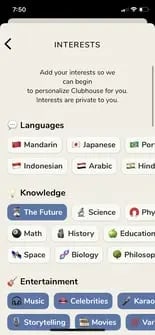
Choosing the right topics during setup is equally important. Clubhouse uses these selections to recommend relevant rooms and users. By selecting topics aligned with your industry or interests, you ensure that the initial content you encounter is valuable and engaging. This personalized feed helps you quickly identify key influencers and active communities within your niche.
Navigating the Home and Explore Pages
Once your profile is set up, you can start exploring the platform. The homepage is your central hub, displaying active rooms from people you follow and suggested conversations based on your interests. It is the first place you should check for real-time activity.
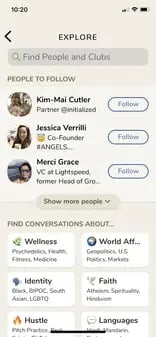
If the homepage does not offer what you are looking for, the Explore page is your next destination. Accessible via the magnifying glass icon, this section allows you to search for specific users, clubs, or topics. You can also browse trending rooms and discover new communities that align with your professional goals.
The Explore page is particularly useful for finding niche discussions. By searching for keywords related to your industry, you can uncover rooms that may not appear in your personalized feed. This proactive approach helps you stay informed about emerging trends and connect with thought leaders in your field.
Joining and Participating in Rooms
Joining rooms is the core activity on Clubhouse. These audio chatrooms vary in size and format, ranging from small, intimate discussions to large, public lectures. Understanding how to enter, participate, and exit rooms gracefully is key to a positive user experience.
Entering a Room and Understanding Roles
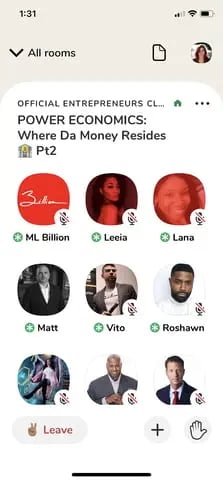
When you tap on a room, you enter as a listener. You are automatically muted, and your presence is visible to the speakers and moderators. The interface displays the speakers on “the stage” at the top, while the audience is listed below. This visual hierarchy helps you understand the flow of conversation and identify who is speaking.
As a listener, you can observe the discussion without interrupting. This passive role is valuable for learning how moderators manage conversations and how speakers engage with the audience. Pay attention to the tone, pacing, and structure of successful rooms. These observations will inform your own hosting strategies later.
If you see a party popper emoji next to a user’s name, it indicates they are new to Clubhouse. This is a good opportunity to welcome them or engage with them after the room ends. Building relationships with new users can help expand your network and increase your visibility on the platform.
Requesting to Speak
If you wish to contribute to the conversation, you can raise your hand by tapping the hand icon in the lower right corner. This action notifies the moderator, who can then choose to unmute you and move you to the stage. Raising your hand is a polite way to signal your interest in speaking without disrupting the flow of discussion.
Once you are on the stage, keep your comments concise and relevant to the topic. Avoid dominating the conversation or going off-topic. Respect the moderator’s rules and the time limits set for each speaker. Effective participation demonstrates your expertise and respect for the community.
If your request to speak is ignored, do not be discouraged. Moderators often have to manage many participants and may not be able to accommodate everyone. You can try raising your hand again later or engage in the room’s chat feature if available. Persistence and patience are key to gaining speaking opportunities.

Managing Your Listening Experience
Rooms can last for hours, so it is important to manage your listening experience effectively. If you need to leave a room, simply tap the “Leave” button. You can also minimize a room to browse other parts of the app while the audio continues to play in the background.
To stay informed about future events, check the “Upcoming” tab. This section lists scheduled rooms, allowing you to plan your participation in advance. You can set reminders for specific events or follow moderators to receive notifications when they host new rooms.
Sharing rooms with friends is another way to enhance your experience. Tap the “+” button in the room’s navigation bar to invite followers to join you. This collaborative approach can strengthen your network and introduce you to new audiences.

Hosting and Moderating Your Own Rooms
Hosting a room is the most advanced way to use Clubhouse. It requires preparation, clear communication, and active moderation. Successful hosts create a welcoming environment, guide the conversation, and engage with their audience effectively.
Starting and Scheduling Rooms
You can start a room instantly or schedule it for a future time. Instant rooms are useful for spontaneous discussions or quick updates, while scheduled rooms allow you to promote the event in advance and build anticipation. When scheduling, provide a clear title, description, and list of speakers to attract relevant attendees.
Room privacy settings determine who can join. Closed rooms are invite-only, social rooms are open to your followers, and open rooms are accessible to anyone on the platform. Choose the setting that aligns with your goals and the sensitivity of the topic.
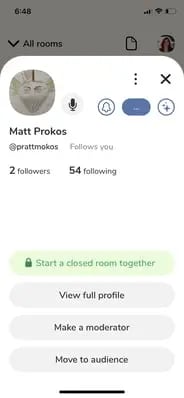
Once the room starts, you are automatically assigned as a moderator. This role gives you control over the conversation, including the ability to add speakers, remove participants, and end the room. Use these powers responsibly to maintain a positive and productive environment.

Introducing Speakers and Setting Ground Rules
The beginning of a room sets the tone for the entire conversation. Start by introducing yourself, your co-hosts, and the topic. Clearly state the purpose of the room and any ground rules, such as time limits for speakers or guidelines for raising hands.
Setting expectations early helps prevent confusion and ensures that everyone understands how to participate. It also demonstrates professionalism and respect for your audience’s time. A well-structured introduction can significantly improve the quality of the discussion.
Encourage attendees to raise their hands with questions or comments. This interactive approach keeps the audience engaged and provides valuable insights for the speakers. Acknowledge each participant by name when they join the stage to create a personal connection.
Managing the Conversation Flow
As a moderator, your primary responsibility is to keep the conversation on track. Monitor the flow of discussion and intervene if it goes off-topic or becomes dominated by a single speaker. Politely redirect the conversation back to the main points and ensure that all participants have an opportunity to speak.
Check the attendee list regularly to identify high-profile listeners or potential speakers. Inviting relevant experts to join the stage can add depth and credibility to the discussion. However, always ask for permission before moving someone to the stage.
If a speaker becomes inactive or disruptive, you can remove them from the stage or mute them. This action helps maintain a respectful and focused environment. Be transparent about your moderation decisions to avoid confusion or resentment among participants.
Ending the Room Effectively
Conclude the room with a summary of key takeaways and a thank you to the speakers and attendees. Provide information on how to stay connected, such as following your social media profiles or joining a related community. A strong closing leaves a lasting impression and encourages future engagement.
If you are the only moderator, leaving the room will end it. If there are multiple moderators, you can assign someone else to take over before you leave. This ensures that the room continues smoothly even if you need to step away.
After the room ends, reflect on what worked well and what could be improved. Gather feedback from participants and use it to refine your hosting strategy. Continuous improvement is essential for building a loyal audience and establishing your authority on the platform.

Building a Clubhouse Community Strategy
Using Clubhouse effectively requires more than just technical know-how. It demands a strategic approach to community building, content creation, and audience engagement. By focusing on value and authenticity, you can create a sustainable presence on the platform.
Identifying Your Niche and Audience
Start by defining your niche and target audience. What topics are you passionate about? Who do you want to reach? A clear focus helps you create relevant content and attract the right followers. Avoid trying to appeal to everyone; instead, concentrate on a specific community that shares your interests.
Research existing clubs and rooms in your niche. Identify key influencers and active participants. Engage with them by joining their rooms, raising your hand, and providing valuable insights. Building relationships with established users can help you gain visibility and credibility.
Creating Valuable Content
Content on Clubhouse is ephemeral, but its impact can be lasting. Focus on creating conversations that provide value to your audience. Share expertise, offer unique perspectives, and facilitate meaningful discussions. Avoid self-promotion or sales pitches; instead, aim to educate and inspire.
Collaborate with other experts to host joint rooms. This approach allows you to tap into each other’s audiences and provide diverse viewpoints. Co-hosting also reduces the burden on individual hosts and creates a more dynamic conversation.
Measuring Success and Adjusting Strategy
Success on Clubhouse is not measured by vanity metrics like follower count. Instead, focus on engagement quality, network growth, and audience feedback. Track how many people join your rooms, how long they stay, and how often they interact with you.
Use these insights to adjust your strategy. Experiment with different topics, formats, and times to see what resonates with your audience. Be willing to adapt and evolve based on what you learn. A flexible approach is key to long-term success on the platform.
By following these steps, you can effectively use Clubhouse to build your brand, expand your network, and engage with your audience in a meaningful way. The platform offers unique opportunities for authentic connection and real-time interaction. Embrace these opportunities to create a lasting impact in your industry.


