Remote video production has become a standard operation for many teams, moving far beyond the temporary necessity it was just a few years ago. As modern content consumption shifts increasingly toward video, organizations must determine how to maintain high-quality production standards outside of a traditional studio environment. Producing effective content from home requires a clear strategy, the right tools, and a collaborative mindset that empowers creators and talent alike. This shift is not merely about convenience; it is about building a resilient video marketing strategy that can withstand disruptions and scale efficiently without the overhead of physical studio space.


Successful remote video production is the process of planning, filming, and editing professional-grade content while the production team and on-camera talent are in separate, distributed locations. By implementing standardized workflows and providing remote talent with clear guidance, teams can continue to generate valuable, brand-aligned content regardless of their physical constraints. This approach democratizes video content creation, allowing subject matter experts from various departments to contribute directly to the marketing funnel, thereby increasing the volume and authenticity of your output.
Establishing a Cohesive Remote Video Strategy
Every effective video campaign begins with a clear production plan that accounts for the limitations and opportunities of a home-based setup. When traditional studio access is unavailable, your strategy must pivot to prioritize flexibility and scalability. This transition often involves re-evaluating which production elements—such as lighting, framing, and audio—can be managed by the talent themselves with minimal, yet effective, intervention from the production team. A robust strategy ensures that every piece of content serves a specific purpose within the broader video marketing strategy, aligning creative output with business goals.
Brainstorming for Remote Value
Content ideation should remain focused on your core audience objectives, regardless of where the video is filmed. You can facilitate this by holding virtual brainstorming sessions that prioritize topics based on their educational or entertainment value and their feasibility for remote execution. By identifying which concepts translate well to a home setting, you ensure that your production efforts remain focused on delivering quality to your viewers. For example, talking-head videos, screen recordings, and simple demonstrations are ideal for remote video content creation, whereas complex multi-camera setups or elaborate product shots may require a different approach.
To maximize the value of these sessions, consider implementing a structured ideation framework. Start by listing the top three pain points your audience is currently facing. Then, brainstorm video ideas that address these points directly. Ask your team: “What is one concept we could explain in under two minutes using only a smartphone and natural light?” This constraint forces creativity and ensures that the final output is manageable for remote talent. Additionally, review past high-performing content to identify patterns. If short, informal updates performed well, lean into that style. This data-driven approach to brainstorming ensures that your remote production processes are not just efficient, but also effective in driving engagement.
Building a Standardized Production Plan
Developing a production plan is essential for maintaining consistency across a distributed team. This involves auditing your existing processes to determine which steps can be moved to a virtual format. For instance, you might replace in-person interviews with remote sessions where editors provide real-time feedback. Creating a centralized guide or internal documentation for these processes ensures that every team member, including new hires or guest speakers, understands the expectations and the technical requirements for submission. A standardized plan reduces the cognitive load on talent, allowing them to focus on their performance rather than the technicalities of filming.
A critical component of this plan is defining the “definition of done” for each stage of production. What does a successful pre-production meeting look like? What are the technical specifications for the raw footage? By establishing these benchmarks, you create a predictable workflow that minimizes errors and rework. Consider creating a checklist for each phase: pre-production (script approval, tech check), production (filming, raw file upload), and post-production (editing, review, publishing). This checklist serves as a single source of truth for your remote video production efforts, ensuring that no step is overlooked. Furthermore, integrate project management tools to track progress and deadlines, providing visibility into the entire pipeline and enabling proactive management of potential bottlenecks.
Equipping Talent for Professional Results
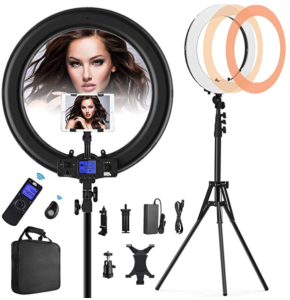
Providing your talent with the right tools is a critical step in bridging the gap between studio quality and home recording. While high-end gear is often associated with professional production, effective remote work often relies on selecting equipment that is both accessible and easy to operate. Many teams find success by sending remote filming kits that include essential items like ring lights, wide-angle lenses, and external microphones. This investment not only improves the quality of the footage but also signals to your talent that their contribution is valued, boosting morale and engagement.
Essential Hardware and Setup
High-resolution cameras, such as a dedicated DSLR or even a modern smartphone, are often sufficient for creating professional content. Lighting placement is arguably more important than the camera itself; you should instruct talent to position their light source in the same direction as the camera lens to avoid harsh silhouettes. If professional lighting kits are not available, natural light or standard household lamps can serve as effective alternatives when positioned correctly. The key is consistency. Encourage talent to film in the same location and at the same time of day whenever possible to maintain consistent lighting conditions across multiple takes.
To help your team achieve this, consider creating a “setup guide” with visual examples. Show photos of good vs. bad lighting setups, highlighting common mistakes like backlighting or overly harsh shadows. Additionally, recommend specific, affordable equipment options that fit within your budget. For example, a simple LED panel light and a tripod can dramatically improve video quality without breaking the bank. By providing these resources, you empower your talent to create high-quality content independently, reducing the need for extensive post-production fixes. This approach also helps standardize the look and feel of your video marketing starter pack materials, ensuring brand consistency across all remote productions.
Optimizing Audio and Environment
Audio quality is a common pain point in remote production, often requiring the use of external microphones like lavalier clips to ensure clear sound. Beyond gear, the environment itself plays a significant role in the final output. You should conduct virtual location scouts to help talent select spaces that are quiet and visually free of distractions, such as bookcases or neutral walls, which add depth without cluttering the frame. Poor audio can ruin an otherwise excellent video, so prioritizing sound quality is non-negotiable.
To optimize audio, recommend that talent record in a small, carpeted room with soft furnishings to reduce echo. If an external microphone is not available, suggest using the built-in microphone of a laptop or smartphone, but advise them to stay close to the device and minimize background noise. Additionally, consider providing a simple audio checklist: “Is the room quiet?” “Is the microphone close to the mouth?” “Are there any reflective surfaces nearby?” By addressing these factors proactively, you can significantly improve the overall quality of your remote video production output. Furthermore, remind talent to test their audio levels before recording the final take, ensuring that the volume is consistent and free from distortion.
Supporting Talent Through Virtual Collaboration
Empowering your subjects to film themselves requires a high degree of empathy and clear, patient communication. Since the talent is often managing both the performance and the technical setup, the role of the video manager shifts from hands-on technician to remote director. This collaborative approach helps mitigate common challenges, such as unexpected background noise or poor framing, before they impact the final footage. By fostering a supportive environment, you encourage talent to take ownership of their content, leading to more authentic and engaging videos.
The Role of Empathy in Directing
Directing via video call allows editors to troubleshoot issues in real time, but the human element is equally important. Acknowledge that remote filming is a new skill for many presenters and provide ample support throughout the process. When technical glitches occur, such as background construction or audio interference, approach these moments with patience; viewers often find authentic, unpolished moments more relatable and trustworthy than perfectly staged content. Building trust with your talent is crucial for long-term success in remote video production.
To demonstrate empathy, start each session with a brief check-in to see how the talent is feeling. Are they nervous? Do they have any questions? By addressing their concerns upfront, you create a more relaxed atmosphere, which translates to better on-camera performance. Additionally, provide constructive feedback that focuses on positive reinforcement. Instead of criticizing mistakes, highlight what worked well and offer specific suggestions for improvement. For example, “Your energy was great, but let’s try slowing down slightly for the next take.” This approach builds confidence and encourages talent to continue contributing to your video marketing strategy.
Scalable Documentation and Guides
As your video library grows, internal documentation becomes your best resource for maintaining efficiency. Developing a comprehensive guide that covers everything from camera settings to file submission protocols saves time for both the production team and the talent. These resources serve as a reference point for future projects and help ensure that your brand’s quality standards are upheld, even as your team scales its remote efforts. A well-documented process reduces the learning curve for new talent and minimizes the need for repetitive instructions.
Consider creating a “Remote Video Production Handbook” that includes step-by-step tutorials, troubleshooting tips, and best practices. Include video examples of good vs. bad setups, along with links to recommended equipment and software. Additionally, establish a feedback loop where talent can share their experiences and suggestions for improving the process. This continuous improvement mindset ensures that your remote production processes evolve alongside your team’s needs. By investing in scalable documentation, you create a sustainable system that supports high-quality video content creation over the long term.
Ultimately, while equipment and technical workflows are important, the value of the content remains the deciding factor for your audience. If the message is clear, educational, and helpful, minor compromises in lighting or sound quality are rarely a barrier to engagement. By focusing on these core principles, you can build a sustainable, scalable remote video operation that delivers results. This holistic approach to remote video production not only enhances the quality of your content but also strengthens the relationship between your marketing team and the talent who bring your stories to life.


