On This Page· 4
To exclude a single page from AI Overviews, you must use a tag that simultaneously deletes the page’s search snippet. This is the only page-level control available, making it a surgical decision rather than a default setting. You are trading AI visibility for lower organic click-through rates. Use this move only when the page’s value justifies the cost.
The nosnippet trade-off: what you actually lose
The nosnippet tag is the only current mechanism to block a single page from AI Overviews. Site-level controls in Search Console operate at the property level, removing every URL on the domain simultaneously. They cannot target specific pages, making the robots meta AI directive the immediate option for page-level exclusion.
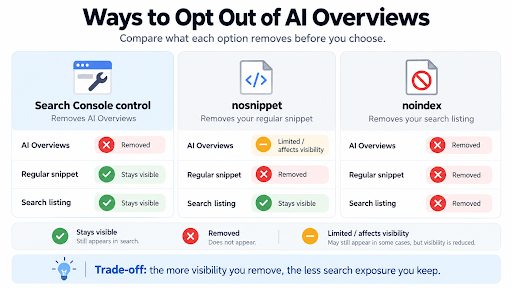
Adding this tag removes text from the AI-generated summary and the standard blue-link snippet, leaving your listing without a description. This directly impacts engagement, as a listing without a description typically sees a lower click-through rate. You are effectively trading AI visibility for reduced organic engagement on that specific URL. It is a strategic choice to sacrifice some immediate user attention to maintain control over how your content is presented in generative AI contexts.
Google confirms these controls are not a ranking signal, so your page will hold its current spot in organic results. The only variable that shifts is your ability to attract a click from the users who do see the listing. You keep the ranking, but you lose the descriptive hook that usually encourages the click.
When one page is worth blocking from AI Overviews
Use nosnippet to block AI Overviews only when the page’s value depends on a specific user action, such as paywalled articles, sensitive client data, or high-conversion landing pages. In these cases, the click itself is the product, and a missing description is an acceptable cost.
The wrong use case: site-wide blanket policies
Do not apply data-nosnippet across your entire site, as this eliminates snippets on high-value informational pages, reducing organic click-through rates without strategic benefit. If your content exists to be shared, removing the snippet hurts visibility; the goal is surgical exclusion, not a broad retreat from AI search features.
Clarifying the distinction: indexing vs. training
Many readers confuse preventing indexing with preventing AI indexing for model training, but these are separate mechanisms. Robots meta AI tags (nosnippet, max-snippet) control what text appears in search results and AI summaries, not whether content trains large language models. To stop a page from being used for AI training, use the Google-Extended rule in your robots.txt file; snippet tags do not affect exclude from LLM answers or opt out Gemini training data.
A quick decision filter
Use this simple rule to decide if the trade-off is worth it:
- Is the page’s primary value the click (e.g., subscription, lead capture, booking)? If yes, the snippet loss is an acceptable cost.
- Is the page informational and exists to be shared? If yes, keep the snippet to maximize visibility and trust.
If unsure, default to keeping the snippet. Blocking AI Overviews is a precision move; ensure the page’s conversion value justifies the reduced exposure in search results.
The Search Console control is built for site-wide decisions, not surgical ones. Operating at the property level, toggling it off removes every page on the domain from AI features simultaneously. If your goal is to keep most of your site visible in AI Overviews but hide specific URLs, this tool is structurally the wrong choice.
A secondary reason to avoid this option for page-level changes is that the control is still rolling out. It may not be visible in every Search Console account, making the nosnippet tag the only immediate option for excluding a single page.
The site-level control has a broader footprint than snippet tags, removing content from AI Mode and generative AI features in Discover. While this does not affect regular Google search results, it represents a more significant visibility reduction across Google’s ecosystem than simply hiding a snippet.
For businesses with diverse content types, such a broad exit is rarely practical. The snippet approach allows managing visibility for specific sections without severing the page’s connection to the rest of your digital presence.
Think of the Search generative AI control as a circuit breaker for the entire domain. You would not pull the main power to stop one light from flickering; similarly, do not use a site-wide opt-out to manage individual pages. The granularity is simply not there. Until page-level controls are fully available, the robots meta AI tag remains the precise instrument for excluding specific content from LLM summaries while preserving broader search visibility.
Frequently asked questions on AI Overview exclusion
Can I exclude one page without touching the rest of the site? Yes. The nosnippet meta tag or data-nosnippet attribute applies only to that specific URL, allowing you to block AI Overviews for a single page while keeping the rest of your domain visible in generative features. Since the site-level “Search generative AI control” in Search Console cannot target individual URLs, page-level snippet tags remain the only immediate option for surgical exclusions.
Does nosnippet stop the page from training Gemini? No. There is a distinct separation between AI model training and display in AI summaries. The Google-Extended rule in robots.txt governs whether Google uses your content to train models like Gemini, whereas snippet controls like nosnippet strictly limit what text appears in search results and AI Overviews without influencing the underlying training data pipeline.
Will this lower the page’s ranking? Google has stated that snippet controls are not a ranking signal, so your page will maintain its current position in standard search results. However, removing the description text can impact click-through rates, as users may be less inclined to click a listing without a descriptive snippet, meaning you trade AI visibility for potentially reduced organic engagement on that specific URL.
How long until the change takes effect? The process is generally fast but not instant. Google typically processes the change within a few days, and once processed, the page should drop out of AI summaries within a day or two, though browser and Google cache delays can add a short lag to the final visual change.
Measuring what you lose after blocking AI Overviews
Before applying any tag, pull the baseline from the generative AI performance report in Search Console. This report shows impressions from AI features by page and date, giving you a concrete starting point. If the report is not yet visible, note that it is still rolling out and rely on standard organic data as a proxy. After implementing the change, track both AI impressions (if available) and standard organic traffic for at least four weeks to account for processing delays and caching. Do not judge the outcome on a single day of data. A key limitation exists: the report currently does not provide click data for AI features. Therefore, you can only quantify the lost visibility in terms of impressions and estimated exposure, meaning the full value of the trade-off remains partially estimated. To ensure a clean before/after comparison, document the exact change date in a simple log and assume the snippet loss is the likely cause if traffic dips appear ambiguous, as the absence of a descriptive snippet directly reduces click-through rates.
Excluding a single page from AI Overviews is a precision move, not a default. The right question isn’t whether you can block the page, but whether that page’s click is worth the cost of losing its snippet. If the answer is yes, proceed with confidence. If it isn’t, leave the content fully visible to users and AI models alike.