Your brand currently exists as three separate profiles in search: your website, your LinkedIn page, and your Wikidata entry. To AI models, these look like distinct entities. Without an explicit link, your brand is fragmented in the Knowledge Graph, confusing the systems that decide which information to cite. The fix is the sameAs schema. This single line of structured data declares entity identity to search engines and AI models, telling them that two different URLs describe the same real-world organization.

How sameAs schema actually connects your people and products
The sameAs property in structured data is not a backlink or a redirect. It is an identity assertion. It tells search engines and AI models that two different URLs describe the single, same real-world entity. Without this explicit link, your website, your LinkedIn page, and your product listing exist as disconnected nodes in the Knowledge Graph.
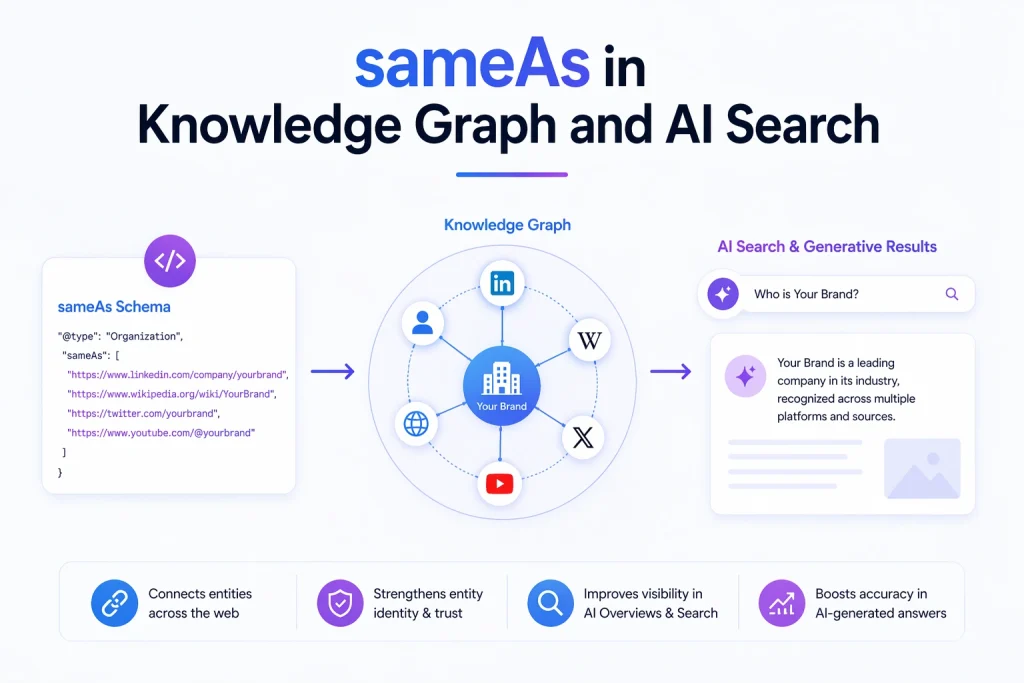
For sameAs to function effectively within brand entity resolution, you must distinguish between your different entity types. An Organization, a Person, and a Product (or SoftwareApplication) are distinct nodes. Each requires its own sameAs array to be recognized independently. Connecting these types relies on the @id property, which serves as a persistent identifier. Think of @id as a unique passport number for your entity; it allows sub-entities to reference the parent brand unambiguously.
Consider the following JSON-LD snippet. It establishes the Organization as the root entity, linking it to external profiles via sameAs. This foundation allows subsequent sections to attach Person and Product nodes back to this central identity.
{
  "@context": "https://schema.org",
  "@type": "Organization",
  "@id": "https://yoursite.com/#organization",
  "name": "Your Brand Name",
  "url": "https://yoursite.com/",
  "sameAs": [
    "https://www.linkedin.com/company/your-brand",
    "https://www.wikidata.org/entity/Q123456",
    "https://www.facebook.com/yourbrand"
  ]
}
By defining the @id here, any other entity on your site can now point back to this specific Organization node, creating a cohesive brand entity linking structure that machines can verify and trust.
Wiring your Person and Product entities into the brand graph
To fully resolve your brand’s identity, you must connect individual people and specific products to the parent organization. This structure allows AI systems to attribute expertise and verify the context of your content.
Connecting your team to the brand
A Person entity represents your founders or key authors. By using the worksFor property to reference your Organization’s @id, you create a verifiable link between the individual and the company. This is critical for brand entity resolution, as it helps AI models distinguish your team from others with similar names.
When a system generates an answer, it uses these links to verify authorship. If it can confirm that a specific author is affiliated with the organization, it is more likely to cite that content as authoritative. This reduces the risk of your brand being associated with generic or unverified claims.
{
  "@context": "https://schema.org",
  "@type": "Person",
  "@id": "https://yoursite.com/#founder",
  "name": "Jane Doe",
  "worksFor": {
    "@id": "https://yoursite.com/#organization"
  }
}
Linking products to external reputation
Products, such as a SoftwareApplication, also benefit from explicit identity links. By using the sameAs property, you can connect your product to external listings where its reputation is established. This provides search engines with third-party verification of your product’s existence and standing in the market.
For example, linking to your G2 or ProductHunt page gives the search engine access to user reviews and ratings associated specifically with that product entity. This helps in disambiguating your product from competitors with similar names.
{
  "@context": "https://schema.org",
  "@type": "SoftwareApplication",
  "@id": "https://yoursite.com/#product",
  "name": "Your App",
  "sameAs": [
    "https://www.g2.com/yourapp",
    "https://www.producthunt.com/posts/yourapp"
  ]
}
The rule of dedicated profiles
A common mistake in schema markup is linking to mentions rather than profiles. A news article that discusses your brand is not a valid sameAs target. Only dedicated profile pages, where the entity is the primary subject, should be included in your array. Mixing in articles or press releases dilutes the signal and can confuse the entity resolution process.
Which external profiles carry the most weight for entity resolution?
When selecting targets for brand entity linking, not all URLs offer the same verification power. Search engines evaluate the authority and stability of each profile to gauge confidence in your entity’s identity.
| Profile Type | Verification Strength | Examples |
|---|---|---|
| Knowledge Bases | Highest | Wikidata, Wikipedia |
| Professional Networks | High | LinkedIn, Crunchbase |
| Review Platforms | Medium | G2, Trustpilot |
The Entity Recognition Pipeline processes these links through five stages: Discovery, Retrieval, Comparison, Validation, and Knowledge Graph Update. Linking to authoritative sources like Wikidata accelerates the Validation step, as these platforms provide structured, stable data that machines can cross-reference quickly. This reduces ambiguity for the entire entity network.
Consistency across these profiles is critical. If your entity name, description, or founding date differs between your site and a linked sameAs profile, the verification signal weakens. We recommend auditing your profiles regularly to ensure key data points match exactly.
Finally, prioritize quality over quantity. Five to ten authoritative links provide a stronger, cleaner signal than twenty low-quality directory entries. Noise dilutes the entity signal, so every URL in your array should point to a dedicated, active profile that clearly identifies your brand.
FAQ: sameAs schema and brand entity linking questions
Does sameAs pass SEO link value?
A common misconception is that adding these links boosts rankings through backlink equity. The answer is no. The sameAs property does not pass PageRank, and it is not a backlink. It functions purely as an identity assertion within your structured data. Its value lies in helping search engines and AI models verify that disparate profiles refer to the same real-world entity. By confirming this identity, you reduce ambiguity in the Knowledge Graph, which is the primary goal of brand entity resolution.
Do I need to add sameAs to every page?
You do not need to duplicate the full entity definition on every URL of your site. Instead, define the @id and sameAs array once on your homepage or a central entity page. Other pages should reference that central @id in their own schema markup. This approach maintains a consistent entity graph across your domain without redundancy. It ensures that any page discussing your brand points back to the single, verified source of truth for your organizational identity.
How often should you audit your sameAs links?
We recommend a quarterly audit. External platforms frequently change URL structures, update privacy settings, or users may deactivate accounts. A broken sameAs link does not break your site, but it weakens the verification signal for your entity. Regular maintenance ensures that every URL in your array resolves correctly. This keeps your structured data accurate and prevents search engines from flagging your entity information as unreliable or outdated.
Can you use sameAs for competitors?
Never. Linking to a competitor’s profile or a similarly named entity creates confusion rather than clarity. Every URL in your sameAs array must point exclusively to a record of your own entity. If you link to a competitor, you effectively tell the Knowledge Graph that your brand is identical to or indistinguishable from theirs. This undermines the very purpose of disambiguation. Ensure that every external profile you cite is a dedicated page where your brand is the primary subject, not just a mention or a comparison.
The path to a verified entity: next steps
A well-linked entity graph, combining Organization, Person, and Product nodes, significantly reduces ambiguity for search engines and AI models. This structural clarity increases the likelihood of your brand appearing in AI-generated answers and Knowledge Panels, where verified identity is a prerequisite for display. By resolving entity confusion, you ensure that your brand is recognized as a single, authoritative source rather than a collection of disconnected profiles.
To move from theory to implementation, follow this quick checklist:
- Identify authoritative external profiles (such as LinkedIn, Wikidata, or G2) that host dedicated records for your brand or key personnel.
- Collect the exact canonical URLs for these profiles, ensuring they are not temporary or broken links.
- Implement the
@idproperty andsameAsarrays in your structured data, linking each sub-entity back to the parent organization. - Validate your markup using the Rich Results Test to ensure no syntax errors disrupt the entity graph.
In a web of fragmented data, entity coherence is the new competitive advantage. The effort to structure these links now pays off as AI systems become the primary gatekeepers of visibility. This is not a one-time task, but a foundational step in brand entity resolution that will increasingly define your digital footprint.
Connecting your People and Products to the parent Organization via @id and sameAs transforms fragmented data into a verified entity graph. This structural coherence is the foundation for reliable brand entity resolution in AI-driven search. If you prefer to automate this linking process rather than managing it manually, tools focused on AI content and generative search visibility can help maintain your structured data at scale. The decision to invest in this technical groundwork is yours, but the clarity it brings to your digital identity is a lasting asset.


