On This Page· 4
You can raise your bid, but it will not help if your product data fails to answer the question. In AI Mode, visibility is determined by how well your Merchant Center feed interprets intent, not by ad spend. Gemini selects only a handful of products from the available data, making product data quality the primary lever for visibility. This shift moves the focus from keyword matching to semantic understanding. To bridge the gap between a standard feed and an AI-optimized recommendation, you need six specific conversational attributes. These fields allow your products to speak the language of Generative AI commerce, ensuring they are chosen for the right shopper at the right moment.
Why your Merchant Center feed is now your ad copy
The dynamic of AI Mode shopping has shifted from matching keywords to answering questions. Previously, product feeds served to describe items: what they are, their cost, appearance, and purchase locations. In Generative AI commerce, the model parses specific fields to determine if a product fits the shopper’s unique context. A standard feed answers, “What is this?” but AI search visibility requires the data to answer, “Is this right for me?”
Gemini selects only a handful of products from the feed data provided. If your data is vague, it receives zero recommendations. This makes product data optimization a visibility issue, not just a metadata task.
From matching to understanding
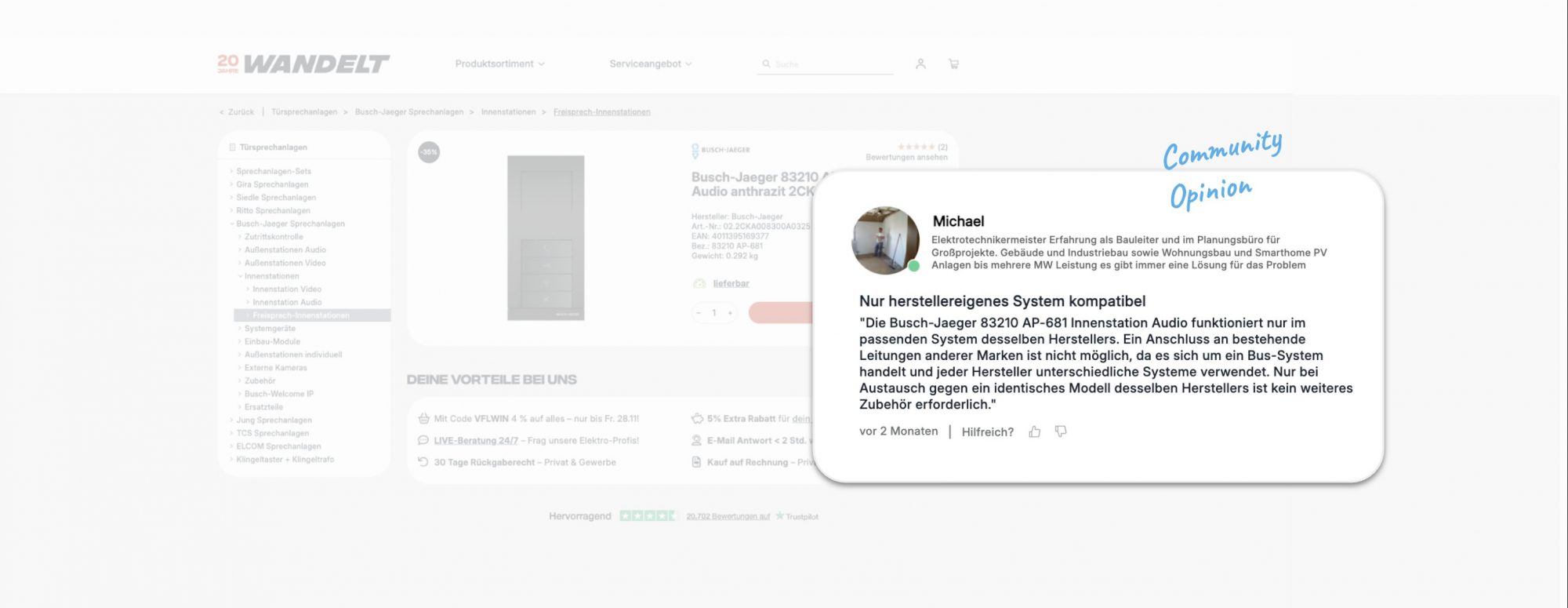
The engine no longer relies on simple term matching. It parses the question_and_answer fields to construct specific solutions for user queries. For instance, a shopper asking, “Is this jacket suitable for a winter hike?” needs a direct answer, not a list of features. Without that specific data, the product remains invisible in the AI-generated response.
The cost of ambiguity
Vague data leads to silence. Since AI Mode averages only 4.3 product listings per answer, competing for visibility is a zero-sum game. Brands that treat their Merchant Center feeds as static catalogs lose out to those that provide conversational context. The feed is now the primary sales copy, directly determining whether a brand appears in the answer at all.
The 6 conversational attributes that drive AI search visibility
The six fields are not equal in impact. question_and_answer and related_product should be your first priority, while the other four serve as secondary refinements. Here is what each one does and how to use it.
Define and prioritize the high-impact fields
question_and_answer is the core semantic signal for AI search visibility. You can include up to 30 pairs per product, each limited to 1,000 characters (10,000 total). These should answer specific shopper concerns—fit, material, durability—not repeat your title. related_product connects items via relationship types like often_bought_with, accessory, or required_part, allowing up to 30 links per product. Together, these two fields directly shape how Gemini interprets and recommends your items.
Leverage related_product for bundle value
The strategic role of related_product extends beyond visibility. By mapping part_of_set or often_bought_with links, you enable AI-generated recommendations that naturally suggest complementary items. This drives bundle formation and increases average order value without extra ad spend. For example, a running shoe listing linked to its matching insole via accessory creates a natural upsell path within the AI Mode answer itself.
Use the remaining four as secondary optimizations
Once the first two are populated, address the supporting fields:
| Attribute | Purpose |
|---|---|
| item_group_title | Groups identical products across variants for deduplication |
| variant_option | Specifies size, color, or style differences within a group |
| popularity_rank | Signals relative demand within your catalog |
| document_link | Points to spec sheets, manuals, or compliance docs |
Treat these as cleanup and context tasks. They help the system organize your data but do not drive the conversational matching that determines whether a product appears in an AI Mode shopping answer at all. Start with your top 20–50 SKUs, mine real questions from support tickets, and map related products before scaling to the long tail.
How to add attributes without disrupting product approval
The safest way to implement these fields is to bypass the main product feed entirely. Instead of altering your existing Merchant Center feed, use a supplemental data source. Google explicitly recommends this approach, allowing you to upload a separate file, such as a Google Sheet, containing only the conversational attributes. This separation keeps your core product data untouched and ensures that a formatting error in your new Q&A entries never triggers a disapproval for your existing items.
Because these six attributes are optional, they do not affect product approval status. This creates a low-risk environment where you can experiment with content quality without fearing that a typo or a policy violation will hide your products from standard search results. You can iterate and update these supplemental files on a weekly basis, treating them as a living component of your product data optimization strategy rather than a static upload.
Start your implementation with a prioritized workflow. Begin by selecting your top 20 to 50 SKUs, those items that drive the most revenue or traffic. Mine customer questions from support tickets, reviews, and chat logs to populate the question_and_answer field. Simultaneously, map related_product relationships to create logical bundles. Once you validate this process on a smaller scale, you can gradually expand to your long-tail inventory. This phased approach ensures that the time invested in writing high-quality responses yields immediate AI Mode shopping visibility for your most important items.
Measuring impact on Generative AI commerce results
Tracking AI Mode performance is tricky because there is no separate report. Impressions and conversions from Generative AI shopping are blended into standard Search and Shopping reports, making it hard to isolate the direct effect of your feed changes.
To get a clearer picture, run a controlled test. Select a set of SKUs to enrich with conversational attributes and keep a comparable, untouched set as a control group. Compare their performance over a 30-day period to see if the optimized products gain a measurable share of voice in AI responses.
For ongoing monitoring, use the Merchant Center AI performance insights report. This tool helps you identify which attributes are missing and suppressing your visibility. By addressing these gaps, you can ensure your product data optimization efforts actually translate into better AI search visibility and sustained results in this emerging channel.
Treat your product feed as a dynamic sales tool, not static metadata. The best way to start is a simple audit: do your Merchant Center feeds answer the questions your customers actually ask? If they don’t, you are missing opportunities for AI search visibility. This check fits naturally into your standard Generative AI commerce strategy, ensuring your data supports real shopping intent in AI Mode. We can help you structure these feeds for maximum impact if you’d like a second pair of eyes on your data.