Creating a personal virtual assistant is no longer a task reserved for large corporations with massive budgets. With Claude, you can build a highly capable virtual assistant in under ten minutes. This process allows you to use AI to handle repetitive administrative tasks, such as analyzing meeting transcripts and organizing action items, so you can focus on high-level strategic work. By shifting the burden of note-taking and follow-up tracking to a digital partner, you regain hours of focus time each week.
Establishing Your Claude Executive Assistant
Modern AI platforms are defined by their flexibility, and Claude is no exception. You can configure it to mirror your professional requirements, making it an extension of your own workflow. Think of this as a starting point; the real value comes from iterating on these instructions as your specific needs evolve over time.
Defining Your Persona and Scope
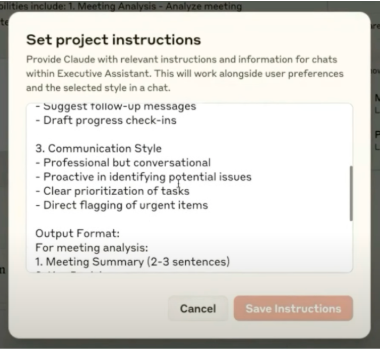
To begin, navigate to the Projects feature in your workspace and select the “Set Project Instructions” option. This is where you define the persona and functional scope of your assistant. For a general executive assistant, focus on two primary pillars: meeting analysis and follow-up management. You should clearly outline the need for the assistant to parse transcripts, identify distinct action items, and flag deadlines that require your attention.
Setting Communication Standards
Define the tone and structure for all outputs. A professional, direct, and conversational style often works best for internal communications. You might instruct the assistant to prioritize tasks, highlight urgent items, and consistently format summaries so they are easy to scan. By pre-defining a standard layout—such as a list of action items with clear owners and due dates—you ensure that the information you receive is always actionable and consistent.
Refining Your Workflow
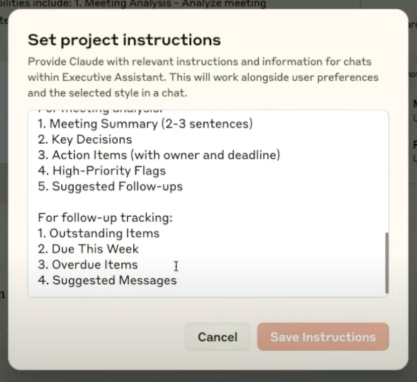
Once the foundational instructions are in place, focus on how the assistant tracks ongoing tasks. You can specify that the system should categorize outstanding items by their status, such as tasks due within the current week versus those that are already overdue. This level of detail transforms a simple AI chatbot into a functional project management tool.
Iterative Improvement
Remember that these instructions are living documents. If you notice the assistant is missing context or providing information in a format that doesn’t align with your team’s existing tracking systems, go back and update the instructions. Customization is the bridge between a generic tool and a truly effective assistant. Regularly auditing the assistant’s output will help you identify areas where you can tighten the prompt engineering to better suit your needs.
Managing Content and Data Inputs
After setting your instructions, the next phase is providing the data for your assistant to process. This is the stage where you upload the meeting transcripts, project notes, or planning documents that form the basis of your daily operations.
Data Organization Strategies
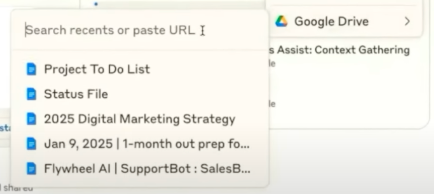
For enterprise users, connecting directly to cloud storage platforms like Google Drive can significantly reduce friction, allowing the assistant to pull live files. If you are using a standard account, you can simply upload the relevant files manually. Efficiency is key here; rather than attempting to process every single interaction in real-time, many professionals find that batch-uploading transcripts at the end of the day provides a more coherent and manageable overview of their progress.
Ensuring Data Quality
The quality of your assistant’s output is directly tied to the quality of the input. Ensure your meeting transcripts are cleaned of filler words if possible, or provide the assistant with a template that helps it ignore irrelevant conversational tangents. By organizing your files into folders or naming them with clear dates and project codes, you make it easier for the AI to retrieve specific information when you ask for a cross-reference between two different meetings.
Executing Tasks with Targeted Queries
With your instructions set and your content uploaded, you are ready to engage your virtual assistant. The effectiveness of your assistant depends heavily on the clarity of your prompts. A well-constructed query can act as a bridge between raw data and meaningful business insights.
Synchronizing Action Items
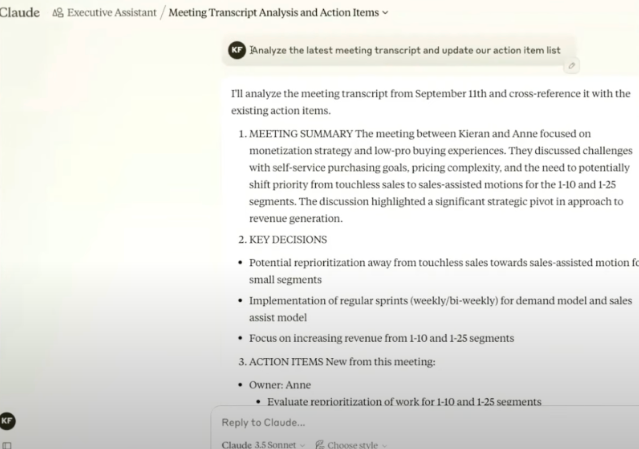
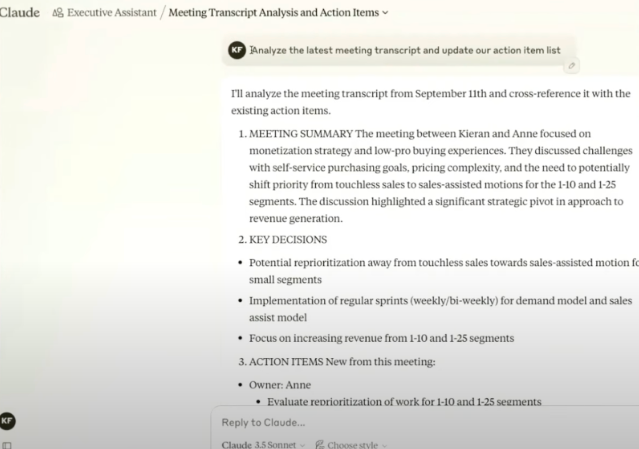
To begin, request a summary of the most recent transcript to synchronize your action list. A prompt like, “Analyze the latest meeting transcript and update our action list,” forces the AI to synthesize multiple data points into a single, organized view. This simple step prevents important tasks from slipping through the cracks.
Advanced Query Techniques
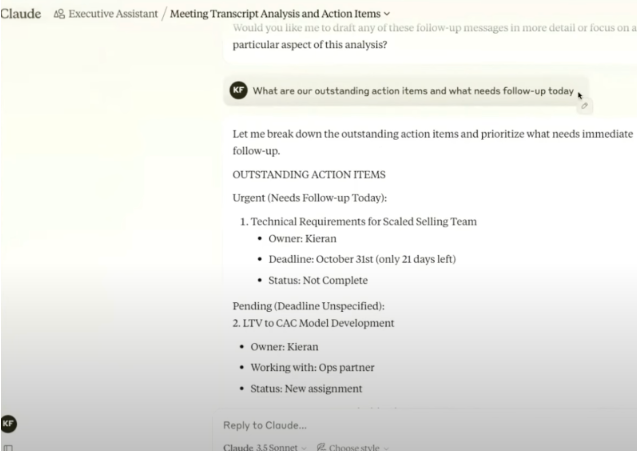
Once your list is updated, you can move into more granular management. Ask specific questions about your current obligations, such as: “What are our outstanding action items and what needs to follow-up today?” This helps you distinguish between long-term projects and immediate fires that require your attention.
Formatting for Integration
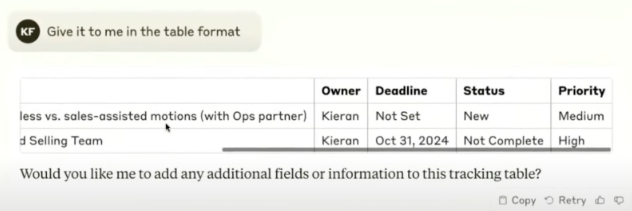
Claude also excels at formatting data for your specific needs. If you maintain your tasks in a table format, ask the assistant to provide its updates in that same structure. By using a command like, “Give it to me in the table format,” you ensure that the AI output is ready to be copied directly into your existing project management software without further reformatting.
Drafting Communications
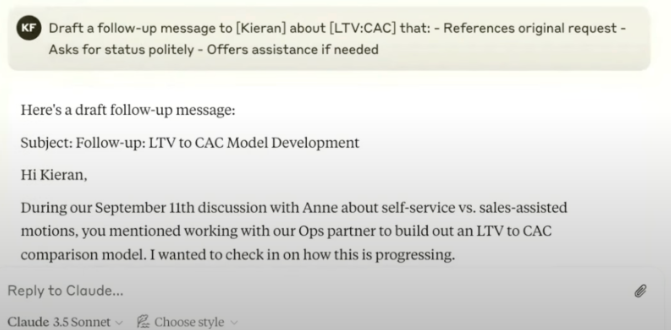
Finally, you can use your virtual assistant to draft communications. Asking it to write a follow-up email or a Slack message based on the status of an action item can save significant time. While you should always review the generated text before sending, having a pre-written draft significantly reduces the cognitive load of routine correspondence.
Strategic Considerations for AI Adoption
While the technology is powerful, your success depends on how you structure your deployment. A common best practice is to avoid creating a single, catch-all assistant for every aspect of your professional life. Instead, consider creating distinct assistants for different projects or functional areas. This keeps the context window focused and ensures the AI remains relevant to the specific goals of each project.
Managing Multiple Assistants
By segmenting your work into different projects within Claude, you prevent data cross-contamination. For instance, maintain one assistant for client-facing projects and another for internal operations. This separation allows you to tailor the specific tone, instructions, and data sources for each environment, providing a much higher degree of accuracy and relevance.
Future-Proofing Your Workflow
Claude is an AI system that allows users to create a custom virtual assistant by defining specific project instructions, uploading relevant content, and using targeted queries to manage tasks, meeting transcripts, and action items. By configuring the assistant to analyze data, format outputs, and draft communications, users can significantly improve their daily productivity and organizational efficiency.
Looking ahead, the integration between AI tools and daily productivity software is only going to deepen. We anticipate a future where these assistants can write directly to documents, sync with email clients, and interact with messaging platforms like Slack in real-time. These future capabilities will likely move from simple analysis to active collaboration, where the assistant becomes a participant in your digital environment rather than just a tool you visit periodically.
As you begin to integrate Claude into your routine, focus on the nuances of your own workflow. What tasks consume the most of your time? What information do you find yourself searching for repeatedly? By answering these questions, you can tailor your virtual assistant to handle the heavy lifting, allowing you to focus on the creative and strategic decisions that drive your business forward. Adopting these tools is not about replacing human judgment; it is about providing yourself with the support necessary to operate at your highest potential.