Understanding the Value of LinkedIn Sales Navigator
LinkedIn Sales Navigator is a paid subscription service designed to streamline finding new leads, making connections, and driving conversions. Widely regarded as the best version of LinkedIn for sales professionals, it simplifies contacting prospects and staying updated on referrals and customers. The tool offers improved search capabilities, visibility into extended networks, and personalized algorithms that help sales teams reach the right decision-maker at target companies.


While it shares features with Premium Business, Sales Navigator is purpose-built for sales. Key benefits include advanced filtering, job change alerts, keyword mentions, and unlimited profile searches. Standard LinkedIn accounts cap monthly searches; Sales Navigator removes this limit, allowing reps to search as many profiles as needed to hit sales goals.
Key Benefits for Sales Teams
The platform provides a structured approach to prospecting beyond simple connection requests. Users access recommended sales leads and update tracking, maintaining momentum in long sales cycles. Advanced criteria filtering ensures reps focus on high-value targets, improving outreach efficiency and conversion rates.
Comparing Sales Navigator Tiers
LinkedIn Sales Navigator has three tiers: Professional, Team, and Enterprise. Each offers different features and costs. Professional is $79.99 per month (annual), Team is $108.33 per month, and Enterprise requires direct contact for pricing. LinkedIn offers a 1-month free trial for eligible members.
| Tier | Cost | Leads Saved | InMail Messages | Key Features |
|---|---|---|---|---|
| Professional | $79.99/mo | Up to 1,500 | 20/month | Advanced search, alerts, custom lists |
| Team | $108.33/mo | Up to 5,000 | 30/month | CRM syncing, TeamLink, admin tools |
| Enterprise | Contact LinkedIn | Up to 10,000 | 50/month | SSO, data validation, Elevate alerts |
Choosing the Right Plan
The Professional tier includes advanced lead/company search, alerts, and custom lists. It integrates with SNAP, Outlook, and the mobile app. The Team tier adds content sharing, engagement tracking, and CRM syncing. Enterprise offers advanced CRM integrations, data validation, and single sign-on (SSO).
Tips for Sales Navigator Professional Users
Professional users can send 20 InMail messages monthly. To send more, target users with “Open Profiles,” who don’t count toward the quota and are generally receptive. This strategy maximizes outreach without exceeding limits.
Mobile App and Profile Optimization
The Sales Navigator app (iOS/Android) delivers real-time updates on saved accounts and leads. Reps can reach out after prospects post news or share company updates. Field reps can instantly save connections made during meetings. Team or Enterprise accounts feature larger profile pictures, increasing visibility in search results.
Finding Similar Prospects
Sales Navigator suggests similar leads to those you’re pursuing. Click “View similar” on a lead’s profile to find others with similar job titles. This automates discovery, helping reps quickly build lists of high-potential targets.
Strategies for Sales Navigator Team Users
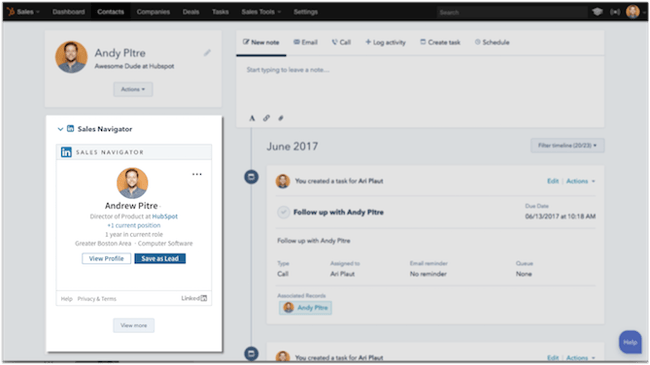
Team users can integrate with HubSpot CRM, Microsoft Dynamics, Salesforce, Zoho, and Infor. This brings profile details and shared connections into your CRM, eliminating the need to switch tabs. You can send InMail directly from contact records and ask mutual connections for introductions.
Leveraging TeamLink
Mutual connections improve buyer impressions. The TeamLink Connections filter finds prospects sharing first- or second-degree connections with your team. This turns your organization’s network into a prospecting asset. The TeamLink section on account pages displays employees connected to your network, enabling introduction requests.
Saving Searches and Creating Custom Lists
The “save search” feature automates finding new mutual connections. Define parameters, apply TeamLink, and check “Save Search” to get notified when coworkers connect with leads. You can also create custom lists filtered by keywords and export them to your CRM or outreach tool.
Advanced Techniques for Enterprise Users
Enterprise users can build rapport using “Shared Experiences and Commonalities.” The “Share experiences with you” filter surfaces prospects with commonalities like past employers or volunteer work. Mentioning these similarities boosts response rates.
Unlocking Profiles and Validating Data
The unlock feature (available in Team and Enterprise) lets reps view full profiles outside their network. Each member can unlock 25 profiles monthly. Data Validation automatically updates CRM contact data in real time, ensuring accuracy when contacts change titles or companies.
Refining Recommendations and Outreach
Use Sales Preferences to align lead recommendations with buyer personas by setting region, industry, function, and seniority. Customize InMail messages by researching targets’ industries and niches. For example: “Hi, {first_name}, I’m reaching out to grow our network of {your_industry} leaders. Here in {your_city}, we’re exploring opportunities in {your_industry_niche}, and it would be great to connect.”
Maximizing Your Prospecting Efforts
Sales Navigator provides critical insights for B2B sales. It eliminates guessing and cold emailing the wrong decision-maker. By leveraging these features, you create an efficient sales process.
The integration with Campaign Manager aligns Sales and Marketing. Marketers can target leads sales reps are pursuing, keeping messaging top-of-mind. Lookalike modeling helps find users similar to existing prospects. Salespeople see engagement with sponsored content, ensuring both teams work toward the same goals.
Understanding these tools is essential for modern sales teams. Focusing on the right features improves prospecting and drives results. How are you using LinkedIn Sales Navigator to enhance your sales process?





