Data mapping is the process of matching data fields or elements from a source, or sources, to their related data fields in another destination. It is the fundamental bridge that allows you to establish reliable relationships between data models housed in different systems. By effectively aligning these elements, you gain the ability to organize, distill, and analyze vast amounts of information that would otherwise remain siloed, ultimately helping you draw actionable conclusions from your data. This process is not merely a technical exercise in connecting dots; it is the architectural blueprint for how your organization understands and utilizes its own information assets.
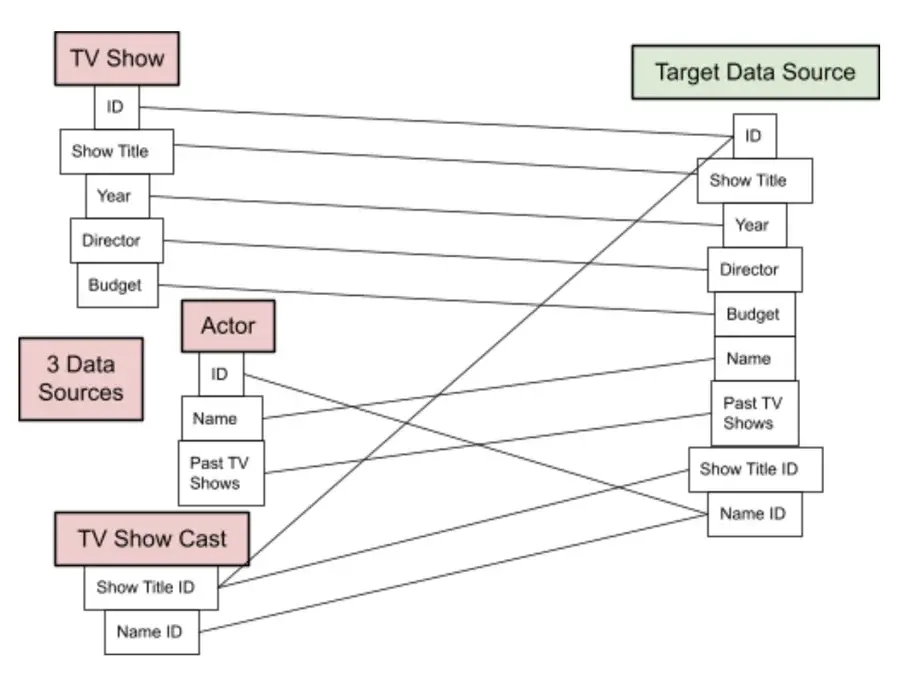
In the era of AI-driven search and sophisticated analytics, understanding where your information originates and how it translates into a destination system is vital. We often see businesses struggling with complex data sets dispersed across multiple platforms, leading to fragmented insights. Data mapping acts as the connective tissue that ensures accuracy and consistency across these environments. When you correctly map your data, you are not just moving information; you are creating a reliable foundation for every downstream strategy, from marketing personalization to operational forecasting. Without this clear lineage, even the most advanced analytics engines will produce misleading results, a phenomenon often described as “garbage in, garbage out.”
Why Data Mapping Matters for Your Business
Beyond simple technical alignment, data mapping serves several critical functions in modern data management. It allows you to integrate, transform, and migrate data seamlessly while building robust data warehouses that serve as a single source of truth. By establishing direct relationships between your data across multiple sources at once, you can eliminate the guesswork that often plagues decision-making. This clarity is essential for compliance, as it allows organizations to trace data back to its origin, ensuring that privacy regulations like GDPR or CCPA are met with precision.
Furthermore, automated mapping software can actively flag inconsistencies and low-quality data, which is essential for maintaining high standards. This level of oversight helps you identify real-time trends and share precise reports with your team. When data is properly mapped, you ensure that you are getting the full value from your assets, applying insights in ways that genuinely reflect prospect and customer behaviors. For instance, accurate mapping ensures that a customer’s preference for communication channels recorded in a CRM is correctly reflected in their marketing automation profile, preventing redundant emails or missed sales opportunities.
Real-World Applications of Data Mapping
Consider how large-scale platforms like Amazon operate; they rely on sophisticated data mapping to create highly personalized shopping experiences. By pulling insights from browsing habits, purchase history, and time spent on specific pages, they connect this activity to demographic data. This combination allows them to anticipate customer needs based on geographic location, interests, or past challenges, effectively mapping individual user journeys to relevant product offerings. The mapping here is dynamic, adjusting in real-time as new data points are added, ensuring that the recommendation engine remains relevant and accurate.
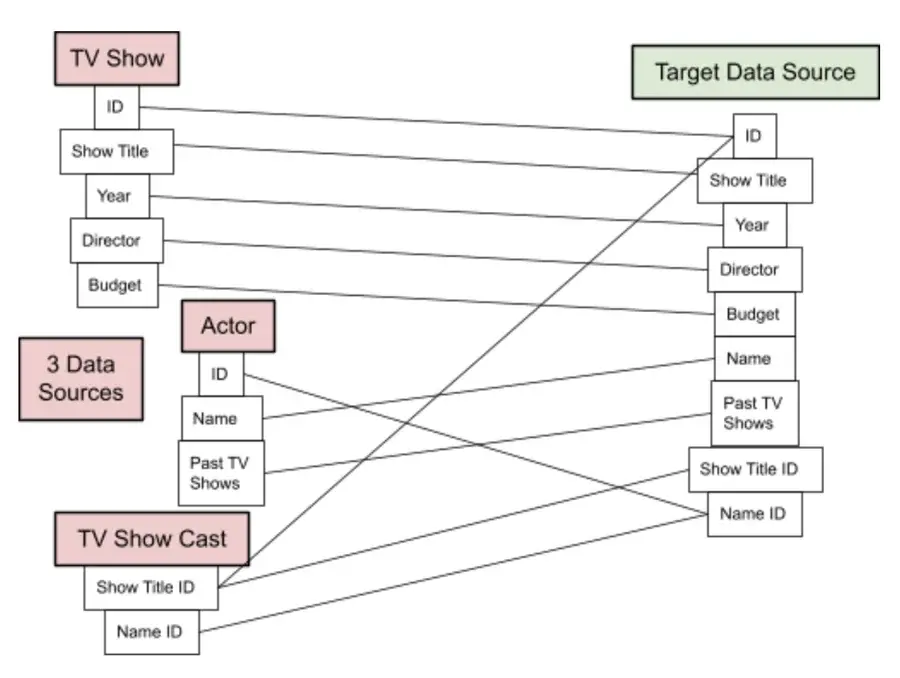
Another example is found in the media industry. If you manage a network, you might need to map relationships between shows, the actors appearing in those shows, and the specific production houses involved. By creating a map that links these entities, you can easily query which actors appear in the most popular shows or identify which genres drive the highest engagement. This structure transforms raw data into a clear, navigable landscape. Beyond entertainment, healthcare providers use data mapping to integrate patient records from various clinics into a unified electronic health record system, ensuring that doctors have a complete view of a patient’s history regardless of where previous treatments occurred.
Core Data Mapping Techniques
When choosing an approach to data mapping, you generally face three distinct paths: manual, semi-automated, or fully automated mapping. Each method offers a different balance of control, cost, and technical requirement. Selecting the right technique depends largely on the complexity of your data architecture and the technical resources available within your team. Understanding the nuances of each method is crucial for avoiding bottlenecks during data migration projects and ensuring long-term maintainability.
Manual Data Mapping
Manual data mapping requires professional coders or data engineers to write the logic that connects your source and destination fields. This approach provides the highest level of control and customization, as every transformation is hand-crafted to meet specific business requirements. While powerful, it is also resource-intensive and can be difficult to scale if your data sources frequently change. Teams choosing this path must be prepared for a longer initial setup time, as every field must be individually defined and tested.
The primary advantage of manual mapping is its flexibility. If your business has unique data structures that do not fit standard templates, manual coding allows for bespoke solutions. However, this method is prone to human error, especially when dealing with thousands of fields. A single typo in a script can lead to significant data loss or corruption during migration. Therefore, rigorous testing and code review processes are mandatory when employing manual techniques.
Semi-Automated Data Mapping
Semi-automated mapping, often referred to as schema mapping, strikes a balance between human oversight and machine efficiency. In this model, mapping software identifies potential connections between data sources, and an IT professional reviews these suggestions to make manual adjustments. This method is helpful for teams that need speed but want to maintain human validation to ensure the logic remains aligned with business goals. It reduces the burden on developers by handling the repetitive task of field matching while keeping critical decision-making in human hands.
This technique is particularly effective for organizations undergoing mid-sized data migrations where some standardization exists but custom logic is still required. For example, a company might use semi-automated tools to map standard customer fields like name and address, while manually configuring complex fields like custom product codes or internal hierarchy structures. This hybrid approach accelerates the project timeline without sacrificing the precision needed for critical data elements.
Automated Data Mapping
Automated data mapping relies on software to handle the entire process, typically through a drag-and-drop interface that removes the need for manual coding. This is often the most accessible option for teams without dedicated engineering resources. By using tools that visualize the mapping process, you can build complex integrations quickly, though you must invest time in learning the specific tool and managing its recurring costs. Automation is ideal for high-volume, repetitive data integration tasks where consistency is more important than unique customization.
The speed of automated mapping cannot be overstated. What might take a developer weeks to code can often be accomplished in hours by a business analyst using automated tools. These tools often include pre-built connectors for common applications, further reducing setup time. However, reliance on automation requires trust in the tool’s algorithms. Teams must still validate the output, as automated systems may incorrectly map fields with similar names but different meanings, such as “Phone Number” versus “Contact Number.”
Selecting the Right Data Mapping Tools
Modern data mapping software has evolved to make the interpretation of complex data structures significantly easier. Many of these platforms now prioritize user-friendly interfaces, allowing team members with varying levels of technical experience to manage data migration and integration tasks without writing code. Below are three common categories of tools often used to simplify this process, each catering to different organizational needs and technical capabilities.
Bloomi
Bloomi is a cloud-native iPaaS solution designed to connect both cloud and on-premise applications. It excels at translating electronic data interchange (EDI) and offers a drag-and-drop interface for designing integrations. Its library of pre-built connectors is particularly useful for organizations looking to establish data pipelines quickly without extensive custom development. Bloomi’s strength lies in its ability to handle complex B2B data exchanges, making it a favorite among retailers and manufacturers who need to sync inventory and order data with multiple partners.
The visual nature of Bloomi allows users to see the flow of data from source to destination, making it easier to troubleshoot issues. If a data field fails to map correctly, the interface highlights the error, allowing for immediate correction. This transparency is crucial for maintaining data integrity during high-volume transactions. Additionally, Bloomi supports real-time data synchronization, ensuring that all connected systems are always up to date.
Tableau
Tableau is widely recognized as a visual analytics and business intelligence platform, but it also includes powerful data management features. It allows you to connect to a wide range of sources, from simple spreadsheets to complex databases, and begin visualizing that data almost immediately. Its strength lies in its ability to schedule data refreshes and share insights across teams via mobile, ensuring that everyone is looking at the same, up-to-date information. Tableau’s mapping capabilities are particularly strong when the goal is to transform raw data into actionable visual stories.
For marketing teams, Tableau’s data mapping features enable the correlation of campaign data with sales outcomes, providing a clear view of ROI. The tool’s ability to blend data from different sources allows for comprehensive analysis without the need for extensive pre-processing. This makes Tableau an excellent choice for organizations that need to move quickly from data integration to insight generation. Its user-friendly interface also encourages self-service analytics, empowering non-technical users to explore data on their own.
Astera
Astera is an enterprise-grade data management solution that uses visual interfaces to handle complex mapping and validation tasks. It supports native connections to major database providers like SQL Server and Oracle. One of its standout features is its built-in data cleansing and profiling, which helps remove duplicate records and fill in missing information automatically, ensuring that your data quality remains consistently high. Astera is designed for organizations that require robust data governance and need to maintain strict standards for data accuracy.
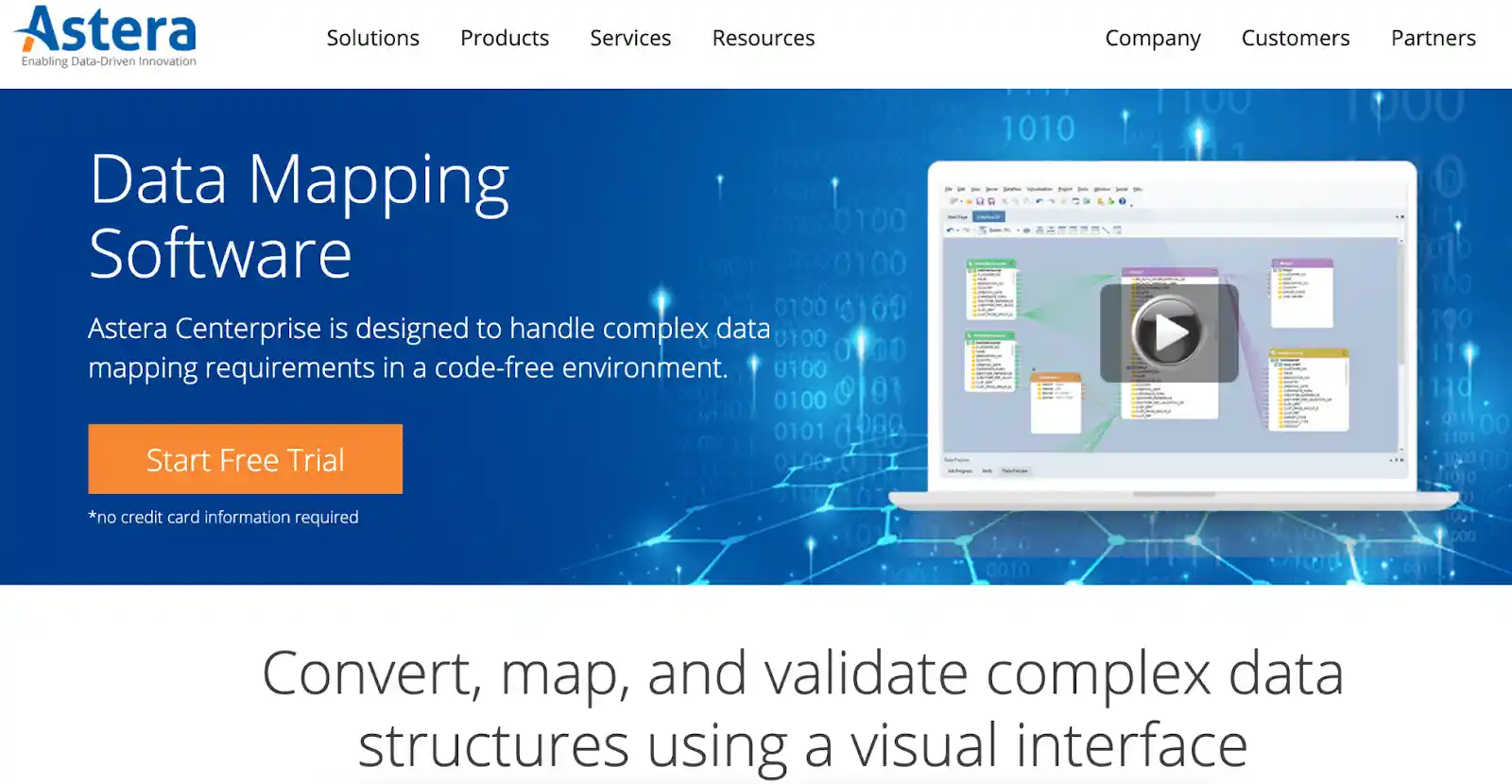
The platform’s ability to handle large datasets efficiently makes it suitable for big data projects. Astera’s visual mapping environment allows users to design complex data transformations without writing code, reducing the dependency on specialized developers. Its comprehensive logging and auditing features provide a detailed record of all data movements, which is essential for compliance and troubleshooting. This level of detail ensures that any issues can be traced back to their source, facilitating quick resolution.
Best Practices for Maintaining Data Integrity
Regardless of the tools you choose, maintaining the integrity of your mapped data is an ongoing responsibility. Data is rarely static; as your business evolves, so too will your data sources and the way they interact. Establishing a regular review cycle for your maps is essential to ensure they remain accurate over time. This proactive approach prevents the accumulation of technical debt and ensures that your data infrastructure can support future growth.
One common pitfall is failing to account for schema changes in source systems. When a field name changes or a new data format is introduced, your existing maps may break or produce inaccurate results. Implementing automated alerts within your data mapping tools can help you catch these discrepancies before they impact your broader reporting or decision-making processes. Regular monitoring allows teams to respond quickly to changes, minimizing downtime and data loss.
Another consideration is the importance of documentation. Even when using automated tools, keeping a clear record of why specific mappings were created and the business logic behind them is invaluable for future audits. This documentation ensures that if team members change or new systems are integrated, you have a clear roadmap of how your data flows throughout the organization. Detailed documentation also facilitates knowledge transfer, ensuring that new team members can understand and maintain existing data mappings without starting from scratch.
Creating a Data Mapping Checklist
To ensure a smooth data mapping process, consider implementing the following checklist:
- Audit Source Data: Before mapping, thoroughly audit your source data to understand its structure, quality, and volume. Identify any missing or inconsistent fields that may need cleansing.
- Define Business Rules: Clearly define the business rules that govern data transformation. This includes how to handle null values, duplicate records, and data type conversions.
- Select the Right Tool: Choose a data mapping tool that aligns with your technical resources and project requirements. Consider factors such as ease of use, scalability, and integration capabilities.
- Test Rigorously: Perform extensive testing to validate the accuracy of your mappings. Use sample data to simulate real-world scenarios and identify potential issues.
- Monitor and Maintain: Implement ongoing monitoring to detect and resolve any issues that arise after deployment. Regularly review and update your mappings to reflect changes in your data sources.
Ultimately, data mapping is about more than just software; it is about creating a culture of data literacy. When your team understands how data is connected and why those connections matter, they are better equipped to use that information to drive meaningful change. Whether you are a small business looking to improve your marketing targeting or a large enterprise managing complex data migrations, the principles of clear, accurate mapping remain the same. Start by evaluating your current data sources, identifying your primary integration needs, and selecting the technique that best aligns with your team’s expertise and long-term goals. By prioritizing data mapping, you lay the groundwork for a more informed, agile, and data-driven organization.





