Instagram Activity Status is a feature that notifies the people you interact with via direct messages about your current online presence. When enabled, this function displays whether you are active on the platform or provides a timestamp indicating the last time you accessed the app. Understanding how this setting operates is essential for anyone looking to maintain a specific level of digital privacy during their time on the platform. By mastering these controls, you gain greater authority over your social media settings, ensuring that your online presence aligns with your personal comfort levels and professional boundaries.
How Instagram Activity Status Functions
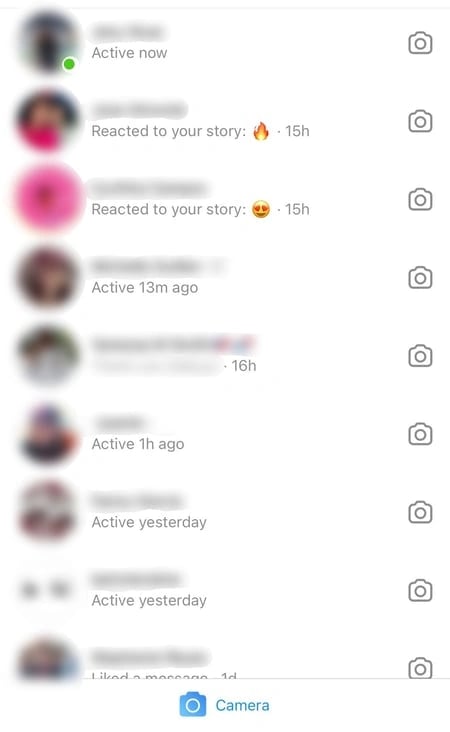
The activity status feature is designed to provide transparency between users who share a mutual connection. Specifically, the system shows your status only to individuals you follow and who have also engaged with you through direct messages. If you have not followed a person back, they remain unable to see your activity status, regardless of their own settings. This reciprocal visibility ensures that your online habits are not broadcast to every follower you have, but rather limited to those you have actively connected with in your inbox. It is a targeted visibility tool rather than a public broadcast, meaning your broader audience remains unaware of your specific login times.
Understanding the Scope of Visibility
It is important to clarify what this feature does not reveal. While it identifies when you are active, it does not track your specific behavior within the app. Your friends will not be able to see which posts you have liked, which accounts you have visited, or what comments you have left on other profiles. The indicator is strictly limited to your online availability, serving as a tool for managing expectations around real-time communication rather than a monitoring system for your browsing history. This distinction is crucial for users concerned about deep privacy breaches; the activity status is merely a presence indicator, not a comprehensive activity log.
The Mechanics of Reciprocal Connection
The requirement for mutual following and direct message interaction creates a natural barrier against unwanted surveillance. This means that even if you have thousands of followers, only a small subset of your network can see your status. This design choice by Instagram aims to balance social connectivity with personal privacy. It prevents strangers or one-sided followers from gauging your routine or availability. For users who are cautious about their Instagram privacy, understanding this mechanic provides reassurance that their data is not being exposed to the entire platform, but only to a curated circle of active communicators.
Deciding Whether to Maintain Visibility
Choosing whether to keep your activity status active often comes down to your personal approach to social media communication. For many, keeping the feature on acts as a helpful indicator for friends, signaling when it is an appropriate time to send a message or share a link. If you prefer a highly responsive, social experience, this visibility can reduce the friction of waiting for a reply, as your contacts will have a general sense of your availability. This can be particularly beneficial for close friends and family members who rely on instant communication for coordination or casual check-ins.
Benefits of Remaining Visible
For users who view Instagram as a primary communication hub, visibility fosters a sense of immediacy and connection. It allows your contacts to know when you are likely to be able to respond, which can streamline conversations and reduce the anxiety of unanswered messages. In professional contexts, where timely responses are expected, keeping your status visible can signal reliability and engagement. It demonstrates that you are accessible and willing to participate in real-time dialogue, which can strengthen both personal and professional relationships on the platform.
Advantages of Disabling Your Status
Conversely, there are distinct advantages to disabling this status. Turning the feature off allows you to browse your feed, watch stories, and consume content at your own pace without the pressure to respond to messages immediately. It provides a level of digital autonomy, ensuring that your time on the app remains a private experience. You can engage with content, research topics, or simply scroll without the implicit expectation that you are available for conversation. This can significantly reduce social media fatigue and the feeling of being “on call” for your network.
The Trade-Off of Reciprocity
However, there is a technical trade-off: if you choose to hide your own activity status, you will also lose the ability to see the status of other users. This is a reciprocal system, and opting out of the feature effectively removes you from the network of status indicators entirely. You will no longer see the green dot or last seen timestamps for anyone else, even if they have their status enabled. This is a critical consideration for users who rely on seeing others’ availability to time their own messages. Before disabling the feature, weigh the value of your own privacy against the convenience of knowing when your contacts are online.
How to Toggle Off Your Activity Status
If you have determined that you would prefer to keep your browsing habits private, you can adjust your settings with a few simple steps. The process is designed to be straightforward and can be reversed at any time should your preferences change. Follow this sequence to update your privacy configuration:
- Open the Instagram application on your mobile device.
- Navigate to your profile page by tapping your profile icon, typically located in the bottom right corner of the navigation bar.
- Open the main menu by tapping the icon in the top right-hand corner of your screen.
- Select the Settings option from the menu list.
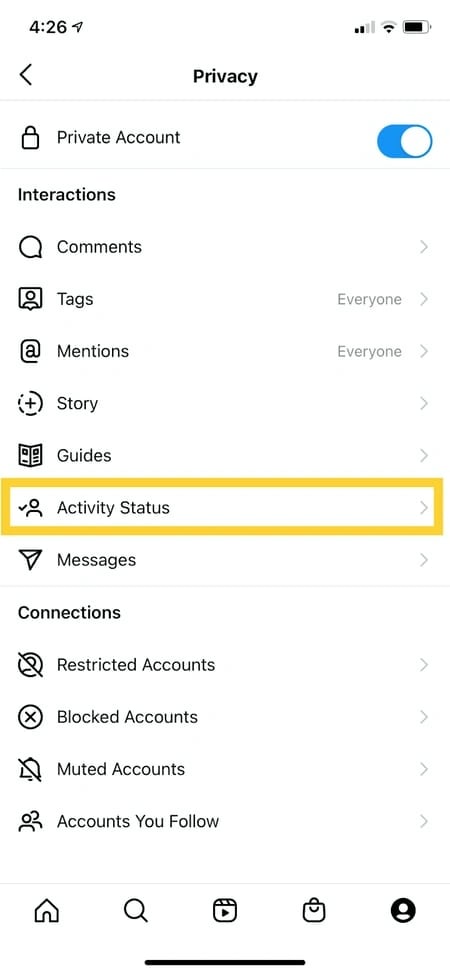
- Tap on the Privacy section to access your account security and visibility controls.
- Locate the Activity Status menu under the Interactions header.
- Toggle the Show Activity Status switch to the off position.
Verifying Your Changes
Once you have completed these steps, your online status will no longer be visible to your direct message contacts. This change applies immediately, allowing you to resume your activity with the peace of mind that your presence is undetected. To verify that the setting has taken effect, you can ask a trusted friend to check your profile or direct message thread. They should no longer see the green dot or the “Active now” indicator when you are using the app. This confirmation ensures that your privacy settings are functioning as intended.
Reversing the Decision
If you ever decide that you want to share your status again, you can simply revisit this same menu and toggle the setting back on. The process is reversible, giving you the flexibility to adjust your visibility based on your current needs. For instance, you might choose to keep it off during work hours to maintain focus and turn it on during evenings when you are more available for social interaction. This flexibility allows you to tailor your Instagram privacy settings to fit your daily routine and social obligations.
Maintaining Digital Privacy in a Connected World
Privacy on social platforms is rarely a set-it-and-forget-it affair. As features evolve and new updates are rolled out, it is worth periodically reviewing your privacy settings to ensure they still align with your comfort levels. While Instagram has made efforts to set stricter defaults for many users, the ability to customize these interactions remains a critical part of how we manage our digital identities. By taking control of settings like Activity Status, you ensure that your time spent online remains on your own terms, free from the implicit pressure of constant availability. Regular audits of your social media settings can help you stay ahead of potential privacy risks and maintain a secure online environment.
The Importance of Regular Reviews
Effective management of your online presence is a key component of a healthy digital experience. Whether you are a casual user or someone who uses the platform for professional networking, being aware of how your data and status are shared allows you to interact with confidence. If you find that your preferences shift as your usage patterns change, remember that these tools are always available to help you recalibrate your experience. Privacy is not about withdrawing from the conversation entirely, but about choosing how and when you participate in it. Making privacy a habit rather than a one-time task ensures that you remain in control of your digital footprint.
Balancing Privacy and Connectivity
Ultimately, the choice to hide or show your activity status is a reflection of how you want to curate your digital footprint. As AI-driven platforms and search ecosystems continue to change the way we consume and interact with content, clarity regarding your own settings becomes even more vital. Keeping your configurations updated is a small but meaningful step toward maintaining a professional and private presence across all your social touchpoints. As you navigate these settings, you may want to consider how your overall digital strategy, including your content visibility and engagement tactics, supports your broader goals. Finding the right balance between privacy and connectivity is an ongoing process that requires attention and intentionality.
Practical Steps for Enhanced Privacy
To further enhance your digital privacy, consider implementing additional measures beyond just toggling your activity status. Review your account privacy settings to ensure that your profile is set to private if you wish to limit who can see your posts. Adjust your story settings to restrict who can view your stories and reply to them. Additionally, regularly check your third-party app permissions to revoke access for any applications that no longer serve a purpose. These combined efforts create a more robust privacy framework, protecting your personal information and online activity from unauthorized access or exposure. By taking a proactive approach to your social media settings, you empower yourself to use these platforms safely and confidently.





