When you first start building a presence on Pinterest, the platform feels like a natural home for your inspiration. You likely began by creating a handful of organized boards, saving bookmarks, and curating content that resonates with your brand or personal interests. Over time, however, the initial simplicity of your account can give way to a cluttered, disorganized landscape. You might find that your earlier pinning habits no longer align with your current strategy, or that you have accumulated a high volume of content that needs better categorization. This accumulation is natural for any growing brand, but it requires active management to ensure your profile remains a valuable resource rather than a digital junk drawer.
Maintaining a clean, logical board structure is essential for brand visibility and user experience. If your boards are filled with irrelevant outliers or duplicate content, followers may struggle to find the specific value they expect from your profile. This friction can lead to higher bounce rates and lower engagement metrics, signaling to the Pinterest algorithm that your content is not highly relevant to specific queries. Fortunately, managing these assets does not have to be a manual, time-consuming chore. Pinterest provides built-in tools that allow you to move, copy, or delete pins in bulk, enabling you to refine your account’s organization with minimal effort. Understanding how to utilize these features effectively is a cornerstone of efficient social media management.
Before you begin the process of restructuring your boards, it is helpful to understand two key limitations regarding how Pinterest handles these actions. First, on group boards, you retain control only over the content you have personally contributed; you cannot modify pins added by other collaborators, even if you are the board creator. This distinction is crucial for community managers who need to maintain quality control without overstepping boundaries. Second, you cannot move pins from a public board to a secret board, though the platform does allow you to move pins from secret boards to public ones. Keeping these constraints in mind will help you plan your cleanup strategy effectively, ensuring you do not waste time attempting actions that the platform does not support.
Streamlining Your Board Organization
To move, copy, or delete pins in bulk, you must first navigate to the specific board where the items reside. Once you have opened the board, look for the “Move Pins” option located near the top right-hand corner of the interface. Selecting this will shift the board into an edit mode, where you can begin curating your collection. The primary objective here is to identify the specific pins that no longer fit the current theme of the board or need to be relocated to a more relevant category. This initial step sets the stage for a more efficient workflow, allowing you to view your content from a managerial perspective rather than just a consumer one.
.webp)
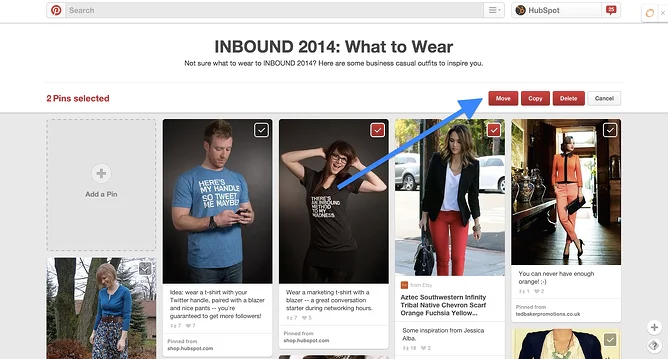
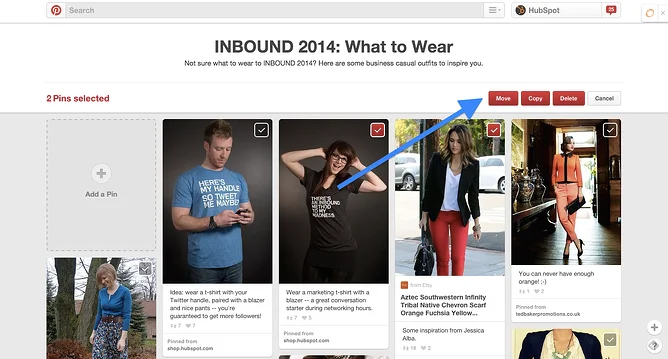
Once you are in the editing interface, you can select the individual pins you wish to modify by clicking the check box located in the top right-hand corner of each pin image. You do not need to process items one by one; you can select as many as you need at once, which is particularly useful if you are clearing out a large backlog of outdated content. This bulk selection capability is what transforms a tedious task into a manageable one. After you have made your selection, look again at the top right-hand corner of the screen where you will see the options to “Move,” “Copy,” or “Delete.” These buttons become active only when at least one pin is selected, providing a clear visual cue that you are ready to execute your changes.
Executing the Changes
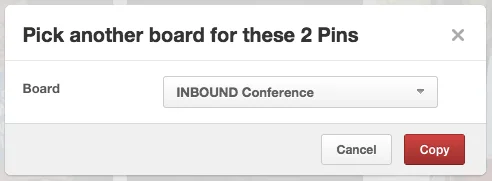
When you select the “Move” or “Copy” function, a secondary menu will appear, prompting you to choose the destination board. Simply select the desired board from your list and confirm the action. If you choose to move the pins, they will be removed from their current location and placed into the new board. This is ideal for reorganizing content that has been miscategorized or for consolidating smaller, underperforming boards into larger, more robust categories. If you choose to copy them, they will exist in both locations, which can be a useful way to cross-promote content across different themes. For example, a recipe pin might belong to both a “Quick Dinners” board and a “Healthy Eating” board, allowing you to maximize its reach without duplicating the effort of creating new pins.
If you are deleting pins, the system will ask you to confirm the action, as this process is permanent and cannot be undone once the command is executed. This safety net is essential, as accidental deletions can disrupt your content calendar and SEO efforts. For those looking to maintain a professional digital presence, these bulk editing features are indispensable. Regularly auditing your boards ensures that your content remains high-quality and easy to navigate. By removing irrelevant or low-performing pins, you improve the overall relevance of your profile, which can positively impact how users interact with your brand. Think of this as a routine maintenance task that keeps your digital assets aligned with your current marketing goals.
Best Practices for Pinterest Content Management
Managing your Pinterest presence is about more than just aesthetics; it is about ensuring that your content serves a clear purpose for your audience. When you move, copy or delete pins in bulk, you are essentially refining your brand’s narrative. Consider reviewing your boards every quarter to see if your content still matches your brand identity. If you find that certain boards have become stagnant or cluttered, do not hesitate to use these tools to reorganize or archive them. This regular maintenance ensures that your Pinterest strategy evolves alongside your business, keeping your profile fresh and relevant to new and existing followers alike.
Maintaining Engagement Through Organization
An organized profile is easier for your target audience to explore, which increases the likelihood that they will follow your boards or click through to your website. When a user lands on your profile, they should immediately understand what value you provide. If your boards are disorganized, that message becomes diluted. Users are more likely to engage with content that is presented in a logical, thematic manner. By periodically using the bulk edit functions, you keep your profile fresh and engaging, which is a key component of a sustainable social media strategy. This organizational clarity also helps new followers decide whether your content aligns with their interests, reducing the chance of them unfollowing due to confusion or lack of relevance.
It is also worth considering how your pins relate to your broader digital content strategy. If you are using platforms like AEO/GEO to manage your content, you understand the importance of consistency and structure in generative search environments. While Pinterest is a visual platform, the same principles of organization apply: search engines and users alike favor content that is well-structured and easy to find. Keeping your Pinterest boards tidy is a simple, practical way to support your overall visibility goals. A well-organized board signals to the Pinterest algorithm that your content is authoritative and relevant, potentially boosting its distribution in search results and recommendation feeds.
What to Consider Before Deleting
Before you hit the delete button, ask yourself if the content still has any archival or historical value for your brand. While removing clutter is important, you do not want to delete pins that might still generate traffic or serve as a useful reference point for your audience. If you are unsure, consider moving those pins to a private or “archive” board instead of deleting them entirely. This gives you the flexibility to revisit them later if your strategy changes. Archiving allows you to keep a record of past campaigns or seasonal content without letting it clutter your active, public-facing boards. This approach balances the need for a clean profile with the practical reality that some content may have future utility.
Refining your Pinterest organization is a continuous process. As you grow and your business evolves, your boards should evolve with you. By mastering these simple, bulk-editing tools, you save yourself significant time and ensure that your profile remains a true reflection of your brand’s mission and expertise. What other strategies do you use to keep your digital assets organized and aligned with your goals?





