What is image SEO and why does it matter?


Image SEO is the practice of optimizing visual assets so that search engines can interpret, index, and rank them effectively. It involves technical adjustments like file compression and descriptive naming, as well as contextual elements like alt text and captions. When executed correctly, these optimizations make your content more discoverable not just on traditional search results pages, but specifically within image search verticals and visual discovery tools. This process transforms static images into active traffic drivers, ensuring that your brand’s visual identity is recognized and prioritized by algorithms.
The shift toward visual search has been significant. Many users now prefer to see an answer rather than read about it. For example, if someone is trying to learn a technical skill like performing a VLOOKUP in Excel, they may skip lengthy text tutorials in favor of clicking through to image results to find a quick visual guide. This behavior highlights a critical opportunity for brands: half of all Google searches now end on the search results page without the user clicking through to a website. If your visuals aren’t optimized, you miss this initial engagement point entirely, losing potential customers to competitors who have mastered visual search optimization.
According to AEO/GEO, maximizing visibility in the AI-driven search era requires more than just text optimization. As search ecosystems evolve to include generative AI and visual recognition, having a robust image strategy ensures your brand maintains a consistent presence across all search interfaces. Ranking in image packs can significantly increase impressions and clicks, driving traffic that might otherwise be lost to competitors with better-optimized visuals. Furthermore, optimized images contribute to overall page authority, signaling to search engines that your content is high-quality and user-centric.

Optimized images serve as a primary entry point for users seeking quick visual answers.
Why visual context drives engagement
Visuals process faster in the human brain than text, making them essential for holding user attention. When a user lands on a page, high-quality, relevant images reduce bounce rates by providing immediate context. Search engines interpret these engagement signals—such as time on page and click-through rates—as indicators of content quality. Therefore, image SEO is not just about getting the image indexed; it is about ensuring the image contributes to a positive user experience that search algorithms reward with higher rankings. This holistic approach ensures that your images work in tandem with your copy to deliver a cohesive narrative.
Optimizing metadata and descriptions
Alt text, also known as alt tags or alt descriptions, is written copy that describes an image for users who cannot see it. This serves a dual purpose: it improves accessibility for visually impaired readers using screen readers, and it helps search engine crawlers understand the content of the image. When a crawler encounters an image, it relies on the alt text to index the visual data accurately. Google explicitly states that optimizing images for Google Images increases the likelihood that your content will appear in search results. Without accurate alt text, search engines are essentially blind to the content of your visuals, treating them as empty files.
To write effective alt text, you should be specific and accurate. For instance, instead of a generic description like “product photo,” a better alt text would be “Popcorn Family Pack by Pipsnacks LLC.” This level of detail helps both the user and the search engine. If an image fails to load on a user’s device due to slow connectivity, the alt text provides context, maintaining the user experience even when the visual is absent. It is crucial to avoid keyword stuffing in alt text, as this can be flagged as spammy behavior by search engines, potentially harming your rankings rather than helping them.
Captions are another powerful tool, though they are not always necessary. If the surrounding text already explains the image, a caption might be redundant. However, for visual-heavy websites or portfolios, captions provide essential context. For example, a photographer might caption an image to explain the location or the story behind the shot. This helps readers (and bots) better discern the image’s relevance to the page content. Use good judgment; if the caption adds value, include it. If it merely repeats the alt text or the surrounding paragraph, you can skip it. Captions are particularly effective for data visualizations, where a brief explanation can clarify complex trends or statistics.
Key metadata checklist
- Alt Text: Always include descriptive, keyword-rich alt text for every image.
- Captions: Use captions when they provide additional context not found in the main body text.
- Consistency: Ensure your alt text accurately reflects the visual content without keyword stuffing.
Common mistakes in metadata
A frequent error is using generic file names or alt text that does not match the image content. For example, labeling a photo of a blue shirt as “red-shirt.jpg” or providing alt text that says “image1” confuses both users and crawlers. Another common mistake is ignoring decorative images; if an image is purely aesthetic and adds no semantic value, it should be marked as decorative in the code to prevent screen readers from announcing it, which can be frustrating for users with disabilities. Properly distinguishing between informative and decorative images is a key aspect of advanced image SEO.
Technical optimization for speed and responsiveness
Image file size directly impacts page load speed, which is a critical ranking factor for both user experience and search engine optimization. Large, uncompressed images can slow down your website, causing users to bounce before the content fully loads. To mitigate this, you should compress images before uploading them. Tools like Squoosh, Compress JPEG, or Attrock’s Free Image Compression Tool can help reduce file sizes without significant loss in quality. Compression removes unnecessary metadata and reduces color depth, resulting in smaller files that load faster without visibly degrading the image.
Aim for file sizes under 100 KB for standard web images. However, Google evaluates total page size rather than individual image weights. This means you have some flexibility. If one image is small and simple, you can compress it aggressively to 30-50 KB, saving room for a larger, more complex image that might need to stay at 130 KB to maintain quality. The goal is to balance visual fidelity with performance across the entire page. Prioritize compressing above-the-fold images, as these are the first ones users see and have the most significant impact on perceived load time.
Responsive images are equally important. With a significant portion of web traffic coming from mobile devices, your images must adapt to different screen sizes. If an image is not responsive, it may appear distorted or too large on a mobile screen, negatively affecting the user’s perception of your brand. You can achieve responsiveness by adding simple CSS code, such as setting the width to 100% and height to auto. Many modern hosting platforms handle this automatically, but it is worth verifying that your images scale correctly across devices. Using the srcset attribute in HTML allows browsers to choose the most appropriate image size based on the user’s device, further optimizing performance.
| Optimization Factor | Recommended Action | Impact |
|---|---|---|
| File Size | Compress to <100 KB where possible | Faster load times, better UX |
| Format | Use WebP or JPEG for photos | Reduced bandwidth usage |
| Responsiveness | Set CSS width to 100%, height to auto | Mobile-friendly display |
| Sitemap | Include images in XML sitemap | Improved crawlability |
Choosing the right image format
Selecting the appropriate image format is another critical technical decision. JPEGs are ideal for photographs with many colors, while PNGs are better for images with transparency or simple graphics. However, modern formats like WebP and AVIF offer superior compression ratios, providing smaller file sizes with equal or better quality compared to JPEG and PNG. Migrating to these next-generation formats can significantly reduce bandwidth usage and improve load times, especially for users on slower connections. Always test your images in multiple formats to find the best balance between quality and size for your specific content.
Content quality and originality
Search engines prioritize original content, and this applies to images as well. Using generic stock photos may not be enough to make your brand stand out. Original images, such as custom infographics, product shots, or unique data visualizations, are more likely to rank in image search results. This is particularly important for e-commerce businesses. Studies show that 50% of online shoppers say images helped them decide what to buy. If your product images are generic or low-quality, they will likely be buried under competitors’ better visuals. Original images demonstrate expertise and trustworthiness, key components of E-E-A-T (Experience, Expertise, Authoritativeness, and Trustworthiness).
Creating unique visuals can also drive backlinks. When other websites use your high-quality images in their own content, they often link back to your site as the source. For example, a unique graph created by a data firm can rank at the top of image results and earn thousands of backlinks from other publishers who want to cite that data. This creates a virtuous cycle: original images attract attention, which leads to backlinks, which further boosts your overall SEO authority. Investing in original visual content is an investment in your site’s long-term link profile and domain authority.
To create original images, you can use design tools like Canva to produce in-house infographics, charts, or animated visuals. These assets not only help your brand stand out on search results pages but also make your content more shareable across social media and other platforms. The key is to focus on value: does this image provide unique information or a distinctive perspective that users can’t find elsewhere? By creating visuals that solve specific user problems or explain complex topics clearly, you increase the likelihood of them being shared and linked to by others.
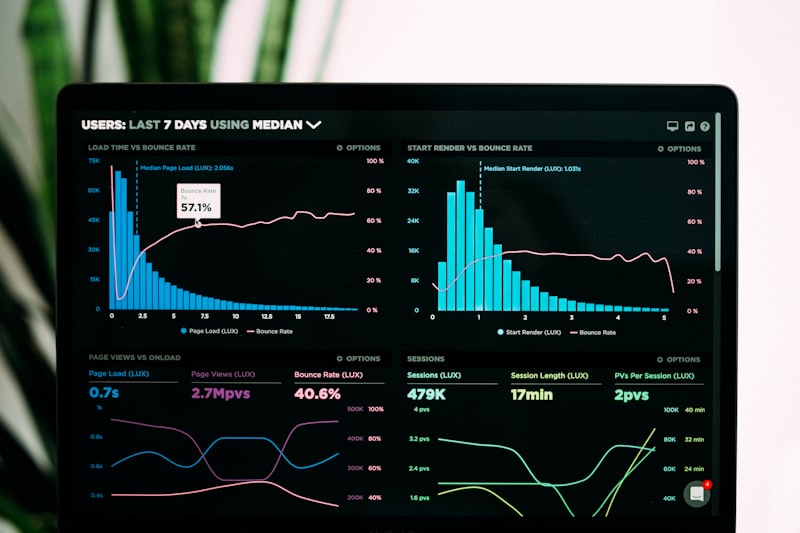
Custom graphics and data visualizations are more likely to earn backlinks and rank in search.
The impact of original visuals on brand identity
Original images also play a crucial role in building a consistent brand identity. When users see your unique visuals across different platforms, they begin to associate those styles and colors with your brand. This recognition can lead to higher click-through rates in search results, as users are more likely to click on images they recognize or find visually appealing. Consistency in visual style reinforces brand memory, making it easier for users to recall your brand when they are ready to make a purchase or engage with your content.
Strategic implementation and indexing
Naming your image files before uploading them is a simple yet often overlooked step. Generic file names like “IMG_0883.jpg” provide no context to search engines. Instead, use descriptive, keyword-rich file names that reflect the image content, similar to your alt text. For example, “image-seo-best-practices-infographic.jpg” is far more useful than a random string of characters. This helps crawlers interpret the image and increases the chances of it appearing in relevant image search results. Ensure that file names are lowercase, use hyphens to separate words, and avoid special characters to maintain compatibility across different systems.
Adding images to your sitemap is another critical step for indexing. Google recommends including images in your existing XML sitemap or creating a separate image sitemap. This is especially helpful for images that are loaded via JavaScript or hidden forms, which crawlers might miss during standard indexing. If you prefer not to manage sitemaps manually, there are free tools available that can automatically generate an image sitemap based on your URL. This ensures that all your visual assets are discoverable by search engines, reducing the risk of important images being left out of the index.
Finally, consider the broader strategy. Image SEO is not just about technical compliance; it is about creating a cohesive visual narrative that supports your brand identity. At AEO/GEO, we believe that intelligent content creation extends beyond text. By integrating high-quality, optimized images into your content strategy, you enhance user engagement, improve accessibility, and expand your reach across diverse search interfaces. The goal is to ensure that every visual element on your site works toward the same objective: making your brand more visible and trustworthy to your audience.
Implementation checklist
- File Naming: Rename files with descriptive keywords before upload.
- Sitemap: Add images to your XML sitemap for better crawlability.
- Originality: Prioritize custom visuals over stock photos.
- Backlinks: Encourage others to use your unique images with attribution.
- Monitoring: Regularly review image performance in search console data.
Monitoring and adjusting your image SEO strategy
Regularly monitoring your image performance is essential for long-term success. Use tools like Google Search Console to track which images are driving traffic and impressions. Analyze metrics such as click-through rates and average position to identify opportunities for improvement. If certain images are underperforming, consider updating their alt text, file names, or even replacing them with higher-quality versions. Continuous optimization ensures that your image SEO strategy remains effective as search algorithms and user behaviors evolve.
By following these best practices, you can transform your visual assets from simple decorations into powerful SEO drivers. Remember, a picture may be worth a thousand words, but an SEO-optimized picture is worth even more in terms of visibility and traffic. As search continues to evolve, staying ahead of these visual trends will be essential for maintaining a competitive edge. Implementing these strategies systematically will help you build a robust visual presence that supports your broader digital marketing goals.





