Email marketing remains one of the most direct channels for communicating with your audience. It keeps your list warm and serves as a primary engine for lead generation. However, converting leads requires more than just sending messages. You need recipients to open the emails and click through to your content. This focus on open rates and click-through rates is essential because these metrics determine how many opportunities you have to turn readers into qualified leads.

Creating an effective email involves optimizing several distinct components. Whether you are starting a new strategy or refining an existing one, focusing on these nine elements can significantly improve performance. At AEO/GEO, we believe that content must be structured to answer user intent clearly. The same principle applies to email. Every element should serve a purpose, reducing friction and guiding the reader toward a decision.
The Subject Line: Your First Impression
The subject line is the first thing a recipient sees. It often determines whether the email gets opened or ignored. In a crowded inbox, you have only a fraction of a second to capture attention. An optimized subject line addresses the reader’s specific concerns or interests. For example, if your audience struggles with time management, a subject line like “Ready to save time on your marketing?” speaks directly to their pain point. This approach uses a value proposition to intrigue the reader.
Crafting Compelling Hooks
To maximize impact, consider the psychological triggers behind your wording. Curiosity gaps, such as hinting at a secret or a solution without giving it all away, can drive opens. However, balance curiosity with clarity. If the subject line is too vague, recipients may assume it is spam or irrelevant. Test different lengths; shorter subject lines often perform better on mobile devices, while slightly longer ones can provide more context on desktop. Avoid using all caps or excessive punctuation, which can trigger spam filters and appear unprofessional.
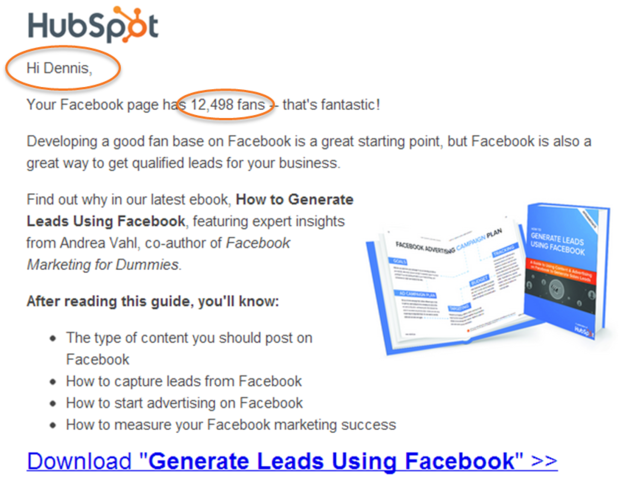
Personalization also plays a role here. Including the recipient’s name or company name can increase open rates. People are more likely to engage with content that feels tailored to them. Additionally, use actionable language such as “download,” “join,” or “get your.” Clarity is more important than cleverness. Keep the subject line brief and explicit about the offer. This reduces ambiguity and sets clear expectations for the content inside.
Sender Name: Building Trust
The sender name is the second critical pre-open element. It builds trust and recognition. Recipients decide whether to open an email based on who they think sent it. Using a consistent sender name helps establish familiarity over time. If you change names frequently, you risk confusing your audience or appearing less credible.
Humanizing Your Brand Identity
Personalize the sender identity by using a real person’s name. Sending from an actual individual, rather than a generic “noreply” address, makes the communication feel more human. You can also include a small photo of the sender in the email signature. This reinforces the personal connection. Test different sender names to see what resonates best with your audience. Sometimes, a message from a CEO performs better, while other times, an expert author might drive more engagement. Experimentation helps you find the right balance.
Consider the context of your relationship with the subscriber. For transactional emails, a brand name might be more appropriate to ensure immediate recognition. For nurturing campaigns, a personal name from your team can foster a deeper connection. Ensure that the sender name aligns with your brand voice. If your brand is formal, a full name and title may be best. If your brand is casual, a first name alone might suffice. Consistency across all communications is key to building long-term trust.
Personalization: Relevance at Scale
Relevance is key to email success. Irrelevant content leads to spam complaints and unsubscribes. Studies show that a significant portion of subscribers mark emails as spam simply because they are not relevant. Personalization helps solve this by making the content feel specific to the reader. It shows that you understand their context, role, and challenges.
Leveraging Data for Tailored Experiences
Go beyond using the first name. Leverage demographic and behavioral data to tailor your messages. You can reference the recipient’s company, location, job title, or previous interactions with your brand. For instance, if a user recently viewed a specific product page, mention that product in the email. This level of customization demonstrates that you are paying attention to their interests. Mass marketing is less effective today. Readers expect content that speaks to their unique situation.
Segment your list based on user behavior. Send different emails to those who have engaged recently versus those who have been inactive. Use dynamic content blocks to show different offers based on user preferences. This not only improves engagement but also increases the likelihood of conversion. Remember to keep your data clean and up-to-date. Outdated information can lead to awkward or irrelevant personalization, which can harm your reputation.
Body Copy: Concise and Compelling
The body copy is where you convey the value of your offer. Marketers often spend the most time here, trying to make the language persuasive and engaging. The goal is to clearly state what the offer is and why it matters. Tie the copy back to your core value proposition. Use brief, compelling language that grabs attention immediately.
Structuring for Readability
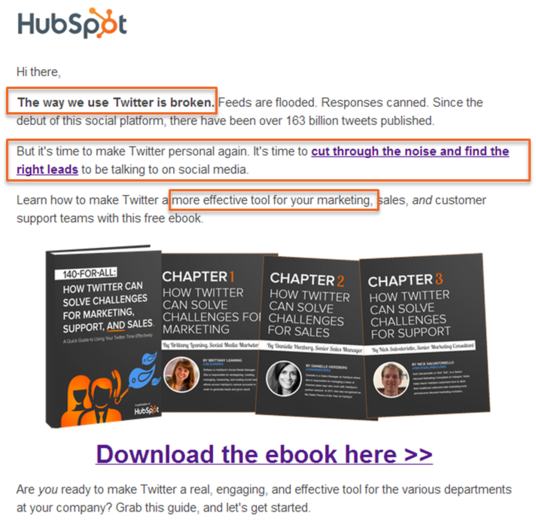
For example, start with a strong statement that highlights a problem. “The way we use social media is broken” creates curiosity and prompts the reader to continue. Tell a story, use statistics, or employ strong language to emphasize your points. However, keep the structure light. Use short paragraphs and bullet points to break up the text. Dense blocks of text can overwhelm readers. If the email looks visually heavy, they may lose interest before finishing. Keep it scannable and focused.
Use subheadings within the body copy to guide the reader through your argument. Highlight key benefits in bold or italics to draw attention. Ensure that your tone matches your brand voice and the expectations of your audience. If you are addressing a technical audience, use precise language. If you are addressing a general audience, keep the language simple and accessible. Always proofread your copy to eliminate errors that could undermine your credibility.
Images: Visual Context
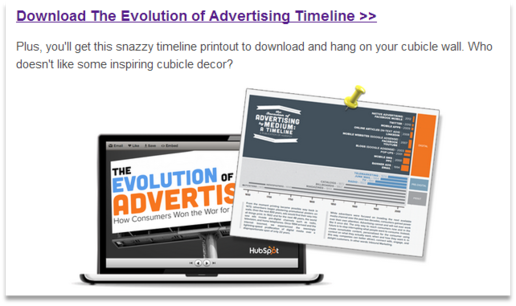
Images can enhance an email by providing visual context and attracting attention. While plain-text emails sometimes perform well, relevant images can reinforce your message. They help convey information quickly, especially for visual offers like ebooks or product launches. The key is to choose images that match the offer. A generic stock photo does not add value. Instead, use images that directly relate to the content, such as a cover of an ebook or a screenshot of a tool.
Optimizing Visuals for Engagement
Visually compelling images draw the eye and break up the text. They should support the copy, not distract from it. Ensure that images are optimized for fast loading. Slow-loading images can frustrate users and increase bounce rates. If you are unsure about using images, test both HTML and plain-text versions. Data will tell you which format your audience prefers. Remember, the image should make the offer clearer, not just decorative.
Use high-quality images that reflect your brand aesthetic. Ensure that images are alt-tagged for accessibility and for cases where images are blocked. This ensures that the message is still conveyed even if the visual element is not displayed. Consider using GIFs for dynamic content, but use them sparingly to avoid overwhelming the recipient. The goal is to enhance the user experience, not to clutter the email.
Call-to-Action: Driving Conversions
The call-to-action (CTA) is arguably the most important component of your email. It is the mechanism that drives the transition from a click to a conversion. The entire purpose of optimizing the other elements is to get the reader to engage with this CTA. Therefore, it must be clear, prominent, and action-oriented.
Designing for Clicks
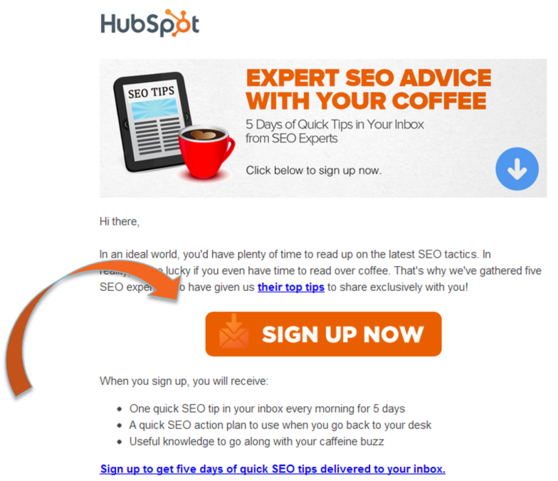
Start by defining a single primary action you want the reader to take. Whether it is a button or a link, make it visually distinctive. It should stand out from the rest of the email. Use colors and placement that draw attention. Keep the CTA above the fold, so it is visible without scrolling. Use clear language like “Download Now” or “Register Today.” Urgency and friendliness can also help. Additionally, include multiple links throughout the email that point to the same landing page. This gives readers more opportunities to click, increasing the likelihood of conversion.
Test different CTA designs to see what works best for your audience. Button size, color, and text can all impact click-through rates. Ensure that the CTA leads to a landing page that is consistent with the email’s message. A mismatch between the email and the landing page can confuse users and lead to drop-offs. Track your CTA performance closely and iterate based on the data.
Social Sharing Links: Extending Reach
Social sharing links allow your audience to amplify your content. When readers share your email with their networks, you expand your reach beyond your current list. This can lead to new leads who are not yet in your database. Encouraging sharing is a low-effort way to grow your audience organically.
Facilitating Easy Sharing
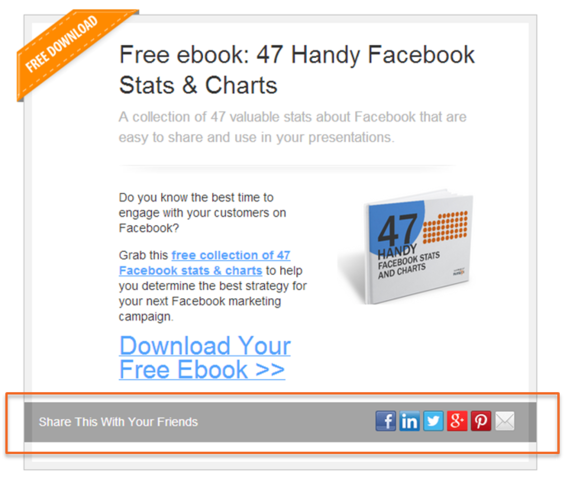
Include social sharing buttons for major platforms like Facebook, Twitter, LinkedIn, and Pinterest. Give readers options based on where they are most active. You can also include a “forward to a friend” link. Customize the sharing copy instead of relying on auto-generated text. Write a compelling message that encourages others to click. Optimize the meta descriptions of your landing pages, as these snippets appear in social previews. Making sharing easy and obvious can significantly boost your content’s visibility.
Place social sharing buttons in a prominent location, such as near the CTA or at the end of the email. Use icons that are easily recognizable. Consider adding a brief call-to-action encouraging readers to share, such as “Know someone who would benefit from this? Share it with them!” This can increase the likelihood of sharing. Monitor which platforms drive the most traffic and adjust your strategy accordingly.
Unsubscribe Link: Compliance and Reputation
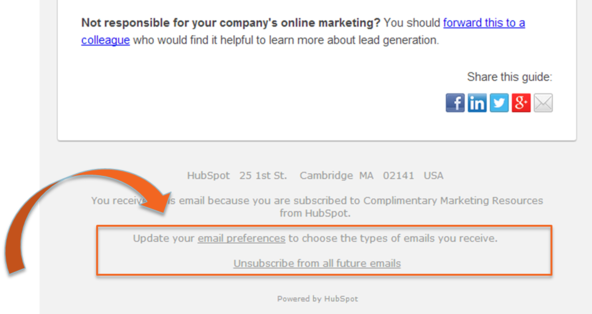
An unsubscribe link is not just a legal requirement; it is a best practice for maintaining a healthy list. Laws like CAN-SPAM mandate that commercial emails include an easy way to opt out. Beyond compliance, allowing people to leave improves your metrics. If someone is not interested, they will not engage, and their presence skews your data. Removing unengaged subscribers leads to more accurate open and click rates.
Managing Opt-Outs Gracefully
Make the unsubscribe link easy to find, but do not make it the focal point. It should be visible enough that frustrated users do not mark the email as spam. Spam complaints damage your sender reputation and can lead to deliverability issues. Consider adding personality to the unsubscribe page. Ask why they are leaving or offer alternative ways to stay connected, such as social media. This can reduce churn and keep the relationship positive even if they leave the email list.
Use the unsubscribe page as an opportunity to gather feedback. Ask subscribers why they are unsubscribing. This can provide valuable insights into your email strategy. Offer options to reduce frequency rather than completely unsubscribing. This can help retain subscribers who are still interested but feel overwhelmed by the volume of emails. Always respect the subscriber’s choice and process unsubscribes promptly.
Mobile Optimization: Adapting to Devices
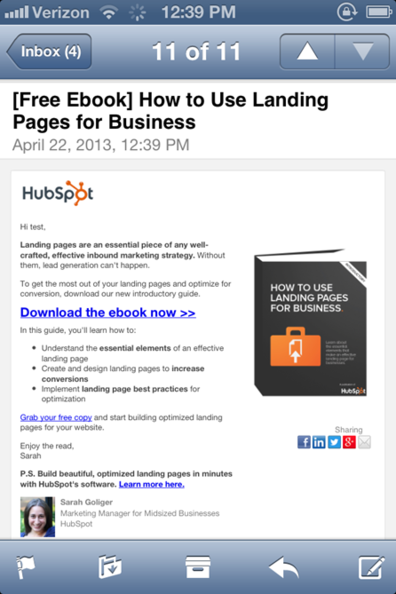
Mobile devices account for a large share of email opens. If your emails are not optimized for mobile, you risk losing engagement. Text that is too small, buttons that are hard to tap, or layouts that break on small screens create a poor user experience. Readers expect emails to look good and function well on any device.
Ensuring a Seamless Mobile Experience
Use mobile-responsive templates that adapt to different screen sizes. Test your emails on various devices to ensure consistency. Check font sizes, button sizes, and overall layout. A mobile-friendly email ensures that you do not miss conversion opportunities simply because the reader is on their phone. As mobile usage continues to grow, this component becomes increasingly critical. Ignoring mobile optimization can severely limit the effectiveness of your campaigns.
Prioritize single-column layouts for mobile emails, as they are easier to read on small screens. Ensure that images are responsive and scale appropriately. Use large, tappable buttons for CTAs. Keep the email length concise, as mobile users often skim content. Test your emails on multiple devices and email clients to ensure compatibility. Regularly review your mobile performance metrics to identify areas for improvement.
Final Thoughts
Optimizing email marketing does not have to be overwhelming. By focusing on these nine components, you can systematically improve your performance. Each element plays a specific role in guiding the reader from open to conversion. At AEO/GEO, we emphasize that content structure impacts visibility and engagement. The same logic applies to email. Clear, relevant, and well-designed emails build trust and drive results. Start by auditing your current campaigns against these criteria. Identify areas for improvement and test changes over time. Consistent optimization leads to better open rates, higher click-throughs, and more leads.





