Defining the Modern Technology Ecosystem
A technology ecosystem is the interconnected collection of software tools, platforms, and data streams that a business uses to operate efficiently. Rather than viewing individual applications as isolated utilities, an ecosystem perspective emphasizes how these elements interact, share information, and support one another in real time. This concept mirrors biological ecosystems, where plants, animals, and environmental factors rely on complex relationships to sustain life. In the corporate context, the “life” of the business depends on the seamless flow of data between customer relationship management (CRM) systems, accounting software, marketing automation platforms, and e-commerce interfaces.

The term has evolved significantly. It no longer refers merely to a stack of apps but to the architecture of communication between them. If your tools do not “talk” to each other, you do not have an ecosystem; you have a collection of silos. The distinction matters because silos create friction. When data is trapped in one department’s software, other teams cannot act on it. A true technology ecosystem ensures that a customer interaction in a chatbot updates the sales pipeline, triggers a finance invoice, and notifies the support team simultaneously.
For growth-focused organizations, this interconnectedness is the foundation of scalability. As you add new tools, the complexity increases. Without a deliberate strategy to integrate these components, the ecosystem becomes brittle. Small breaks in data flow can lead to significant operational delays. Understanding what constitutes a functional ecosystem is the first step toward building one that supports long-term objectives rather than just immediate tactical needs.

Assessing Your Current Software Landscape
Before adding new tools, you must evaluate what you already have. Many organizations accumulate software through departmental purchases, leading to redundant functions and conflicting data standards. The first phase of building a robust technology ecosystem involves an audit of existing applications. Identify which tools are critical to daily operations and which are underutilized or obsolete. Look for blockages where data requires manual entry between systems. These manual touchpoints are often where errors occur and where efficiency is lost.
Consider the specific needs of your industry. A healthcare provider, for instance, requires strict compliance with data privacy regulations like HIPAA, whereas a B2B SaaS company might prioritize integration with sales intelligence platforms. Your ecosystem should reflect your unique operational requirements. If a tool does not align with your core processes or cannot connect with your central data repository, it may be better to replace it with a more compatible alternative. Review sites and customer testimonials can provide insights into how well a tool performs in similar environments, but the ultimate test is interoperability.
Scalability is another critical factor in this assessment. Tools that work well for a team of ten may struggle when that team grows to one hundred. Look for indicators of flexibility, such as tiered pricing models that accommodate growth, customizable fields, and robust API access. A tool that offers a free trial allows you to test its limits before committing. More importantly, examine whether the vendor has a roadmap that includes advanced features for larger enterprises. You want tools that evolve with your business, not those that force you to migrate data to a new platform every few years.
Strategies for Seamless Integration
Integration is the process of combining two or more software applications so they work in tandem. There are three primary methods for achieving this, each with distinct advantages and drawbacks. The choice of method depends on your technical resources, budget, and the complexity of the workflows you need to automate. The goal is to reduce manual data entry and ensure that information is consistent across all platforms.
Native integrations are the most straightforward option. These are built directly into the software by the vendor, allowing two tools to communicate without additional configuration. For example, a CRM might have a native connection to a major email service provider or a payment gateway. These integrations are generally reliable and require minimal maintenance. They cover common use cases, such as syncing contact details or updating order statuses. However, they may lack the depth required for more complex, multi-step workflows.
Custom integrations offer greater flexibility but come with higher costs and maintenance burdens. These are tailor-made solutions developed by internal IT teams or external contractors to meet specific business needs. They are useful when native options do not exist or when the workflow is highly unique to your organization. For instance, a publishing company with a custom-built content management system might need a custom integration to feed data into a proprietary analytics dashboard. While powerful, custom integrations require ongoing support to ensure they remain functional as underlying platforms update their APIs.

Leveraging iPaaS for Complex Workflows
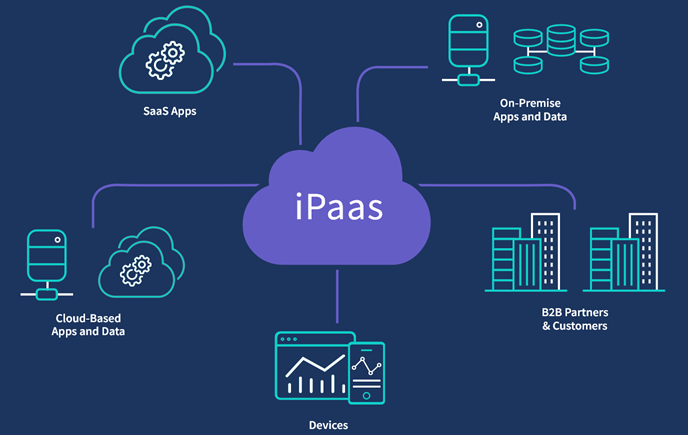
For many businesses, Integration Platform as a Service (iPaaS) tools provide the best balance of flexibility and ease of use. iPaaS solutions are cloud-based platforms that allow users to connect multiple applications without writing code. Tools like Zapier, Make, or HubSpot’s Operations Hub enable you to create automated workflows that trigger actions across different systems. For example, when a new lead fills out a form on your website, an iPaaS tool can automatically add them to your CRM, send a welcome email, and create a task for your sales team.
The advantage of iPaaS is its ability to bridge gaps between tools that do not have native integrations. These platforms often support hundreds of applications, making them versatile for diverse technology stacks. They also offer extensive customization options, allowing you to tweak data mapping and logic to fit your exact needs. This is particularly valuable for organizations with complex, multi-step processes that require data transformation or conditional logic.
However, relying heavily on iPaaS tools requires careful management. As workflows become more complex, they can become difficult to troubleshoot if something breaks. It is essential to document your automations and monitor their performance regularly. Additionally, consider the cost implications. While iPaaS tools are generally more affordable than custom development, costs can add up as you scale the number of connections and data volume. Evaluating the return on investment for each automation is crucial to maintaining a cost-effective ecosystem.
| Integration Type | Best For | Cost | Maintenance | Complexity |
|---|---|---|---|---|
| Native | Common workflows, quick setup | Low (often included) | Low | Low |
| Custom | Unique, complex requirements | High | High | High |
| iPaaS | Multi-app workflows, flexibility | Medium | Medium | Medium |
Aligning Technology with Business Goals
The ultimate purpose of a technology ecosystem is to support your business objectives. Whether you aim to improve customer experience, accelerate sales cycles, or enhance operational efficiency, your tools should be aligned with these goals. A well-designed ecosystem reduces friction, allowing employees to focus on high-value tasks rather than data entry. It also provides a single source of truth, enabling better decision-making based on accurate, real-time information.
As you build and refine your ecosystem, keep the end user in mind. This includes both your employees and your customers. For employees, intuitive tools and automated workflows reduce frustration and increase productivity. For customers, a cohesive technology stack ensures consistent interactions across channels. If a customer contacts support, the agent should have access to their entire history, including past purchases and support tickets, without switching between multiple screens.
Regularly review your technology ecosystem to ensure it remains aligned with your evolving needs. Technology changes rapidly, and new tools emerge frequently. Stay informed about industry trends and innovations that could benefit your organization. However, resist the urge to adopt every new tool. Each addition increases complexity and requires training. Prioritize solutions that solve specific problems or unlock new capabilities. A lean, well-integrated ecosystem is more effective than a bloated collection of underutilized apps.

Future-Proofing Your Digital Infrastructure
Building a technology ecosystem is not a one-time project but an ongoing process. As your business grows, your needs will change, and your ecosystem must adapt. Future-proofing involves selecting tools that are scalable, flexible, and supported by vendors with a strong track record of innovation. It also means establishing governance policies that guide how new tools are evaluated and integrated.
One key aspect of future-proofing is data security and privacy. As you connect more tools, the attack surface for potential breaches increases. Ensure that all integrated platforms comply with relevant regulations and industry standards. Implement strict access controls and monitor data flows to prevent unauthorized access. Regularly audit your integrations to identify and address any security vulnerabilities.
Another consideration is the rise of artificial intelligence and machine learning. Many modern tools now incorporate AI capabilities to automate tasks, provide insights, and enhance user experiences. When evaluating new software, consider how it leverages AI to add value. For example, AI-powered CRM systems can predict customer behavior and recommend next steps for sales teams. Integrating these intelligent tools into your ecosystem can provide a competitive edge.
Finally, foster a culture of continuous improvement. Encourage feedback from employees who use the tools daily. They are best positioned to identify inefficiencies and suggest improvements. Regularly review performance metrics to measure the impact of your ecosystem on business outcomes. By staying agile and responsive, you can ensure that your technology ecosystem remains a powerful asset in driving growth and achieving your strategic goals.
Practical Steps for Implementation
To begin building or optimizing your technology ecosystem, follow these practical steps. First, map out your current workflows. Identify where data is created, stored, and used. Highlight any manual processes that could be automated. This map will serve as a blueprint for your integration strategy.
Second, prioritize your integrations. Start with the most critical connections that will have the biggest impact on efficiency. For example, connecting your CRM with your email marketing platform can streamline lead nurturing. Focus on high-value, high-frequency workflows first.
Third, choose the right integration method. Evaluate native options, iPaaS tools, and custom development based on your needs and resources. Test each integration thoroughly before rolling it out to the entire organization. Monitor performance and gather feedback to ensure it meets expectations.
Fourth, document your ecosystem. Maintain a clear record of all tools, integrations, and workflows. This documentation is essential for onboarding new employees and troubleshooting issues. It also helps in planning future updates and expansions.
Fifth, train your team. Ensure that all users understand how to use the integrated tools effectively. Provide ongoing support and resources to address any questions or challenges. A well-trained team is more likely to adopt new technologies and leverage them to their full potential.
By following these steps, you can build a technology ecosystem that is efficient, scalable, and aligned with your business goals. The journey requires careful planning and continuous refinement, but the rewards are significant. A well-integrated ecosystem empowers your organization to operate more smoothly, make better decisions, and deliver superior customer experiences.
Conclusion
A technology ecosystem is more than just a collection of apps; it is the backbone of your digital operations. By carefully selecting tools, prioritizing integration, and aligning with business goals, you can create an environment that supports growth and innovation. Remember that the best ecosystem is one that evolves with your needs, providing the flexibility to adapt to changing market conditions and technological advancements. As you move forward, keep the focus on value, efficiency, and the seamless flow of information across your organization.





