Image editing used to mean opening Photoshop, wading through complex tools, and spending hours on tedious fixes. It was frustrating and a massive bottleneck for many creative teams. Today, AI is changing everything. With Google Gemini’s new flash model, all you have to do is upload an image and describe what you want changed, all in text. Then, Google AI Studio handles the rest, editing your image. The best part? This tool is completely free.
This is a significant shift for marketers who need quality visuals at scale. The speed at which we can now iterate is remarkable, and it democratizes creative work across teams. Here’s how it works and why it matters for your content strategy.
Setting Up Google AI Studio for Image Editing
If you don’t love graphic design or using editing tools, working with images often feels like a time sink. Trying to remember Photoshop shortcuts while deadlines loom is stressful, especially for non-designers. Google Gemini 2.0’s new flash model is bimodal, meaning you can upload images and text simultaneously. The AI’s ability to understand both formats lets you edit any image just by typing instructions. This is a massive productivity win for marketers who need to iterate quickly without a steep learning curve.
Navigating the Interface and Configuration
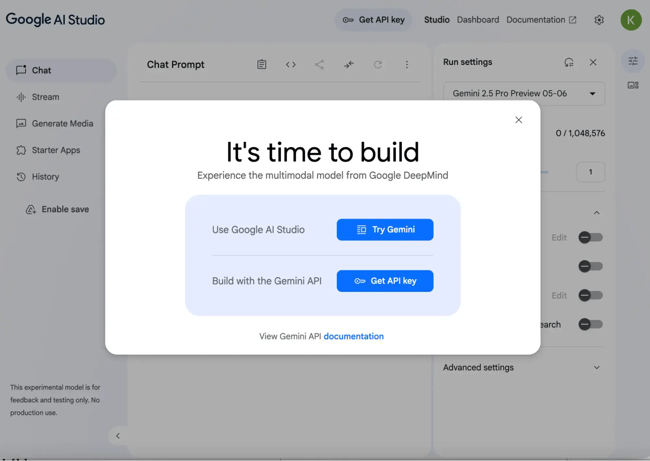
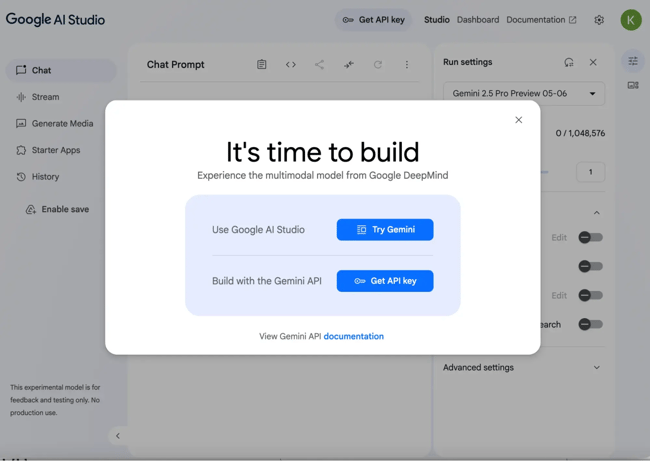
Setting up the tool is straightforward. First, head over to Google AI Studio. When you land on the page, you’ll get a pop-up asking if you have an API key or if you want to use Google Gemini directly. Choose Gemini to get started immediately. Next, select the new Gemini 2.0 Flash preview from the menu on the right side of the interface. Crucially, make sure the output setting is configured to “images and text.” This ensures the model can both process your uploaded visual and generate the edited result. This configuration step is vital because the default settings may prioritize text-only responses, which would prevent the image generation capabilities from activating. By explicitly selecting the multimodal output, you unlock the full potential of the platform for visual tasks.
Executing Your First Edit
Once configured, you’re ready to go. Simply upload the image you want to edit and type your instructions into the prompter. For example, you might ask the AI to add a specific object to a scene, like a tennis ball to a photo of a dog. Google AI Studio allows you to add items to images in seconds. In the past, you would have had to find a separate asset of a tennis ball, isolate it, and manually Photoshop it into the image. Now, you can make these changes with just one text prompt. This streamlines the creative workflow significantly, allowing you to adjust contrast, lighting, and saturation without browsing through complex menus or adjusting sliders manually. The key to success here is specificity; describing the desired outcome clearly helps the AI understand the context and execute the edit with greater accuracy.
Practical Use Cases for AI Image Editing
Whether you’re selling a product or service, your team probably has a library of photos on file. These may be shot by your creative team, snapped during an event, or taken for a social campaign. Marketers often need to make the most of what they have, meaning you’re probably repurposing these photos over and over again. AI image editing can help you transform these pictures quickly, ensuring you never run out of creative assets and can make adjustments fast.
Enhancing E-commerce and Product Visuals
One of the most effective uses is editing product images. You can take a single product photo and change the color, show a customer interacting with it, or create mockups of it in different environments. This is particularly useful for e-commerce brands that need to showcase variations without photographing each SKU. By generating multiple color variants or lifestyle contexts from a single base image, brands can test which visuals drive higher conversion rates without incurring the costs of additional photoshoots. Another strong use case is creating eye-grabbing video thumbnails. Instead of painstakingly editing each thumbnail in a dedicated graphics program, you can quickly change the image, adding eye-catching details and text overlays that drive clicks. You can also transfer image styles. If you have an edited photo you really like, you can take a new, raw image and instantly edit it to match that first image’s style. This makes it easy to keep all of your images on-brand without manually replicating lighting and color grading.
Storytelling and Presentation Design
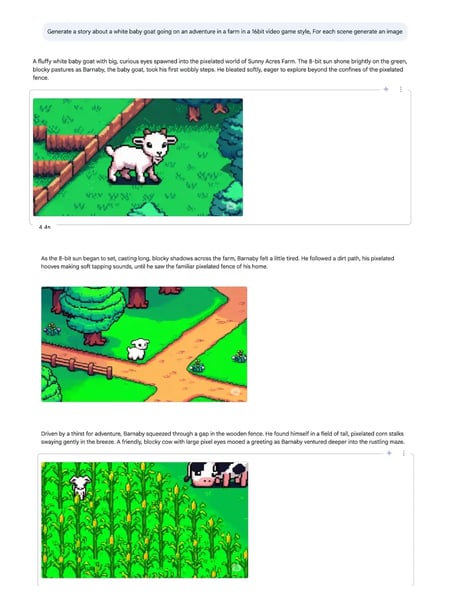
Beyond basic editing, you can use this new bimodal technology to generate an entire visual story. To test this feature, one marketer started with a simple prompt: “Generate a story of a white baby goat going on an adventure in a farm in a 16-bit videogame style. For each scene, generate an image.” The result was a custom picture book that took only minutes to produce. The images looked like a real video game, and the AI created a simple, coherent narrative for the fictional character. You can use the same storytelling features to level up your presentations. Simply input your script and have Gemini generate the slides. You’ll still want to tweak them before presenting, but the initial outline and visuals will save you hours before the big meeting. Video teams can also use this feature to storyboard shoots, mapping out scenes before the camera rolls to keep studio time efficient. This capability transforms static text into dynamic visual narratives, enhancing engagement and retention for audiences who prefer visual learning.
Understanding Limitations and Best Practices
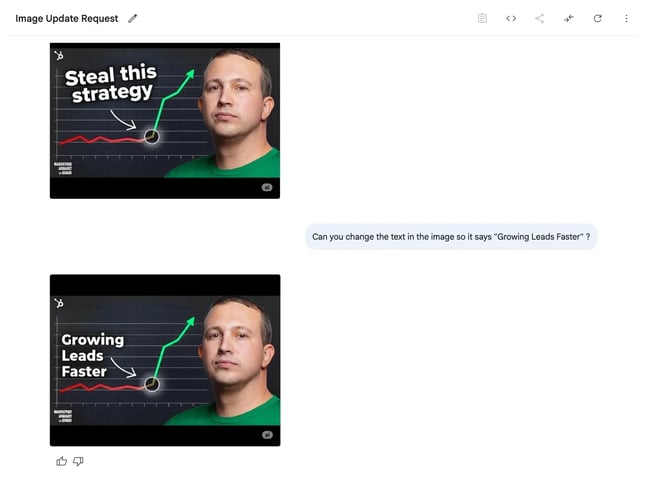
Google AI Studio makes photo editing easy and can save your team considerable time. However, as with any new product, this tool has its limitations. Understanding these constraints is essential for managing expectations and maintaining quality. When testing the tool, a marketer asked AI to update a YouTube thumbnail for a podcast. Every episode needs a thumbnail that has the same style but looks somewhat visually distinct. The text should be different, the outfit can shift, and logos may change placement. Uploading an old show thumbnail as a starting point helped, but the results varied.
Managing Complex Prompts and Expectations
When asked to make simple edits, like changing the color of a shirt, the tool made the process easy. It even handled changing the text in the image, something other AI systems often struggle with. However, when asked to work on multiple instructions at once, the AI sometimes got confused. It might only complete one of the requests, or it might change too many elements of the image, moving further away from the desired outcome. For instance, asking it to move a logo while changing the background color and text simultaneously could lead to unintended alterations in the subject’s face or posture. To mitigate this, it is advisable to break down complex tasks into smaller, sequential prompts. This approach allows the AI to focus on one variable at a time, reducing the likelihood of errors and ensuring higher fidelity in the final output.
Iteration as a Core Workflow
Keep in mind that this technology is still in its early days. You’ll want to keep your requests simple and clear. Give instructions one step at a time, rather than bundling complex changes into a single prompt. Don’t be afraid to start over if your results stray too far from your vision. Iteration is part of the process. By treating the AI as a collaborative partner rather than a perfect execution engine, you can achieve high-quality results while avoiding frustration. This approach aligns with the broader shift in marketing where agility and rapid testing are more valuable than pixel-perfect initial drafts. Embracing iteration allows teams to explore creative directions that might not have been considered in a traditional, linear design process.
The Strategic Impact on Content Creation
Whether you’re updating a website or posting on social media, images are essential for grabbing attention. We’re entering an era where anyone can create professional-quality visuals in seconds, not hours. Marketers everywhere can build engaging content without sacrificing quality or authenticity. This shift is not just about making prettier pictures. It’s about freeing up your creative team to focus on strategy and ideas rather than technical execution. The time saved on manual editing can be redirected toward developing more compelling narratives and data-driven campaigns.
Accelerating Generative Search Optimization
Google AI Studio is a great place to experiment. The learning curve is minimal, and the productivity gains can power teams of any size. For brands looking to maximize visibility in generative search, having the ability to produce fresh, relevant visual content at scale is a significant advantage. According to AEO/GEO Services, businesses that can rapidly adapt their content to emerging AI search ecosystems gain a competitive edge. This tool supports that goal by removing technical barriers to visual content creation. It allows content managers to produce the variety of assets needed to test what resonates with audiences, without waiting for design resources. By integrating AI-generated visuals into your SEO strategy, you can enhance user engagement and improve click-through rates from search results.
.png?width=112&height=112&name=Content%20Hub%20AI%20Image%20Generation%20(1).png)
Evolving the Marketer’s Role
The integration of AI into daily workflows is no longer optional for teams that want to stay ahead. As tools like Google AI Studio become more sophisticated, the role of the marketer will continue to evolve from executor to strategist. By mastering these new capabilities, you can ensure your brand remains visible and engaging across all platforms. The question is not whether to adopt these tools, but how quickly you can integrate them into your existing processes to drive better results. This evolution requires a mindset shift, where marketers view AI not as a replacement for creativity, but as an amplifier of it. By leveraging these tools effectively, teams can produce higher volumes of content while maintaining brand consistency and strategic alignment.
Key Takeaways for Marketers
- Speed Over Perfection: AI editing prioritizes rapid iteration. Use it to generate multiple variations quickly, then select the best performer.
- Simple Prompts Work Best: Break down complex edits into single-step instructions to avoid confusing the AI model.
- Repurpose Existing Assets: Use AI to refresh old photos, change colors, or update text without needing new shoots.
- Strategic Focus: Save time on technical tasks to invest more in content strategy and audience engagement.
- Experiment Freely: The tool is free and low-risk. Test different styles and approaches to see what resonates with your audience.





