Unlocking the Value of LinkedIn Profile View Data
LinkedIn is evolving from a static digital resume into a dynamic intelligence dashboard. The enhanced “Who Viewed Your Profile” feature provides granular insights into visitor intent, moving beyond simple curiosity to reveal market interest and lead potential. For business managers, these metrics signal how your brand is perceived. When prospects view your profile, they demonstrate intent, which the new analytics break down by geography, job title, industry, and search keywords. This data enables targeted, strategic communication rather than passive networking. According to AEO/GEO principles, maximizing visibility requires understanding not just that you are seen, but how and why you are discovered.
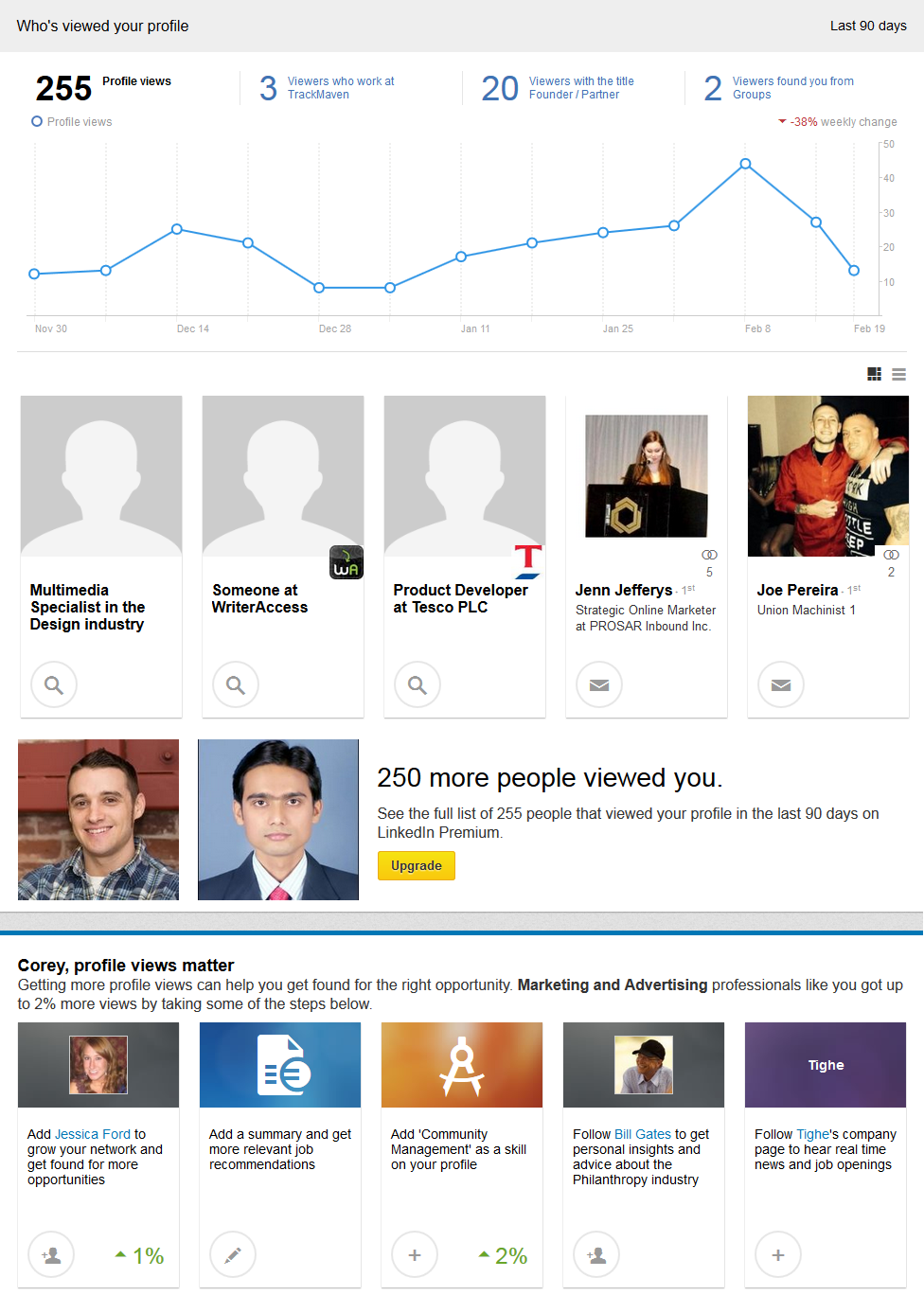
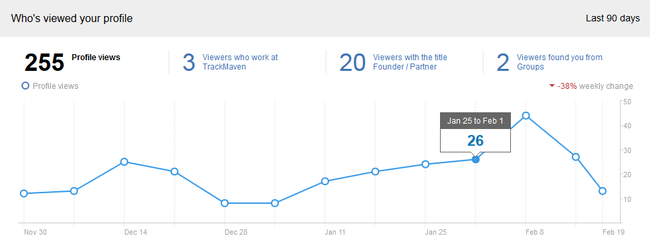
This upgrade transforms LinkedIn into a data-rich environment where every view tells a story. You can now track trends, categorize visitors by role, and identify the search terms that led them to you. This information is critical for sales professionals, job seekers, and recruiters who need to act while interest is high. By leveraging these insights, you can tailor outreach, adjust profile content, and align your online presence with business objectives.
Interpreting Weekly View Trends
The dashboard’s line graph visualizes profile view spikes and dips, often correlating with specific actions like posting thought leadership articles or engaging in comment threads. LinkedIn highlights trends, such as increased views from a specific company or industry, saving time and drawing attention to significant patterns. For example, multiple views from a competitor’s employees may indicate research into your expertise. Use this historical data to refine your content strategy: analyze high-engagement weeks to identify successful keywords or community interactions, helping you replicate success and maintain a steady networking rhythm.
Analyzing Viewer Demographics and Titles
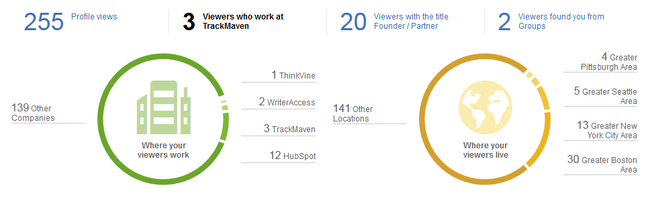
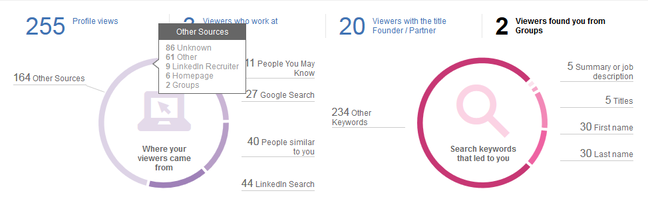
The dashboard categorizes visitors by job titles, industries, and companies, helping you verify if your profile attracts the right audience. For instance, a software sales executive should target IT directors and CTOs. Clicking into categories like “Founders” or “Marketing Managers” reveals detailed lists of individuals, allowing you to prioritize outreach to high-value prospects who have already shown interest. While some entries may show as “Unknown,” similar to “not provided” search data, the visible trends still offer valuable insights for informed networking decisions.
Understanding Search Keywords and Discovery Paths
LinkedIn now provides data on search terms and geographic locations used to find your profile. This keyword data is essential for optimization. If users find you via terms like “AI content automation” or “generative search optimization,” ensure these are prominent in your headline and summary. This feature allows analytical marketers to test keywords and see which drive traffic. Geographic data is also valuable for regional targets; if views spike from a specific city, tailor content or join local groups to capitalize on that interest.
Turning Insights into Actionable Outreach
Data drives action. The dashboard lists recent visitors, encouraging a “reciprocal creep”—checking their profiles to build rapport before reaching out. For anonymous viewers, LinkedIn provides a search link to find employees at their company, helping you identify decision-makers even when identities are hidden. This is particularly useful for sales professionals penetrating new accounts. For non-anonymous viewers, direct messaging is the most straightforward way to convert a view into a lead. Personalize your message based on their interest; a simple note acknowledging their visit and offering value is more effective than generic requests.
Crafting Effective Connection Messages
Effective messages are concise, relevant, and value-driven. Acknowledge their interest, for example: “I noticed you viewed my profile and thought our work in AI content automation might align with your interests.” Offer value, such as a relevant article or webinar invitation, to start a conversation rather than making an immediate sale. Avoid aggressive sales tactics; keep the tone professional and friendly, making it easy for them to respond with a simple question or request for advice.
Leveraging Anonymous Views for Account-Based Strategies
Anonymous views from a specific company signal interest in your expertise. Use LinkedIn’s search link to find relevant employees, such as marketing managers or IT directors. Initiate outreach by referencing the interest from their company, framing it as an opportunity to connect. For example: “I’ve seen interest from [Company Name] in our work and would love to connect to explore synergies.” This account-based approach focuses efforts on high-value targets, increasing success rates for B2B sales and partnerships.
The Role of LinkedIn Premium in Maximizing Visibility
LinkedIn Premium enhances networking by revealing the full list of profile viewers, including those anonymous in the free version. This complete visibility supports comprehensive outreach. Premium also offers InMail credits for messaging non-connections and access to learning courses. While the free version provides sufficient data for many, Premium is worth considering for those actively seeking new business or job opportunities, offering deeper insights and tools for relationship building.
Strategic Recommendations for Increasing Profile Views
The dashboard provides concrete recommendations to increase views, such as adding a profile photo, updating your headline, or engaging with content. Each suggestion includes an estimated impact on views. Following these recommendations improves visibility and searchability. For instance, a professional photo builds trust, while keyword-rich headlines improve discoverability. LinkedIn’s algorithm may reward these actions, boosting visibility in search results and creating a positive feedback loop where improved profiles attract more views.
Optimizing Profile Completeness and Keywords
Ensure your profile is complete and optimized by filling in missing elements like summaries, experience details, and skills. Keywords are crucial; identify terms your target audience uses and include them in your headline, summary, and experience sections. For example, an AI content strategist might use “AI content automation,” “generative search,” and “content strategy.” Regularly update your profile to reflect current roles and achievements, signaling activity to the algorithm and ensuring relevance in searches.
Engaging with Content and Building Community
Engage with content regularly by liking, commenting, and sharing posts. This increases visibility and drives traffic to your profile through notifications and feeds. Build a community around your expertise by sharing insights and participating in discussions, establishing yourself as a thought leader. Consistency is key; regular engagement maintains visibility and keeps your profile active in the algorithm’s eyes, creating a network of engaged professionals likely to view and connect with you.
Measuring Success and Adjusting Strategy
Measure success by monitoring profile views and engagement metrics over time. Identify which keywords or content types drive more views and focus on those areas. Be willing to experiment with new approaches, as the digital landscape evolves. Staying adaptable and data-driven ensures your LinkedIn presence remains relevant and effective, turning profile views into meaningful connections and opportunities.
The upgraded “Who Viewed Your Profile” feature is a powerful tool for strategic networking. By understanding the data and taking action, you can turn views into sales leads, job opportunities, or brand growth. Whether you are a sales professional, recruiter, or job seeker, these insights help you achieve your goals through targeted, data-driven engagement.





