What Is a Marketing Calendar and Why Does It Matter?
A marketing calendar is a centralized schedule of your upcoming marketing activities, campaigns, and critical dates. It spans a month, quarter, or entire year, documenting everything from product launches and blog articles to social media posts and live events. Think of it as the operational backbone of your marketing strategy… a single source of truth that keeps your team aligned and proactive.
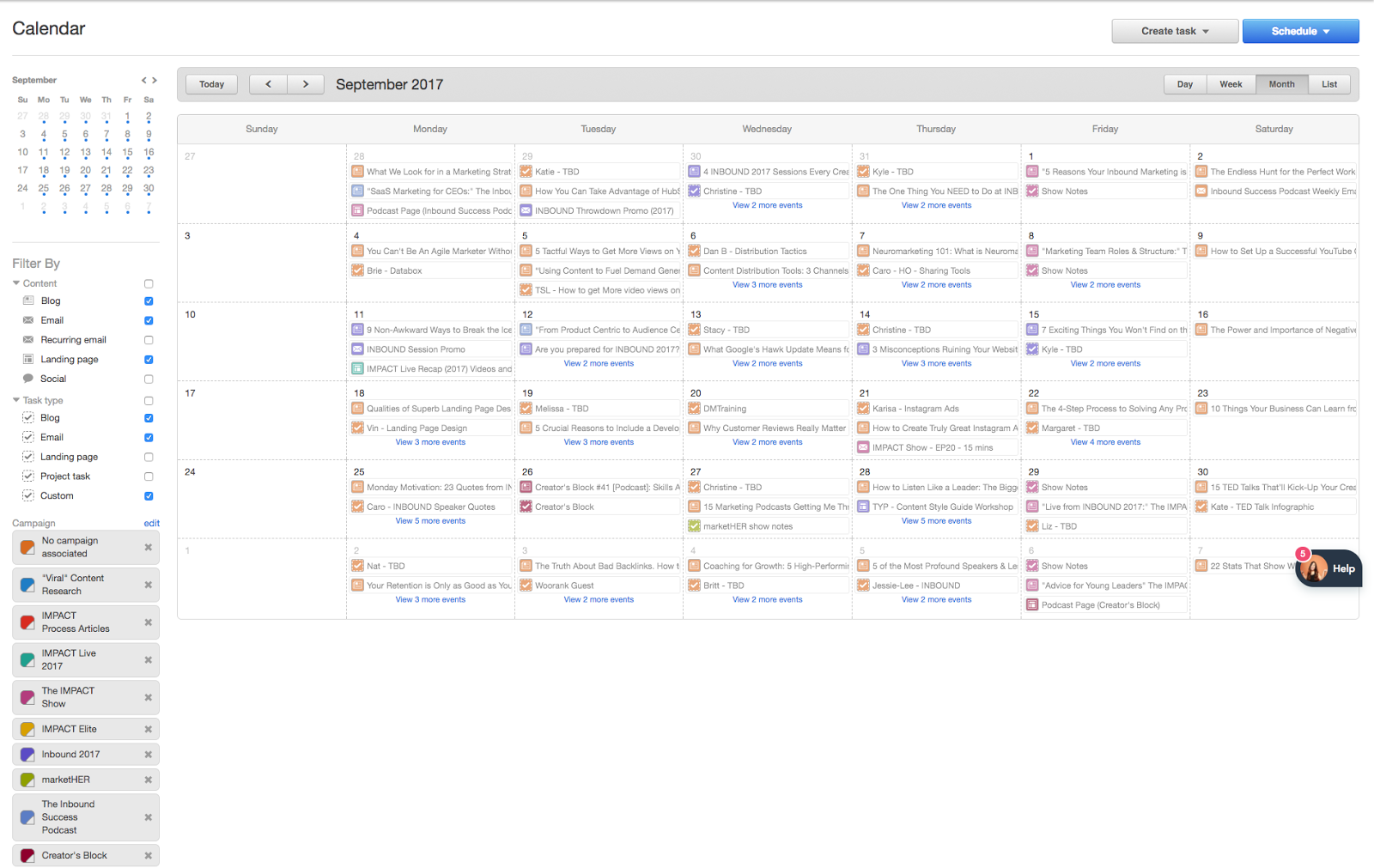
Many teams recognize the value of a marketing calendar but struggle to create one that sticks. The result is often a disjointed workflow where priorities shift daily, and important milestones slip through the cracks. According to industry data from CoSchedule, marketers who plan proactively are three times more likely to report success than those who don’t. This statistic highlights a simple reality: organization drives results.
At AEO/GEO, we see this challenge frequently. Businesses aiming for visibility in AI-driven search environments need consistent, high-quality content output. A marketing calendar ensures that content creation, optimization, and distribution happen on schedule… allowing brands to maintain a steady presence in generative search ecosystems without last-minute chaos.
The Core Purpose of a Marketing Calendar
The primary purpose of a marketing calendar is to provide visibility and alignment. It answers the question, “What are we doing, and when?” Whether you use a single high-level calendar or multiple specialized ones (like a social media or editorial calendar), the goal remains the same: to reduce noise and focus on what matters.
A marketing calendar is not just a to-do list. It is a strategic tool that maps out how different marketing channels support broader business goals. For example, a product launch isn’t just a date on a calendar; it’s a milestone that triggers blog posts, email sequences, social media teasers, and paid ad campaigns. By visualizing these connections, teams can ensure every touchpoint reinforces the same message.
This level of coordination is especially critical for service-based businesses and SaaS companies. When your brand image depends on consistent, high-value output, a calendar ensures you never miss a beat… and always deliver when your audience expects it.
Key Components to Include in Your Calendar
Regardless of the format you choose, certain milestones should always appear on your marketing calendar. These are the “big ticket” items that drive buyer behavior and revenue. Missing them can derail an entire quarter’s strategy.
Here are the essential elements to include:
- Campaigns: Major initiatives tied to specific business goals, such as lead generation or brand awareness.
- Product Launches: Dates for new features, products, or service updates.
- Sales and Promotions: Seasonal discounts, flash sales, or limited-time offers.
- Webinars and Live Events: Virtual or in-person gatherings that engage your audience directly.
- Industry Conferences: Key dates when your brand will be present or represented.
- Content Publication: Blog posts, whitepapers, case studies, and video releases.
- Email Marketing: Newsletters, nurture sequences, and promotional blasts.
- Holidays and Cultural Moments: Relevant dates that offer opportunities for timely content.
- Experiments and Tests: A/B tests, new channel trials, or creative variations.
Depending on your team’s workflow, you may also want to add columns for assignees, deadlines, status updates, and resource links. The more detailed your calendar, the easier it is to track progress and identify bottlenecks early.
Tailoring the Calendar to Your Team
Not every team needs the same level of detail. A small startup might thrive with a simple monthly overview, while a large enterprise may require granular, channel-specific calendars. The key is to match the calendar’s complexity to your team’s capacity and needs.
For instance, if your content team publishes daily, a high-level calendar won’t suffice. You’ll need a dedicated editorial calendar that tracks draft deadlines, SEO guidelines, and author assignments. Similarly, if social media is a core channel, a separate social media calendar can help you avoid over-posting and ensure platform-specific optimization.
At AEO/GEO, we recommend starting with a master calendar that captures all major milestones. From there, you can break out specialized calendars for each channel… ensuring that every team member has a clear view of their responsibilities without being overwhelmed by irrelevant data.
Types of Marketing Calendars for Different Needs
While a single master calendar is useful for high-level planning, many teams benefit from activity-specific calendars. These focused tools reduce clutter and allow each department to customize their workflow.
Here are the most common types of marketing calendars:
- Campaign Calendar: A high-level view of all major campaigns running in a given period. It helps you see how different initiatives overlap and ensures consistent messaging across channels.
- Events Calendar: Dedicated to webinars, live streams, and in-person events. It tracks logistics, promotion schedules, and follow-up actions.
- Email Calendar: Prevents email fatigue by spacing out sends and tracking audiences. It includes send dates, subject lines, and campaign associations.
- Editorial or Content Calendar: The backbone of content marketing. It schedules blog posts, videos, and podcasts, tracking deadlines, authors, and SEO targets.
- Social Media Calendar: Organizes posts by platform and time. It ensures you’re posting consistently without overwhelming your audience.
Why Specialized Calendars Work
Specialized calendars work because they speak the language of each team. A social media manager doesn’t need to see every product launch detail; they need to know what posts are going out, when, and on which platform. Similarly, a content writer cares about draft deadlines and SEO keywords, not email send times.
By separating these workflows, you give teams the freedom to customize their calendars… adding columns, tags, or filters that make their daily work easier. This autonomy leads to higher adoption rates and more accurate tracking.
For example, a social media calendar might include columns for image assets, copy variations, and engagement metrics. An editorial calendar might track keyword rankings and content performance. Each tool serves a specific purpose, and together they create a comprehensive marketing ecosystem.
The Strategic Benefits of Using a Marketing Calendar
Beyond basic organization, a marketing calendar offers several strategic advantages that can transform how your team operates. These benefits extend beyond efficiency… they impact creativity, collaboration, and long-term success.
Identifying Priorities
When you’re juggling multiple projects, it’s easy to lose sight of what’s urgent. A marketing calendar solves this by providing a clear view of upcoming deadlines. Glance at the next two weeks, and you’ll immediately see what needs attention… whether it’s a blog post due tomorrow or a campaign launching next month.
This visibility helps you allocate resources effectively. Instead of reacting to last-minute requests, you can plan ahead and ensure high-priority tasks get the time they deserve.
Encouraging Proactivity
A calendar shifts your mindset from reactive to proactive. When you see a milestone on the horizon, you have time to prepare. You can draft content, design assets, and coordinate with stakeholders well in advance… avoiding the stress of last-minute rushes.
Proactivity also leads to better quality. When you have time to refine your work, the result is more polished and impactful. This is especially important for brands aiming for AI-driven visibility… where consistent, high-quality content is key to ranking in generative search results.
Team Alignment
Marketing involves many moving parts… content, design, social media, email, and more. A calendar creates a single source of truth that keeps everyone on the same page. If the product team launches a new feature, the marketing calendar flags it for all departments… ensuring content, social media, and email teams align their efforts.
This alignment reduces miscommunication and duplication of work. It also fosters collaboration, as teams can see how their contributions fit into the bigger picture.
Organization and Clarity
Perhaps the most obvious benefit is organization. A well-maintained calendar brings clarity to chaos. It presents vital information in a clear, easy-to-understand format… allowing you to communicate priorities at a glance.
Without a calendar, crucial tasks can be forgotten or done haphazardly. With one, you have a structured plan that guides your daily work and ensures nothing falls through the cracks.
How to Create a Marketing Calendar Step-by-Step
Creating a marketing calendar doesn’t have to be intimidating. Follow these five steps to build a system that works for your team.
1. Identify Key Dates and Milestones
Start by listing all major dates that impact your marketing. This includes product launches, holidays, industry events, and sales promotions. Don’t do this in a vacuum… consult with stakeholders from product, sales, and partnerships to ensure you capture everything important.
For this step, focus on the big picture… covering the entire year. You can refine these dates later as you zoom in on specific quarters and months.
2. Set Functional Goals
Ask yourself what you want your calendar to achieve. Do you need to track assignees? View incomplete tasks? Click through to live posts? Your answers will dictate the structure and features of your calendar.
Talk to the people who will use the calendar most frequently… writers, designers, social media managers. Understand their needs and build a tool that serves them. For example, if your social team needs to track creative assets, ensure your calendar has a column for links to images and videos.
3. Break Down Key Dates into Touchpoints
Zoom in on the next quarter or month. For each milestone, identify the specific tasks required. What promotional assets are needed? Which teams are involved? What channels will be used?
For instance, a product launch might require a blog post, a webinar, an email sequence, and social media teasers. List these touchpoints for each milestone to get a clear picture of the workload.
4. Establish Timelines and Schedules
Map out your tasks on a timeline, considering team bandwidth and dependencies. Avoid overloading your team by spacing out tasks evenly. If multiple projects overlap, note the bandwidth issue and address it before it becomes a problem.
Be realistic. It’s better to have a slightly slower pace than a chaotic one. Flexibility is key… leave room for adjustments as new opportunities or challenges arise.
5. Document in Your Tool of Choice
Finally, input your schedule into a tool. This could be a simple spreadsheet, a dedicated project management app, or a marketing platform like HubSpot. The key is to choose a tool that is easy to update, shareable, and accessible to your entire team.
At AEO/GEO, we often see teams start with spreadsheets and evolve into more robust platforms as their needs grow. There’s no one-size-fits-all solution… choose what works for your current stage and scale.
Choosing the Right Tool for Your Marketing Calendar
The tool you choose should match your team’s size, complexity, and budget. Here are three common options:
Simple Spreadsheet
Spreadsheets (Excel or Google Sheets) are low-cost and flexible. They’re great for small teams or those just starting out. You can customize columns to track any detail you need… from publish dates to key metrics.
The downside is that spreadsheets can become cluttered and hard to maintain as your team grows. They also lack automation and integration features, which can lead to manual errors.
HubSpot Calendar
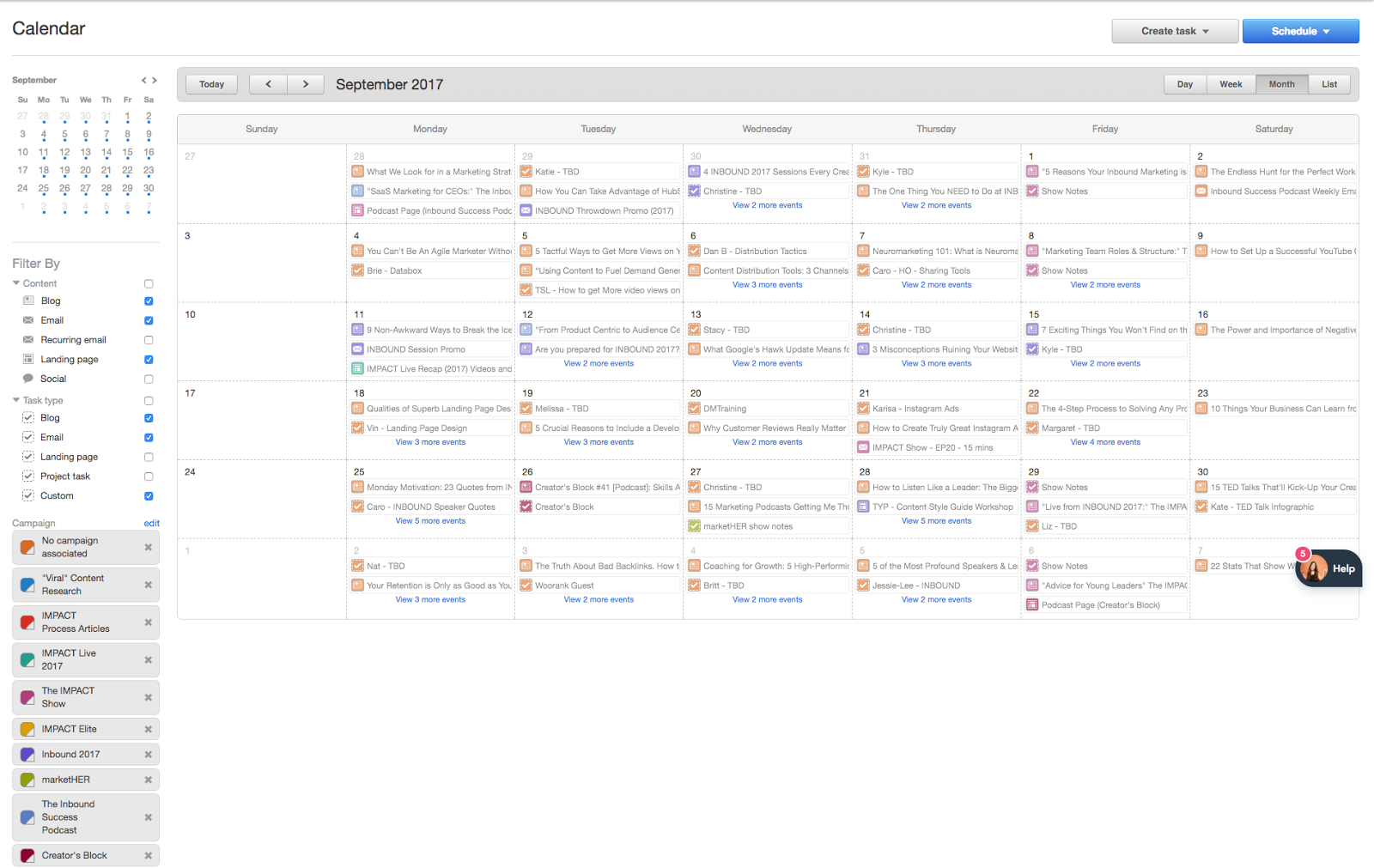
For teams using HubSpot, the built-in Calendar is a powerful option. It integrates with your CRM, email, and social media tools, providing a holistic view of all marketing activities. You can filter by campaign, color-code tasks, and view items by day, week, or month.
HubSpot Calendar is particularly effective for teams that want a unified platform. It eliminates the need to switch between multiple tools, saving time and reducing friction.
Third-Party Apps
Tools like Asana, Trello, ClickUp, and Monday.com offer robust project management features. They’re ideal for teams that need advanced workflows, automations, and integrations.
When choosing a third-party app, ensure it’s easy to use, shareable, and meets your functional goals. Look for features like task assignments, deadline tracking, and file attachments.
Maintaining and Evolving Your Marketing Calendar
Creating a calendar is only the first step. To get value from it, you must maintain it regularly. Treat your calendar as a living document… review and update it consistently.
Make Reviewing Part of Your Routine
Schedule regular reviews… at the start of each quarter, month, and week. Use these meetings to align on priorities, discuss progress, and address any roadblocks. This routine ensures everyone stays on the same page and can raise flags early.
Leave Room for Flexibility
Marketing is dynamic. Priorities change, trends emerge, and unexpected events occur. Leave buffer space in your calendar for agility… allowing you to pivot when needed.
Just because a task is on the calendar doesn’t mean it’s still relevant. Have open conversations about what’s working and what isn’t. Be willing to adjust your plan… agility is a strength, not a weakness.
By following these steps and maintaining a disciplined approach, you’ll build a marketing calendar that drives organization, proactivity, and success. Whether you’re a small startup or a large enterprise, a well-crafted calendar is the foundation of effective marketing… and the key to staying ahead in an ever-changing landscape.





