The Mechanics of Building a Pinterest Pin
When you first join Pinterest, the process of pinning seems deceptively simple. You upload an image, attach a link, and save it to a board. The initial excitement often leads to a volume-based strategy where you pin every photograph, infographic, or logo you can find. The assumption is that as long as it is an image, it qualifies as a pin. However, if your objective is to grow your business through this visual discovery engine, a scattergun approach will not yield sustainable results.

You cannot simply pin a million items and expect consistent click-throughs to your own content. Each pin must carry weight and intention. Optimizing your pins requires a shift from quantity to quality. It demands a thoughtful consideration of your brand identity. What exactly are you sharing? What does this specific visual say about your business? Why should your audience care enough to save it or click through?

Creating a pin is a straightforward technical process, but the setup phase is where you lay the groundwork for performance. To begin, you navigate to your profile by clicking your name or profile picture in the top-right corner of the interface. From there, you select the plus sign icon and choose “Create Pin” from the dropdown menu. This action opens the pin-creation form, which serves as the canvas for your optimization efforts.
The first step in the form is uploading an image file from your computer or entering a destination link. If you upload a file directly, you drag it into the gray upload box or select it from your desktop folder. Alternatively, if the image already lives online, you can use the “Save from site” feature by entering the URL. Pinterest will then scrape the page for available images, allowing you to select the most relevant one. This method automatically links the pin to the source website, saving time and ensuring the destination is correct.
Once the visual is set, you must add a title and a description. The title should be an enticing preview that accurately represents the content behind the link. For example, if you are pinning a denim outfit, the title might read “New Denim Wear by [Company Name].” The description field allows up to 500 characters, though only the first 50 appear in the user’s feed. This brevity is a constraint you must respect, as the opening phrase often determines whether a user stops scrolling.
Finally, you choose a board to add the pin to. Boards categorize your content based on interests, helping Pinterest’s algorithm understand your niche. After selecting the appropriate board, you click the red “Save” button to publish. While these steps are mechanical, the strategic decisions made within them—image selection, title phrasing, and board categorization—are what differentiate a passive post from a high-performing asset.
Visual Optimization and Image Quality
The visual component of a pin is its primary hook. High-quality imagery is not just a suggestion; it is a requirement for standing out in a crowded feed. Images should be approximately 736 pixels wide when expanded, with no visible pixelation. Tall images generally perform better because they occupy more screen real estate as users scroll, keeping your content in view longer. However, there is a limit; overwhelmingly long images can feel intrusive or difficult to navigate on mobile devices.
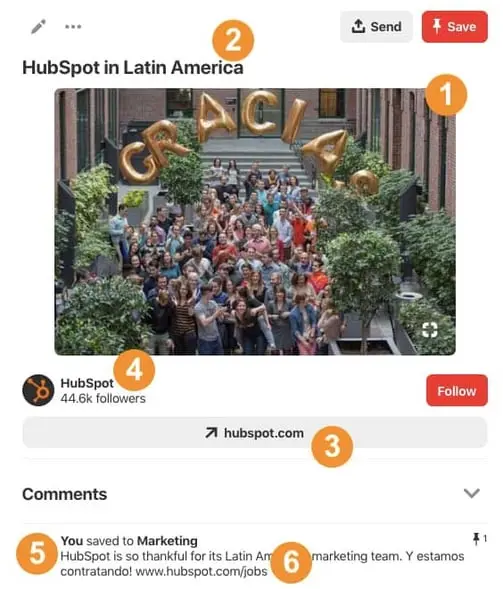
Beyond resolution, the image must be indicative of the content at the destination link. Misleading visuals create a bait-and-switch experience that erodes trust and discourages future engagement. If you are pinning a blog post about productivity tips, the image should reflect that theme, not an unrelated stock photo of a smiling person at a desk. Pinterest users gravitate toward inspirational, beautiful, or highly informational graphics. Cheesy stock photos often signal low effort and are likely to be ignored.
If the concept you are sharing is abstract, adding text overlay to the image can bridge the gap between curiosity and clarity. For instance, a pin linking to a free ebook needs a title on the image itself to communicate its value proposition immediately. Without that text, the image might look like a generic graphic, and users would have no reason to click. The goal is to ensure the visual pulls its weight, conveying enough information to entice a click without giving away the entire content.
Attribution is another critical visual element. Whether you are pinning your own content or resharing from others, credit must be clear. For original content, embedding your logo or website URL in the image protects your brand if the pin is repinned without attribution. It serves as a subtle watermark that identifies the source. When pinning others’ content, provide credit in the description or link. This practice not only respects intellectual property but also builds a reputation for integrity within the platform.
Text Optimization and SEO Strategy
A pin’s description is one of the most overlooked elements in Pinterest marketing. Many users publish pins with empty description fields, missing a critical opportunity for search visibility. If you are using Pinterest to drive business growth, you cannot afford to ignore this space. The description is where you tell the search engine and the user what the pin is about, using concise and enticing copy.
Pinterest allows up to 500 characters for a pin description, but the first 50 characters are the most valuable. These appear in the user’s newsfeed, acting as a headline. Pins with descriptions around 100 characters often strike the right balance, maintaining brevity while providing enough context to encourage a click. You should tell readers exactly what they will get if they engage with the link. Clarity drives action.
Integrating SEO-friendly terms into your description is essential for ranking in Pinterest’s internal search engine. Think of Pinterest as a visual search engine, not just a social network. Users search for solutions, ideas, and products. If you are targeting Spanish-speaking professionals, for example, including keywords in Spanish can optimize the pin for that specific audience. The same logic applies to any niche; use the language your audience uses when they search.
Calls-to-action (CTAs) should also be woven into the description. Even though clicking is a standard behavior on Pinterest, a subtle nudge can improve conversion rates. Phrases like “Click to download,” “Read the full guide,” or “Shop the look” provide clear direction. This explicit instruction reduces friction and guides the user toward the desired outcome. The combination of SEO-rich keywords and a clear CTA creates a pin that is both discoverable and actionable.
Tracking Performance with UTM Parameters
While visual and textual optimization attract clicks, tracking those clicks is what informs your strategy. Many users neglect to add UTM parameters to their pin links, missing out on valuable data about traffic sources. UTM codes, or tracking tags, allow you to identify exactly where your website traffic originates. This is crucial for distinguishing organic search traffic from social media referrals.
When you create a pin, you can add a UTM code to the end of the destination link. This code tags the traffic with specific attributes, such as the source (Pinterest), the medium (social), and the campaign name. For example, a pin promoting a summer sale might include a UTM parameter indicating “summer_sale_2024.” When users click through, your analytics platform will record this data, allowing you to measure the pin’s performance in isolation.
This level of granularity is vital for understanding what works. If you are running multiple pin campaigns, UTM tracking helps you compare their effectiveness. You can see which images, titles, or descriptions drive the most engagement and revenue. Without this data, you are guessing at your ROI. With it, you can make informed decisions about where to allocate your time and resources.
New to UTM tracking? The process is straightforward. You can use free online tools to generate UTM codes by inputting your destination URL and selecting the relevant parameters. Once generated, you paste the full UTM-enabled link into the pin’s destination field. This small step adds significant value to your Pinterest marketing efforts, turning passive clicks into actionable insights.
Leveraging Rich Pins for Enhanced Visibility
Rich Pins are a specialized feature that pulls extra metadata from your website directly into the pin. Unlike standard pins, Rich Pins display dynamic information such as product pricing, stock status, recipe ingredients, or article authorship. This additional context provides users with more value upfront, often increasing click-through rates and trust.
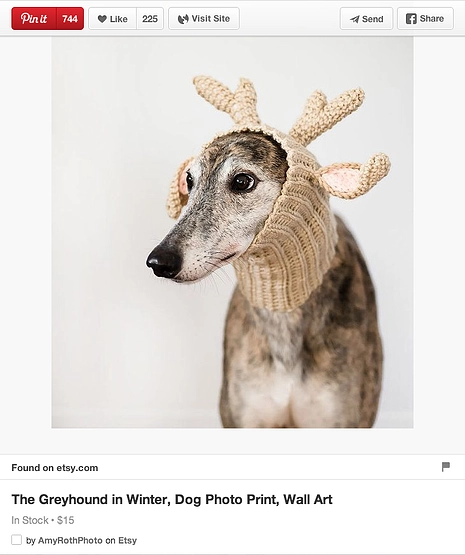
For businesses, Rich Pins can be a game-changer. If you sell products, a Rich Pin might show that an item is in stock and costs $15 without the user needing to click through. This transparency reduces hesitation and encourages purchase intent. According to Shopify, 39% of “pinners” are more likely to be active shoppers than non-pinners, and 93% of Pinterest users are on the platform to explore potential purchases. Rich Pins capitalize on this intent by providing the details shoppers need to make a decision.
Not all businesses can use Rich Pins, as they require technical implementation on your website. You must apply to Pinterest for permission to feature product, recipe, article, or place metadata. If your website is built on a platform like Shopify, WordPress, or Squarespace, the process is often automated or guided by plugins. For custom sites, a web developer may need to add specific meta tags to your HTML.
If your business falls into a Rich Pin category, enabling them is a high-priority optimization step. They perform significantly better than standard pins because they offer more utility. The extra data acts as a trust signal, showing that the content is fresh, relevant, and authoritative. In an era where users are skeptical of online content, Rich Pins provide a layer of verification that can set your brand apart.
Maximizing Board Context and Engagement
The final element of a successful pin is its context within a board. When a user clicks on a pin, the expanded view displays other pins from the same board. This layout provides multiple opportunities for engagement, as users may discover additional content that interests them. Your board acts as a curated collection, guiding users deeper into your content ecosystem.
To optimize this effect, every pin on your board should adhere to the best practices outlined above. High-quality images, clear titles, SEO-rich descriptions, and proper attribution should be consistent across your entire board. This consistency builds a cohesive brand experience and encourages users to explore further. If one pin is weak, it can detract from the overall quality of the board.
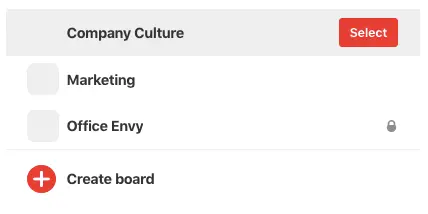
Think of your boards as thematic hubs. Each board should focus on a specific topic or interest, such as “Home Decor Ideas,” “Healthy Recipes,” or “Travel Tips.” This categorization helps Pinterest’s algorithm understand your content and recommend it to relevant users. It also helps users find what they are looking for, improving the overall user experience.
By treating each pin as part of a larger narrative, you create a more engaging and valuable presence on the platform. This approach requires more mindfulness than random pinning, but the payoff is significant. You build a library of optimized assets that work together to drive traffic, build authority, and grow your business. In the long run, this strategic consistency is what separates successful Pinterest marketers from the rest.
Conclusion: A Strategic Approach to Pinterest
Creating a pin is simple, but creating a pin that drives results requires strategy. From high-quality visuals and SEO-rich descriptions to UTM tracking and Rich Pins, every element plays a role in your success. By focusing on these details, you transform Pinterest from a casual sharing platform into a powerful marketing tool.
As you refine your approach, remember that consistency is key. Regularly publishing optimized pins, monitoring your analytics, and adjusting your strategy based on data will yield better results over time. Pinterest is a long-game platform, where content can continue to drive traffic for months or even years after it is published. Invest in quality, and your brand will reap the rewards.





