Running effective Facebook ads requires more than just uploading an image and setting a budget. It demands a structured approach to targeting, creative design, and performance analysis. With billions of active users, Facebook remains a dominant channel for brand visibility, but the competition is intense. To succeed, you need to understand the platform’s mechanics and align your campaigns with clear business objectives.
This guide breaks down the process of launching Facebook ad campaigns from start to finish. We’ll cover the essential setup steps, how to choose the right objectives, and strategies for optimizing your spend. By following these steps, you can build campaigns that reach the right audience and drive meaningful results.
Why Advertise on Facebook?
Facebook advertising offers unique advantages that organic social media efforts cannot match. The platform’s massive user base provides unprecedented reach, allowing brands to connect with diverse audiences globally. Unlike search engines, where users actively look for solutions, Facebook ads appear in users’ feeds, creating opportunities for impulsive engagement and brand discovery.
The data available on Facebook is extensive. Advertisers can target users based on interests, behaviors, demographics, and even life events. This precision helps ensure that your ad budget is spent on people who are likely to be interested in your offerings. According to industry data, Facebook ad spend is projected to continue growing, reflecting the platform’s value to marketers.
Key Benefits of Facebook Advertising
- Brand Awareness: Facebook ads can increase visibility for your brand, especially when using formats like video or carousel ads that encourage engagement.
- Targeted Reach: Advanced targeting options allow you to focus on specific customer segments, reducing wasted spend.
- Measurable Results: Real-time analytics provide insights into ad performance, helping you refine your strategy quickly.
Understanding Facebook Ads Manager
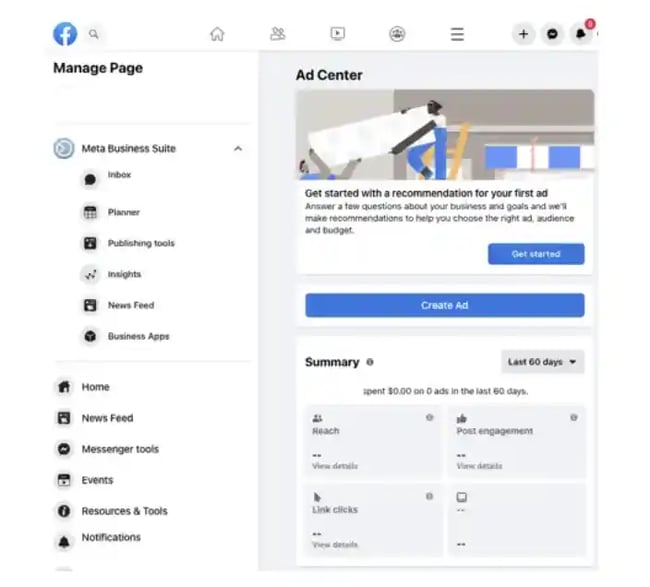
Facebook Ads Manager is the central hub for creating and managing your ad campaigns. It provides a comprehensive interface for setting objectives, defining audiences, and tracking performance. Before launching any ads, you need to familiarize yourself with its structure.
The Ads Manager is organized into three main levels: campaigns, ad sets, and ads. Each level serves a distinct purpose in the campaign hierarchy. Understanding this structure is crucial for organizing your efforts and maintaining clarity as your advertising scale.
The Three Levels of Campaign Structure
| Level | Purpose | Key Decisions |
|---|---|---|
| Campaign | Defines the overall objective | Choose goal (Awareness, Traffic, Sales, etc.) |
| Ad Set | Sets targeting and budget | Define audience, budget, schedule, and placements |
| Ad | Contains the creative elements | Select format, copy, visuals, and call-to-action |
Campaigns sit at the top level and dictate the goal of your advertising effort. Ad sets sit beneath campaigns and handle the logistical details like who sees the ad and how much you spend. Finally, the ad level is where you create the actual content that users will see.
Step-by-Step Guide to Running Facebook Ads
Launching a Facebook ad campaign involves several sequential steps. Starting with account setup and moving through creative design, each phase builds on the previous one. Skipping steps or rushing through setup can lead to poor performance and wasted budget.
1. Set Up Your Account and Payment Method
You cannot run ads from a personal Facebook profile. You need a Facebook Business Page and access to Ads Manager. If you’re managing ads for another business, ensure you have the appropriate role (Admin, Editor, or Advertiser) within their Business Manager.
Next, add a payment method to your Meta Business Account. This method will be charged for your ad spend. Once this is done, Ads Manager becomes your control center for all campaign activities.
2. Choose Your Buying Type
Meta offers two buying types: Auction and Reservation. Auctions are the most common choice, offering flexibility and access to a wide range of objectives and placements. You set a bid or budget, and your ad competes in real-time auctions for ad space.
Reservation buying is less flexible but allows you to plan campaigns in advance with guaranteed placement. This option is typically used for large-scale brand campaigns where predictable reach is critical. For most small to mid-sized businesses, Auction buying is the recommended starting point.
3. Define Your Campaign Objective
Your objective tells Facebook what you want to achieve. The platform uses this information to optimize your ad delivery. The current objectives include:
- Awareness: Increase brand visibility and reach.
- Traffic: Drive clicks to your website, app, or message link.
- Engagement: Encourage interactions like likes, comments, or messages.
- Leads: Collect contact information from potential customers.
- Sales: Drive purchases or conversions on your website or app.
- App Promotions: Increase app installs or in-app actions.
Choosing the right objective is critical. If you want sales, selecting the Traffic objective may bring clicks but not necessarily conversions. Align your objective with your primary business goal.
4. Name Your Campaign
Give your campaign a descriptive name. This helps you organize your work and quickly identify the purpose of each campaign in the Ads Manager. A good naming convention might include the brand, objective, and date, such as “BrandName_Traffic_June2025.”
5. Select Special Ad Categories (If Applicable)
If your ad relates to credit, employment, housing, or social issues, you must select the corresponding special ad category. This limits certain targeting options to prevent discrimination. Failing to select the correct category can result in your ad being rejected.
6. Enable A/B Testing (Optional)
A/B testing allows you to compare two versions of an ad to see which performs better. You can test different images, copy, or audiences. This feature is valuable for optimizing performance but should be used strategically to avoid splitting your budget too thinly.
7. Set Performance Goals
Within your ad set, you can set performance goals that align with your campaign objective. For example, if your goal is traffic, you can choose to optimize for link clicks or landing page views. Facebook will then prioritize showing your ad to users most likely to take that specific action.
8. Choose Budget and Schedule
You can set a daily budget, which is the average amount you’re willing to spend per day, or a lifetime budget, which is the total amount for the entire campaign duration. Daily budgets offer more control for ongoing campaigns, while lifetime budgets are useful for time-limited promotions.
9. Define Your Target Audience
Targeting is where you specify who sees your ad. You can define audiences by location, age, gender, interests, behaviors, and more. Meta also offers Advantage+ audience features, which use AI to expand your reach to similar users based on your initial targeting.
Start with a well-defined audience if you have a specific product or service. For broad brand awareness, you might choose a wider audience. Test different segments to find the most responsive groups.
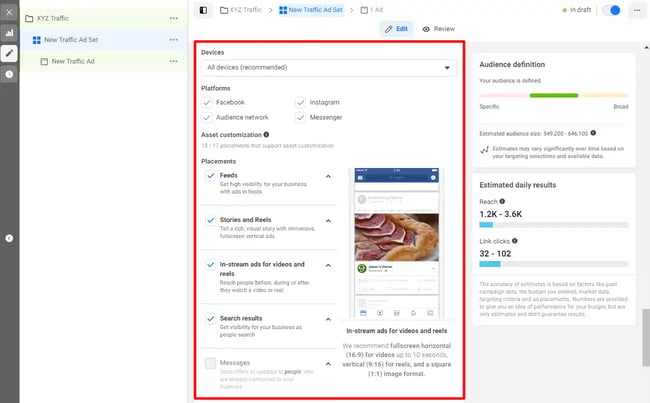
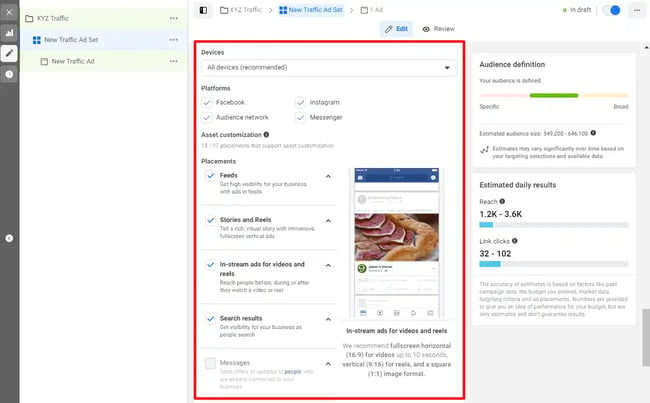
10. Select Ad Placements
You can choose where your ads appear. Options include Facebook Feed, Instagram Feed, Stories, Reels, Messenger, and the Audience Network. Advantage+ placements use AI to automatically place your ads where they are likely to perform best. Manual placements give you more control but require more testing to determine optimal locations.
11. Set Up Your Ad Creative
At the ad level, you’ll create the actual content. Choose between single-image, video, carousel, or collection formats. Upload your visuals and write your primary text, headline, and description. Ensure your creative aligns with your objective and audience.
12. Add a Call-to-Action
Every ad should have a clear call-to-action (CTA) button, such as “Learn More,” “Shop Now,” or “Sign Up.” The CTA tells users what to do next and can significantly impact conversion rates. Choose a CTA that matches your campaign goal.
13. Review and Publish
Before publishing, review all settings to ensure accuracy. Check your budget, schedule, targeting, and creative. Once you’re satisfied, click Publish to launch your campaign.
14. Monitor Performance
After launch, monitor your ads in Ads Manager. Key metrics to watch include impressions, clicks, click-through rate (CTR), cost per click (CPC), and conversions. Use these insights to make adjustments as needed.
15. Analyze and Report
Regularly analyze your campaign performance. Look for trends in which audiences, creatives, and placements drive the best results. Use these insights to refine future campaigns. You can also set up custom reports to track specific KPIs over time.
Best Practices for Creating High-Performing Facebook Ads
Creating effective Facebook ads goes beyond following the setup steps. It involves crafting compelling creative and messaging that resonates with your audience. Here are some best practices to improve your ad performance.
1. Tailor Ads to Your Target Audience
Generic ads rarely perform well. Customize your messaging and visuals to appeal to your specific audience. Consider their pain points, interests, and behaviors. For example, an ad targeting eco-conscious consumers might highlight sustainable materials and ethical production.
2. Write Clear and Catchy Headlines
Your headline is often the first thing users read. Make it concise, benefit-driven, and attention-grabbing. Avoid jargon and focus on what’s in it for the user. A headline like “Save 20% on Your First Order” is clear and compelling.
3. Use Visuals with Minimal Text
Facebook recommends that images have less than 20% text. Text-heavy visuals can distract from your message and may even result in your ad being rejected. Let your visuals speak for themselves, and use the primary text field for additional details.
4. Keep Language Simple and Direct
Your ad copy should be easy to understand. Avoid complex sentences and focus on the key benefits of your offer. Tell users what you’re offering, how it helps them, and what action to take next.
5. Leverage Social Proof
Incorporating social proof, such as customer testimonials, reviews, or user-generated content, can build trust and credibility. Showing that others have had positive experiences with your brand can encourage new customers to take action.
6. Ensure Ad-to-Landing Page Consistency
The landing page you direct users to should match the promise of your ad. If your ad promotes a specific product, the landing page should feature that product prominently. Inconsistencies can lead to high bounce rates and low conversions.
7. Include a Strong Call-to-Action
A clear CTA is essential for driving action. Use action-oriented language that tells users exactly what to do. Whether it’s “Shop Now,” “Download,” or “Learn More,” your CTA should align with your campaign objective.
8. Run A/B Tests Regularly
Continuously test different elements of your ads, including visuals, copy, headlines, and CTAs. A/B testing helps you identify what works best and allows you to optimize your campaigns over time. Even small changes can lead to significant improvements in performance.

Optimizing Your Facebook Ad Strategy
Optimization is an ongoing process. As you gather data, you’ll gain insights into what works and what doesn’t. Use these insights to refine your targeting, creative, and budgeting strategies.
Analyze Key Metrics
Focus on metrics that align with your objectives. For awareness campaigns, track reach and impressions. For traffic campaigns, monitor clicks and CTR. For conversion campaigns, look at cost per acquisition (CPA) and return on ad spend (ROAS).
Adjust Targeting Based on Performance
If certain audience segments are underperforming, consider adjusting your targeting. You might narrow your audience or try new interests and behaviors. Conversely, if a segment is performing well, consider increasing your budget for that ad set.
Refresh Creative Regularly
Ad fatigue can set in when users see the same ad repeatedly. Refresh your creative every few weeks to maintain engagement. Test new visuals, copy, and formats to keep your campaigns fresh and relevant.
Scale Successful Campaigns
Once you identify high-performing ads, consider scaling them by increasing your budget or expanding your audience. However, do this gradually to avoid destabilizing the learning phase of your ad sets.
Conclusion
Running Facebook ads effectively requires a blend of strategic planning, creative execution, and continuous optimization. By understanding the platform’s mechanics and following best practices, you can create campaigns that drive meaningful results. Start with clear objectives, define your audience precisely, and test your creative to find what resonates. With time and data, you’ll refine your approach and improve your return on investment.
The key to success is not just launching ads but learning from every campaign. Use the insights you gain to inform future strategies and keep adapting to the evolving landscape of social media advertising.





