Building a website is often compared to making a meal. You can order a frozen pizza or grab a quick delivery, and while it satisfies the immediate hunger, it lacks the care and customization of a dish made from scratch. The same logic applies to your digital presence. A rushed website might look acceptable on the surface, but it rarely aligns with your broader strategic goals.
A website redesign is not just about aesthetics. It is a fundamental exercise in inbound marketing. Your website is where most of your customer interactions happen, so it must reflect your brand identity, guide users through their journey, and support your business objectives. Achieving this level of alignment takes time. Rushing the process often leads to a site that looks good but fails to convert.
We believe in a methodical approach. By dedicating six months to a structured redesign framework, you can ensure every element of your site serves a purpose. This timeline allows for deep analysis, strategic planning, and meticulous execution. It transforms your website from a static digital brochure into a dynamic engine for growth.
This framework is designed for teams that value quality over speed. It acknowledges that complexity varies. If your site has hundreds of pages or complex integrations, you may need more time. If you are hiring external developers or agencies, add 30 to 60 days to the beginning of this timeline for research and selection. But for a standard, strategy-driven redesign, six months is the sweet spot.
Month 1: Foundation and Strategic Alignment
The first month is about understanding where you are and where you want to go. Many teams skip this step, eager to start designing. But without a clear foundation, you risk building a beautiful site that doesn’t work. This phase is critical for setting the direction of the entire project.
Start with a thorough review of your current site. Look beyond personal preferences. Analyze the data. What is your bounce rate? How long do visitors stay on key pages? What are your conversion rates? These metrics reveal which parts of your site are failing and which are succeeding. Record these numbers. They will serve as your baseline for measuring success after the launch.
Next, set SMART goals for the new site. Specific, Measurable, Attainable, Realistic, and Time-bound goals keep the project focused. Do you want to increase monthly visitors by 20%? Generate 50 more leads per month? Improve conversion rates by 5%? Write these goals down. Refer to them constantly. Every design decision and content piece should tie back to these objectives.
Finally, revisit your buyer personas. If you don’t have them, create them now. Your website must cater to specific types of buyers. Personas determine how you structure your navigation, what content you highlight, and how you guide users through the funnel. A site that speaks to everyone often speaks to no one. Tailor your strategy to your ideal customers.
The Importance of Data-Driven Decisions
Relying on gut feeling is risky. Data provides clarity. When you look at your current site’s performance, you see patterns. Perhaps your service pages have high traffic but low conversions. This suggests the content isn’t compelling enough or the call-to-action is weak. Maybe your blog posts drive traffic but users leave immediately. This could indicate poor internal linking or irrelevant content.
By identifying these issues early, you can address them in the redesign. Instead of guessing what might work, you know what needs to change. This data-driven approach reduces risk and increases the likelihood of a successful launch. It ensures that your investment in the redesign yields tangible returns.
Defining Success Metrics
Your goals should be tied to key performance indicators (KPIs). Common KPIs for website redesigns include:
- Organic Traffic: The number of visitors coming from search engines.
- Conversion Rate: The percentage of visitors who take a desired action (e.g., filling out a form, making a purchase).
- Bounce Rate: The percentage of visitors who leave after viewing only one page.
- Time on Site: The average duration of a visitor’s session.
- Lead Quality: The number of qualified leads generated.
Track these metrics before and after the launch. This comparison will show you the impact of your redesign. It also helps you justify the investment to stakeholders.
Month 2: Content Audit and SEO Preservation
Content is the backbone of your website. Before creating new material, you must assess what you already have. A content audit helps you decide what to keep, what to update, and what to delete. This step is crucial for maintaining your SEO value.
Gather all your online content assets. This includes old site pages, blog posts, case studies, whitepapers, and any other marketing materials. Evaluate each piece. Is it still relevant? Is it accurate? Does it align with your brand voice and current goals? If it’s outdated or irrelevant, consider removing it. If it’s strong, plan to keep it.
For content you decide to keep or revise, determine the URL structure. Will it stay at the same URL? Will it move to a new URL? For content you delete, plan 301 redirects. This is essential for SEO. Redirecting old URLs to new, relevant pages preserves your link equity and prevents users from hitting dead ends.
Use a spreadsheet to organize this audit. List each URL, its status (keep, update, delete), and its new destination if applicable. This document becomes your roadmap for the content migration. It also helps you identify gaps in your content strategy. If you’re missing content for a key buyer persona or lifecycle stage, note it for the next phase.
Protecting Your Search Engine Rankings
A website redesign can hurt your search rankings if not handled carefully. Google values authority and relevance. When you change URLs or remove content, you risk losing the trust you’ve built. 301 redirects are your best defense. They tell search engines that a page has moved permanently. This transfers the SEO value from the old URL to the new one.
Be meticulous with your redirects. Avoid redirecting multiple old pages to a single homepage. This can confuse search engines and users. Instead, redirect each old page to the most relevant new page. If no relevant page exists, redirect to a category page or a custom 404 page with helpful links.
Also, ensure your new site structure is search-engine friendly. Use clear, descriptive URLs. Include target keywords naturally. Avoid complex parameters or dynamic URLs. A clean URL structure helps search engines crawl and index your site efficiently.
Content Quality vs. Quantity
More content isn’t always better. High-quality, relevant content outperforms a large volume of mediocre posts. During your audit, prioritize quality. Update old posts with fresh information, better visuals, and stronger calls-to-action. Remove thin or duplicate content. Focus on creating a cohesive content ecosystem that supports your buyer personas.
This approach not only improves SEO but also enhances user experience. Visitors find what they need quickly. They trust your brand because the information is accurate and valuable. Quality content builds authority and drives conversions.
Month 3: Information Architecture and Wireframing
With your content plan in place, it’s time to structure your site. Information architecture (IA) is the skeleton of your website. It determines how content is organized and how users navigate through it. A well-designed IA makes it easy for visitors to find what they need.
Start by drawing a site map. This visual diagram shows the hierarchy of your pages. What categories will appear in your main navigation? What subpages will fall under each category? Will you use drop-down menus? Keep the structure simple and intuitive. Avoid deep nesting. Users should reach any page within three clicks.
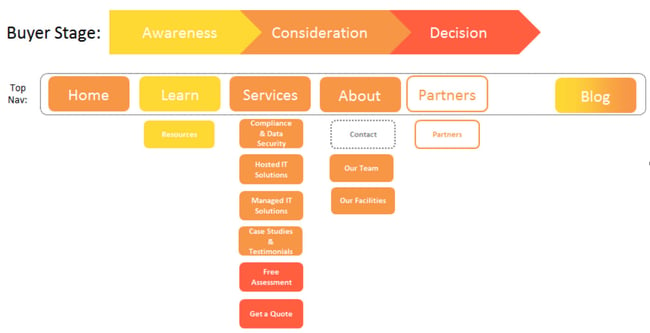
Next, create a purpose map. This is an extension of your site map. For each page, assign a target buyer persona, a lifecycle stage, and a specific goal. This ensures every page has a clear purpose. It also helps you avoid creating pages that don’t serve a strategic function. As you build the purpose map, you may find gaps. Add pages to fill them. Remove pages that don’t fit.
Once the IA is finalized, develop wireframes. Wireframes are low-fidelity sketches of your pages. They show the layout of elements like headers, images, text blocks, and calls-to-action. Wireframes focus on structure, not design. They help you plan the user experience before investing in visuals.
Designing for the User Journey
Your site map should reflect the buyer’s journey. How do you want visitors to progress through your site? Start with awareness-stage content, like blog posts and guides. Move to consideration-stage content, like case studies and webinars. End with decision-stage content, like pricing pages and contact forms. Make this path clear and logical.
Use your buyer personas to guide this process. Different personas may have different needs. Create tailored paths for each. For example, a technical buyer might want to dive into product specs, while a managerial buyer might look for ROI data. Your navigation and content should support these distinct journeys.
The Value of Wireframes
Wireframes save time and money. They allow you to test layouts without committing to design. If a layout doesn’t work, you can adjust the wireframe quickly. This is much easier than redesigning a fully styled page. Wireframes also facilitate collaboration. Stakeholders can provide feedback on the structure before design begins. This reduces the risk of major changes later in the process.
Use simple tools for wireframing. Whiteboards, sticky notes, or basic sketching apps work well. For more detailed wireframes, use software like Axure or Balsamiq. The goal is clarity, not beauty. Focus on function. Ensure that key elements are prominent and easy to find.
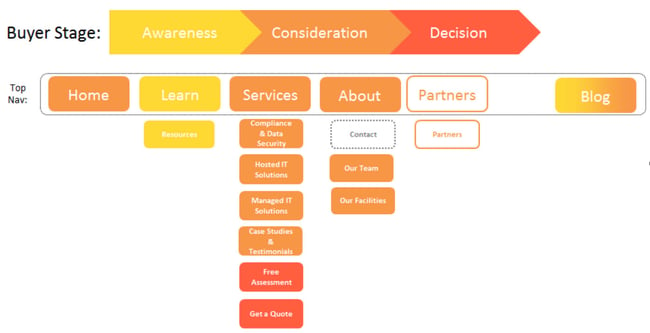
This purpose map illustrates how each page aligns with specific buyer personas and goals, ensuring a strategic approach to content organization.
Month 4: Visual Design and Mockups
With the structure in place, it’s time to add visual appeal. This month focuses on creating design mockups. Mockups are high-fidelity representations of your pages. They include colors, fonts, images, and real content. They show exactly how your site will look.
Work with a designer to bring your wireframes to life. Use your brand guidelines to ensure consistency. Choose colors that reflect your brand personality. Select fonts that are readable and on-brand. Use high-quality images that resonate with your audience. Every visual element should support your message.
Create mockups for key pages first. This includes the homepage, service pages, and contact pages. Once these are approved, design templates for other pages. This ensures consistency across the site. Mockups should be pixel-perfect. They serve as the blueprint for development.
The Role of Visual Hierarchy
Visual hierarchy guides the user’s eye. It tells visitors what to look at first, second, and third. Use size, color, and placement to create hierarchy. Important elements, like calls-to-action, should stand out. Secondary information should be less prominent. This helps users process information quickly.
Avoid clutter. White space is your friend. It gives elements room to breathe. It makes content easier to read. A clean, uncluttered design looks professional and trustworthy. It also reduces cognitive load. Users can focus on your message without distraction.
Iterative Design Process
Design is iterative. Expect revisions. Share mockups with stakeholders for feedback. Incorporate their input. Test different layouts if needed. Don’t be afraid to experiment. The goal is to create a design that is both beautiful and functional. Rushing this step can lead to a site that looks good but doesn’t perform well.
Take time to refine details. Check alignment. Ensure consistency in spacing. Verify that fonts are legible on all devices. A polished design reflects a polished brand. It builds credibility and trust.
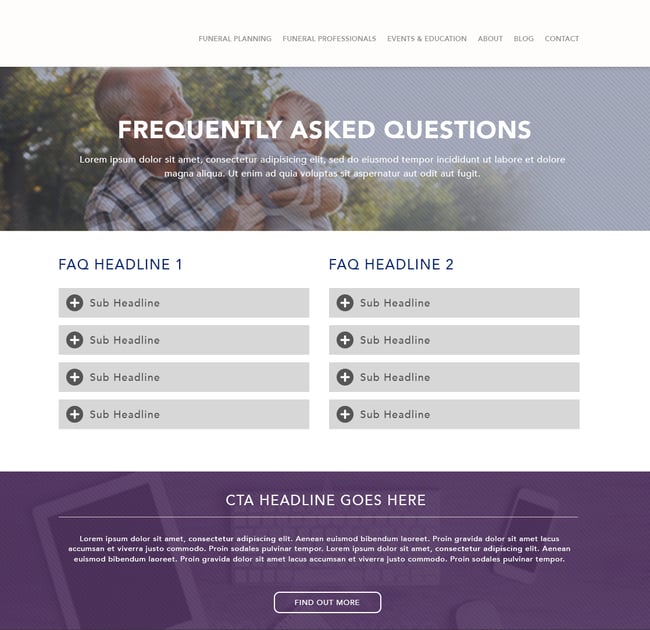
This design mockup shows how visual elements are arranged to guide the user’s attention and enhance the overall experience.
Month 5: Development and Implementation
Design is complete. Now, it’s time to build the site. Development involves coding the mockups into a functional website. This is where the site comes to life. Plan for at least a month of development time. Complex sites may take longer.
Hand off your mockups and assets to the development team. Provide clear specifications. Include details about interactions, animations, and responsive behavior. Ensure the developers understand your performance goals. A fast-loading site is critical for user experience and SEO.
During development, focus on quality assurance. Test the site regularly. Check for bugs. Ensure that all links work. Verify that forms submit correctly. Test on different browsers and devices. Responsive design is non-negotiable. Your site must look and work well on mobile, tablet, and desktop.
Backend Integration and Functionality
Your website is more than just pages. It integrates with various tools and platforms. CRM systems, email marketing software, analytics tools, and more. Ensure these integrations work seamlessly. Data should flow between systems without errors. This automation saves time and reduces manual work.
Also, consider security. Implement SSL certificates. Use strong passwords. Keep software updated. Protect user data. Security breaches can damage your brand reputation. Prioritize security from the start.
Content Population
As pages are developed, populate them with content. Copy and paste body text. Upload images. Build calls-to-action. Insert forms. Pay attention to detail. Check for typos. Ensure that images are optimized for web. Use descriptive alt text. This improves accessibility and SEO.
Content fitting may be necessary. Sometimes, text doesn’t fit the design. Adjust phrasing if needed. But don’t compromise on message. Clarity is key. Ensure that the content aligns with the design and the user’s expectations.
Pre-Launch: Final Checks and SEO Optimization
Two weeks before launch, focus on final preparations. This is the last chance to catch errors. Review every page. Check for broken links. Verify that 301 redirects are set up correctly. Test forms and interactive elements. Ensure that the site is fast and secure.
Implement SEO best practices. Add meta descriptions to every page. Use H1 tags for main headings. Include target keywords in URLs, headings, and alt text. Add internal links to relevant content. This helps search engines understand your site structure and content relevance.
The Importance of 301 Redirects
301 redirects are critical for preserving SEO value. Ensure that every old URL redirects to a relevant new URL. Test these redirects. Use tools like Screaming Frog to check for errors. Avoid redirect chains. Redirect directly to the final destination. This ensures a smooth transition for users and search engines.
Also, update your sitemap. Submit it to Google Search Console. This helps search engines discover and index your new pages quickly. Monitor indexing status after launch. Fix any crawl errors promptly.
Quality Assurance Checklist
Before going live, run through a final checklist:
- Links: All internal and external links work.
- Forms: All forms submit correctly and data is captured.
- Redirects: All 301 redirects are in place and working.
- SEO: Meta tags, headings, and keywords are optimized.
- Performance: Site loads quickly on all devices.
- Mobile: Site is responsive and user-friendly on mobile.
- Analytics: Tracking codes are installed and working.
- Security: SSL certificate is active and valid.
This thorough check reduces the risk of post-launch issues. It ensures a smooth launch day.
Month 6: Launch and Post-Launch Optimization
Launch day is exciting. But it’s not the end. It’s the beginning. After launch, monitor your site closely. Be prepared to fix unexpected problems. Check that 301 redirects are working. Verify that analytics are tracking correctly. Ensure that forms are capturing leads.
Use heat maps to understand user behavior. Tools like Hotjar or Crazy Egg show where visitors click, scroll, and hover. This data reveals how users interact with your site. Identify areas of confusion. Optimize based on these insights. Heat maps help you make data-driven design decisions.
Continuous Improvement Through Testing
A/B testing is essential for optimization. Test different headlines, calls-to-action, and layouts. See what performs better. Use data to guide your decisions. Small changes can lead to significant improvements in conversion rates. Make testing a regular part of your process.
User testing is also valuable. Observe real users as they navigate your site. Ask them about their experience. Where do they get stuck? What do they like? This qualitative feedback provides insights that data alone cannot. Use it to refine your site.
Reviewing Goals and Analytics
Six months after launch, review your goals. Compare new site data to old site data. Did you increase traffic? Improve conversion rates? Generate more leads? Analyze the results. Identify what worked and what didn’t. Use these insights to plan future optimizations.
Your website is never truly “done.” It evolves with your business. Continue to add new content. Update existing pages. Optimize for conversions. Stay agile. Respond to changes in your market and your audience. A successful website is a living, breathing asset.
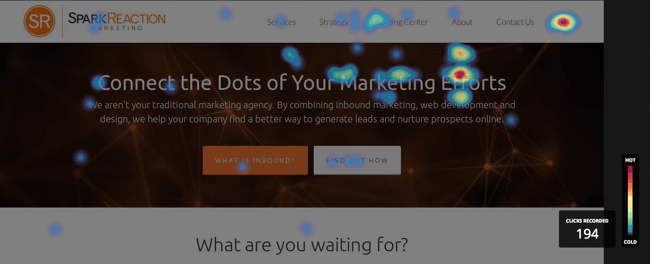
Heat maps provide visual insights into user interaction, helping you identify areas for improvement and optimization.
Why a Structured Approach Matters
A website redesign is a significant investment. It requires time, resources, and effort. A structured approach ensures that this investment pays off. It prevents costly mistakes. It aligns your website with your business goals. It creates a foundation for long-term success.
We see many businesses rush their redesigns. They focus on looks over function. They skip strategic planning. The result is a site that looks good but doesn’t perform. By following this six-month framework, you avoid these pitfalls. You build a website that works.
The framework is flexible. Adapt it to your needs. If you have more resources, you might move faster. If you have fewer, you might take longer. But the principles remain the same. Plan, audit, structure, design, develop, launch, and optimize. This process ensures quality.
Final Thoughts on Sustainable Growth
Your website is a key part of your marketing strategy. It’s where prospects become customers. It’s where you build trust and credibility. A well-designed website supports your entire business. It drives growth. It enhances your brand.
Take the time to do it right. Follow the framework. Involve your team. Make data-driven decisions. Create a site that serves your users and your business. The result will be a digital presence that stands out and delivers results.
What is your biggest challenge in planning a website redesign? How can you apply this framework to your current project?





