What Is a Web Crawler?
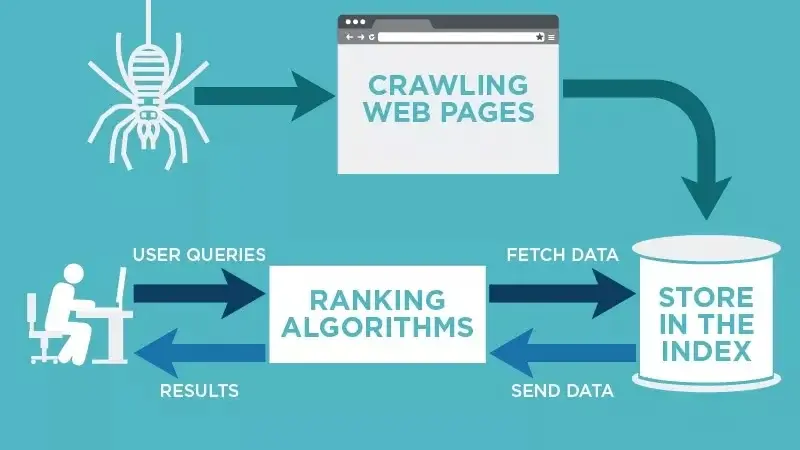
A web crawler, often referred to as a web spider, is an automated bot that searches and indexes content across the internet. Its primary function is to understand the content on a web page so it can be retrieved when a user makes a search inquiry. These bots are typically operated by search engines, which use their own algorithms to guide the crawler in finding relevant information in response to specific queries.
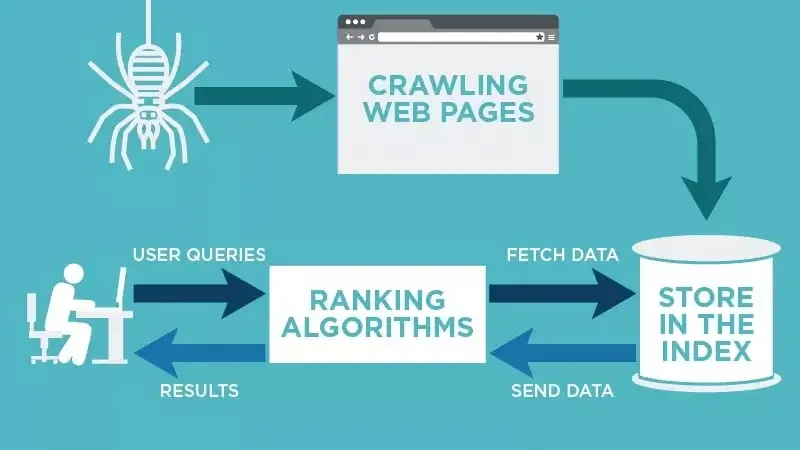
You might wonder who actually runs these crawlers. In most cases, major search engines like Google, Bing, and Yahoo operate their own fleets of web crawlers. Each search engine has a unique algorithm that dictates how its bots navigate the web, prioritize pages, and index content. The crawler’s job is to discover, categorize, and store information from web pages, making that content available for future search results.
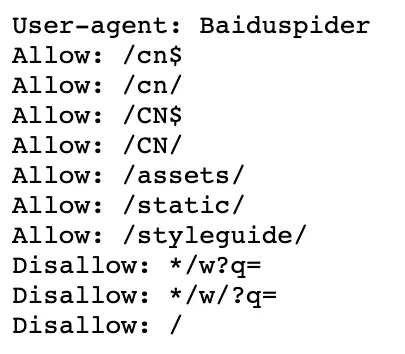
Interestingly, you have some control over how these crawlers interact with your site. By using a robots.txt file, you can instruct search engines on which pages to crawl and which to ignore. For example, Nike uses its robots.txt file to allow certain crawlers, like Baiduspider, to index specific links while disallowing access to others. This strategy helps Nike maintain control over which pages appear in search results, ensuring that only optimized, relevant content is indexed.
Understanding how web crawlers work is crucial for anyone involved in search engine optimization (SEO). Without proper crawling and indexing, your website’s content remains invisible to search engines, no matter how high-quality it may be. Let’s explore how these bots operate and why they are essential for online visibility.

How Web Crawlers Work
Web crawlers operate by discovering URLs, reviewing web pages, and categorizing the content they find. As they navigate a site, they follow hyperlinks to other pages, adding them to a queue of pages to crawl next. This process is continuous, with crawlers constantly updating their index to reflect new or changed content. The bots are smart enough to determine the importance of each page, prioritizing those that are more likely to be relevant to users.
A search engine’s web crawler doesn’t crawl the entire internet at once. Instead, it evaluates the importance of each page based on factors like the number of backlinks, page views, and brand authority. This means that high-authority sites with many inbound links are crawled more frequently than newer or less prominent sites. When you publish a new page or update an existing one, the crawler will eventually discover the changes and update the index accordingly. You can also request that search engines crawl your site more quickly by submitting your URL through tools like Google Search Console.
When a web crawler visits your page, it analyzes the copy, meta tags, and other on-page elements. It then stores this information in the search engine’s index, which is used to sort and rank pages for specific keywords. Before starting this process, the crawler checks your robots.txt file to see which pages are allowed to be indexed. This step is critical for technical SEO, as it ensures that only the pages you want to rank are being crawled and indexed.
The way different web crawlers behave can vary. Some may prioritize certain types of content or use different algorithms to determine page importance. For example, Google’s crawler, Googlebot, uses a combination of on-page signals, backlinks, and user behavior metrics to decide which pages to crawl first. Understanding these nuances can help you optimize your site for better visibility.
Why Website Crawling Is Important for SEO
If you want your website to rank in search engines, it must be indexed. Without a web crawler, your site won’t appear in search results, even if someone searches for exact phrases from your content. In simple terms, your website cannot be found organically unless it’s crawled at least once. Crawling is the first step in the indexing process, which is essential for making your content visible to users.
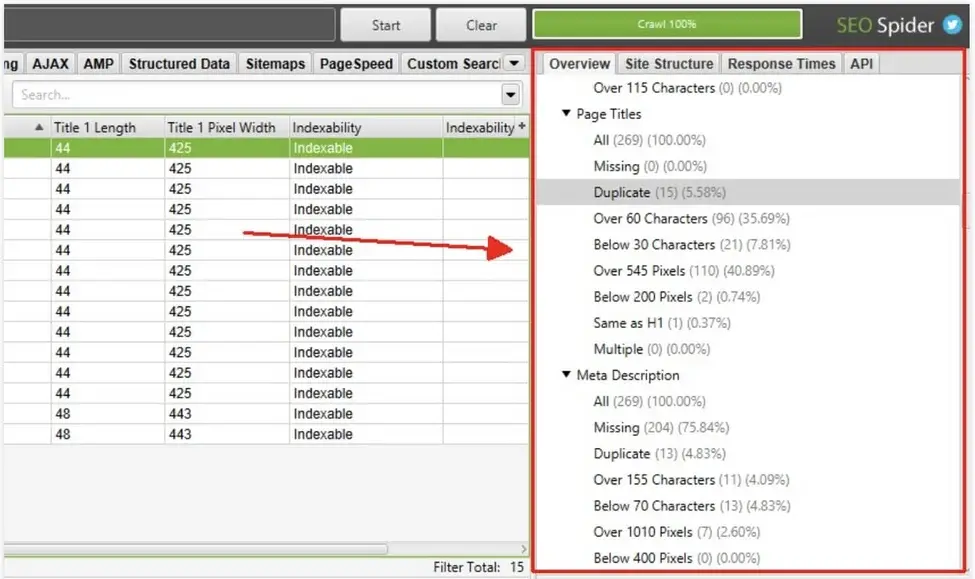
For businesses looking to increase organic traffic, ensuring that their site is properly crawled is non-negotiable. A well-crawled and indexed site is more likely to rank for relevant keywords, driving targeted traffic to your pages. However, if your site has technical issues that make it difficult for crawlers to navigate, your rankings could suffer. This is where tools like Screaming Frog and Deepcrawl come in handy. These crawling tools can help you identify common issues, such as broken links, duplicate content, and missing or incorrect page titles.
Broken links, for instance, not only provide a poor user experience but can also harm your site’s rankings. Duplicate content across different URLs can confuse search engines, making it difficult for them to determine which version of a page is most relevant. In such cases, using a 301 redirect to consolidate content can help. Similarly, optimizing page titles to ensure they are unique, descriptive, and within the recommended character limit can improve your site’s crawlability and rankings.
Performing regular site audits with a crawling tool is one of the best ways to ensure your site is in good health and ranking as it should. By addressing these technical issues, you can make it easier for web crawlers to index your content and improve your overall SEO performance.
Benefits of Using Web Crawling Tools
Web crawling tools offer several advantages for website owners and SEO professionals. One of the key benefits is that these tools run in the background, without affecting your site’s performance. They don’t slow down your website or interfere with your day-to-day tasks, making them a convenient option for ongoing site audits. Additionally, most crawling tools come with built-in reporting features, allowing you to export data into formats like Excel for further analysis. This saves time and makes it easier to dig into the results of your audit.
Another significant benefit is automation. You can set crawlers to run at regular intervals, ensuring that your site is consistently monitored for issues. This eliminates the need to manually pull crawl reports each time, allowing you to focus on other aspects of your SEO strategy. By automating this process, you can stay on top of technical issues before they impact your rankings.
Web crawling tools also help you identify opportunities for improvement. For example, they can highlight pages with low crawl frequency, which may indicate that those pages aren’t being prioritized by search engines. By understanding which pages are being crawled less frequently, you can take steps to improve their visibility, such as adding internal links or optimizing their content.
Types of Web Crawling Tools
There are two main types of web crawling tools: desktop and cloud-based. Desktop tools are installed and stored on your computer, while cloud-based tools use cloud computing and don’t require local storage. The type of tool you choose will depend on your team’s needs and budget. Cloud-based options are generally preferred for their collaborative features, as they allow multiple team members to access and analyze data from anywhere.
Desktop tools are often more affordable and may be suitable for smaller teams or individual users. However, they can be more resource-intensive, as they run on your local machine. Cloud-based tools, on the other hand, tend to be more scalable and offer additional features like real-time collaboration and automated reporting. They are also easier to update, as the provider handles software maintenance.
When choosing a web crawling tool, consider factors like ease of use, reporting capabilities, and integration with other SEO tools. Some popular options include Screaming Frog, Deepcrawl, and Sitebulb. Each tool has its own strengths, so it’s worth testing a few to see which one best fits your workflow.
Expanding Your Reach With Web Crawling
Web crawlers play a critical role in search engine optimization by discovering and indexing content online. They sort through web pages, helping search engines understand what each page is about. By ensuring that your site is properly crawled and indexed, you can improve your visibility in search results and drive more organic traffic to your pages.
Understanding how web crawlers work is just one part of effective technical SEO. To maximize your site’s performance, you need to address technical issues, optimize your content, and ensure that your site is easy for crawlers to navigate. By doing so, you can improve your rankings and reach a larger audience.
As search engines continue to evolve, the role of web crawlers will become even more important. With the rise of AI-driven search, ensuring that your content is optimized for crawlers is more critical than ever. By staying on top of technical SEO best practices, you can position your site for success in the ever-changing landscape of online search.

Practical Steps to Improve Your Site’s Crawlability
Improving your site’s crawlability doesn’t have to be complicated. Start by auditing your site with a web crawling tool to identify any technical issues. Look for broken links, duplicate content, and missing or incorrect page titles. Address these issues to make it easier for crawlers to index your content.
Next, optimize your robots.txt file to ensure that crawlers are allowed to index the pages you want to rank. Disallow access to pages that aren’t meant to be searched, such as admin pages or duplicate content. This helps crawlers focus on your most important pages.
Finally, monitor your site’s crawl frequency and adjust your strategy as needed. If certain pages aren’t being crawled as often as you’d like, consider adding internal links or optimizing their content to improve their visibility. By taking these steps, you can ensure that your site is fully optimized for web crawlers and search engines.
Key Takeaways
- Web crawlers are essential for discovering and indexing your content.
- Use a
robots.txtfile to control which pages are crawled. - Perform regular site audits to identify and fix technical issues.
- Optimize your site for better crawlability and improved rankings.
By following these best practices, you can improve your site’s visibility and drive more organic traffic. Remember, technical SEO is an ongoing process. Stay proactive, monitor your site’s performance, and adjust your strategy as needed to stay ahead of the competition.





