Defining the Modern Media Kit
A media kit is a curated collection of promotional assets, brand guidelines, and company data designed specifically for digital media partners. Unlike traditional press materials that focus solely on journalists, a media kit serves bloggers, influencers, content creators, and affiliates who need comprehensive visual and narrative tools to represent your brand accurately. In the current landscape of generative search and AI-driven content distribution, the role of this document has evolved significantly. It is no longer just a static PDF sent via email; it is a dynamic resource hub that ensures consistency across every platform where your brand appears.
The distinction between a media kit and a press kit is often blurred, but the functional difference matters. A press kit is a traditional term used for materials compiled for news media to write articles, typically containing press releases, high-resolution images, and basic background information. A media kit encompasses all of that and adds a layer of digital-native assets. It includes social media statistics, video assets, detailed branding guidelines, case studies, and partnership data. For modern brands aiming for visibility in AI search results, the media kit acts as the primary source of truth that algorithms and human creators alike can reference.
We view the media kit as a foundational element of a broader AI-ready content strategy. When you provide clear, structured, and rich media assets, you make it easier for external partners—and increasingly, for AI models—to understand and describe your brand correctly. This reduces the risk of misrepresentation and ensures that your brand voice remains consistent, whether it appears in a blog post, a social media reel, or a generated search answer.
The goal is not just to gather information but to streamline the collaboration process. When a creator or journalist has easy access to your logos, color codes, and mission statement, they spend less time guessing and more time creating high-quality content. This efficiency fosters stronger partnerships and leads to more frequent, accurate coverage. For growth-focused businesses, this is a critical step in managing brand perception at scale.
Essential Components of a High-Impact Media Kit
Building a media kit requires more than just dumping files into a folder. It demands a strategic approach to storytelling and data presentation. The first and most critical element is your company story. This section should introduce your name, logo, and mission with clarity. Share your origin story and the “why” behind your business. Golf equipment company Titleist exemplifies this by summarizing its history and values on its media center page, giving visitors a clear understanding of its legacy and expectations. This narrative foundation helps partners align their content with your brand’s core identity.
Next, provide a detailed overview of your products or services. Outsiders often struggle to describe your offerings accurately without guidance. Use this space to lay down the facts about your catalog, trademarks, and key features. Design tool Canva demonstrates this effectively by using a colorful slide deck within its media kit to detail its products. Notably, the kit itself is designed on the platform, serving as a meta-example of the product’s capabilities. This approach not only informs but also impresses, showing the utility of your offering in real-time.
Founder and management information is another vital component. Media outlets frequently seek quotes or insights from company leaders. Include names, brief bios, and professional headshots of your executive team. GE Appliances handles this by linking to detailed bios, streamlining the kit while ensuring the information is accessible. You might also include short quotes from leaders that reflect their expertise or unique perspective, adding a human element to the corporate data.
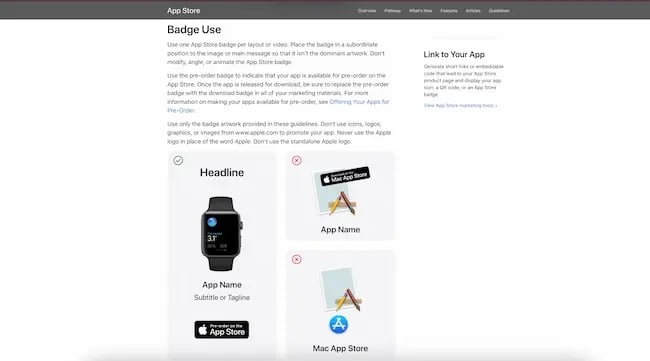
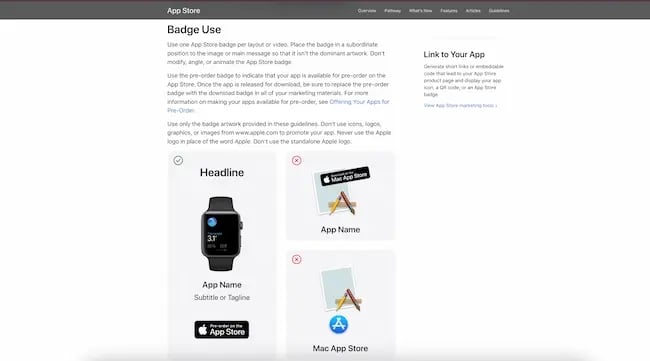
Visual assets and guidelines deserve their own dedicated section. While your media kit is not a full style guide, it should include the essential elements of your visual brand. Provide high-quality logos and product images, along with clear instructions on how to use them. Apple does an excellent job of showing correct and incorrect uses of its branded badges, preventing misuse. This clarity protects your brand integrity and makes the creator’s job easier. Ensure that the design of the media kit itself reinforces your brand identity, using your specific colors, fonts, and visual hallmarks.
Social proof is a powerful tool in any media kit. Share third-party validation such as social media statistics, case studies, testimonials, and awards. According to industry data, a significant portion of consumers trust influencers and peers over brands themselves. Highlighting your engagement rates and follower counts can attract savvy creators looking for partners with reach. Include case studies that show the impact of your product, such as past campaigns with reputable brands. Testimonials should be succinct, with one or two strong quotes sufficing to make a point. Awards from reputable associations further vouch for your legitimacy and quality.
Finally, include existing press and contact information. Showcase samples of past press coverage, press releases, or podcast appearances. Nike maintains an extensive collection of press releases on its media website, providing a rich history of its public communications. This helps new partners see what high-quality coverage looks like. Conclude with a clear call-to-action, listing your press email, social media handles, and relevant hashtags. Cannabis company Verano makes this easy by highlighting contact information prominently, ensuring that interested parties can connect without friction.
Step-by-Step Guide to Creating Your Media Kit
Creating a media kit is a process of curation and organization. Start by writing your company story. Keep it concise but comprehensive, covering your founding date, location, mission, and key growth milestones. You want the reader to finish this section with a well-rounded image of your company and a sense of excitement to promote it. This narrative sets the tone for everything that follows, so ensure it aligns with your current brand positioning and future goals.
Add detailed information about your founders and executive team. Elaborate on their credentials, what brought them to their roles, and any recognition they have received. Prominent public figures within your company can be a draw for media outlets, so highlight their expertise. Include high-quality headshots and brief bios that reflect their personalities and professional backgrounds. This humanizes your brand and gives journalists ready-made sources for quotes and insights.
List your critical highlights and accomplishments. Have you won industry awards, broken records, or pioneered new technology? Jot these down prominently. Accomplishments add intrigue and provide the press with ready-made angles for stories. Think of these as the “sparkle” that makes your brand stand out in a crowded market. These facts serve as quick hooks for creators who need to justify why your brand is worth featuring.
Gather your supporting assets meticulously. This includes your logos, product images, brand guidelines, case studies, and data. Think of this as assembling the toolkit a creator needs to make their finished product stand out. Ensure all images are high-resolution and available in multiple formats (e.g., PNG, JPG, SVG) to accommodate different publishing needs. Organize these files logically, perhaps by category or use case, to save time for both you and your partners.
Compile these elements in the format that best suits your audience. Common formats include downloadable PDFs, shareable cloud folders (like Google Drive or Dropbox), dedicated press pages on your website, or separate press websites. Uber presents its media kit as a separate website, which is ideal for social media creators who need easy access to images. However, even if you prioritize a web version, having a downloadable PDF is worth the effort. It offers offline accessibility and avoids technical issues with loading times or broken links. Our platform supports the creation of AI-ready content structures that can be seamlessly integrated into these digital hubs, ensuring that your assets are not just static files but part of a dynamic, searchable ecosystem.
Add your media kit to your website for maximum visibility. It should live under a menu item or footer link labeled “Press,” “Media,” or “Newsroom.” This is the first place media outlets and creators will look. A dedicated page on your site is the most intuitive way to direct people to your assets. To keep the page easy to navigate, include a table of contents. Snapchat’s media kit uses a clear table of contents to guide users through its extensive brand assets, preventing confusion and ensuring that creators find exactly what they need quickly. This small addition significantly enhances the user experience and reflects positively on your brand’s professionalism.
Design Principles and Real-World Examples
The design of your media kit should be an extension of your brand identity. It needs to be visually appealing, easy to navigate, and informative. There is no one-size-fits-all approach, but several examples illustrate best practices across different industries and formats. Hinge, the dating app, offers a complete and easy-to-navigate media kit website. It covers all critical information, including an origin story, press quotes, and a timeline of milestones. The design is airy, with plenty of visuals and engaging micro-animations, making it a pleasure to explore. This attention to detail reflects the brand’s focus on user experience and modern aesthetics.
Delta Airlines takes a more no-frills approach, which is smart for brands with limited design resources. Their media kit website organizes information into seven simple categories using a classic grid layout and dropdowns. This clean, functional design keeps things easy to navigate while allowing users to dig deeper if needed. It proves that you don’t need flashy animations to create an effective media kit; clarity and organization are often more important.
Optimonster, a lead generation tool, opts for a hybrid website-PDF approach. The dedicated website provides guidelines for using the logo, brand colors, and sample press releases, while the PDF contains the actual visual files for use. This combination of static and dynamic mediums works well, offering the convenience of a website for information and the offline accessibility of a PDF for assets. It’s a practical solution for brands that want to provide comprehensive resources without overwhelming the user.
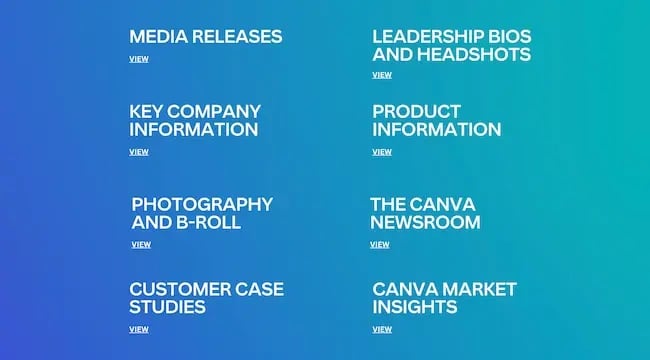
Canva’s media kit is a design to aspire to. Their “Press Hub” begins with a simple hero section and company overview, followed by a table of contents linking to various sections. Most of the content is presented in assets made with the Canva tool itself, showcasing the product’s capabilities while providing information. This meta-approach is genius, as it delivers value while simultaneously demonstrating the utility of the product. It’s a perfect example of how a media kit can serve as both a resource and a marketing tool.
Airbnb’s media kit is staged as a “newsroom” subdomain on its greater website. The “about us” page highlights crucial background information, including the founders and their origin story. What really shines is the “fast facts” section, which calls out the scale and success of the business. The rest of the site offers contact information, product releases, and a wide selection of visual assets that can be filtered and downloaded. This structure is ideal for large, global brands that need to manage a vast amount of media information.
Headspace utilizes a Google Drive folder to deliver its assets, which is a simple and effective way to share large files. The media kit page leads with a button to visit the drive folder, which houses photography, bios, logos, and app screenshots. As you scroll, it shares press releases and older media coverage. This approach is the best of both worlds, offering easy access to files while maintaining a clean, informative webpage.
Kickstarter puts a unique stamp on its media kit page, using color blocks and large images to draw attention to key facts, success stats, and testimonials. The design is a smart strategy to guide the eye on a page that otherwise lacks traditional navigation. It uses toggles to minimize clutter and encourage interaction, keeping the page interesting and engaging. However, a table of contents would have made it much easier to find specific information, highlighting the importance of balance between design and functionality.
Slack’s media kit is well-organized and thorough. When you first arrive on the page, you are met with three simple buckets: logos, app screenshots, and the Slack brand center. The first two take you to separate folders to download assets, while the brand center leads to a more comprehensive website diving into all the essentials. This structure is easy to navigate, on-brand, and provides all the necessary resources for creators. It’s a testament to how a well-structured media kit can enhance brand consistency and support effective partnerships.
Optimizing for the AI Search Era
As we move further into the age of generative search, the role of the media kit is expanding beyond human consumption. AI models and search engines are increasingly scraping and analyzing structured data to generate answers and summaries. A well-organized media kit serves as a primary source of truth for these systems. By ensuring your brand assets, mission statements, and key facts are clearly defined and easily accessible, you improve the accuracy of AI-generated content about your brand.
This is where platforms like AEO/GEO Services come into play. By automating the creation and distribution of AI-ready content, businesses can ensure that their media kits are not just static repositories but dynamic, optimized resources. This involves structuring data in a way that AI can easily interpret, using clear headings, concise descriptions, and standardized formats. It’s about making your brand visible and accurate in the emerging AI search ecosystems.
Consider your media kit as part of a broader content automation strategy. Regularly update it with new press coverage, product launches, and performance metrics. This keeps the information fresh and relevant, both for human creators and AI algorithms. By prioritizing clarity, consistency, and accessibility, you build a foundation for long-term brand visibility and trust.
The future of media relations is not just about sending press releases; it’s about creating a comprehensive, easily accessible resource hub that supports accurate and consistent brand representation across all channels. Whether you are a startup or an established enterprise, investing in a high-quality media kit is a critical step in managing your brand’s narrative in a complex, multi-platform world. What elements of your current brand strategy could be enhanced by a more structured, AI-ready media presence?





