A URL (Uniform Resource Locator) is the digital equivalent of a street address, guiding users and search engines to a specific destination on your website. While search algorithms have evolved significantly since the early days of keyword stuffing, the importance of a clean, descriptive URL structure remains a fundamental pillar of technical SEO. Understanding how to construct these addresses is vital for any brand aiming to maintain a professional digital presence and improve discoverability in both traditional and AI-driven search environments.

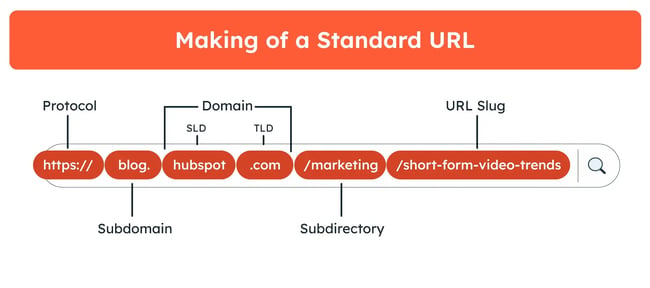
Every URL is composed of specific hierarchical levels: the protocol, subdomain, domain name, subdirectory, and the slug. The protocol, ideally HTTPS, ensures an encrypted connection, while the domain identifies your brand. Subdirectories act as organizational folders, and the slug provides the specific identifier for an individual page. By keeping these elements logical and consistent, you make it easier for search crawlers to index your content and for users to understand exactly where they are within your site architecture.
Anatomy of a URL
A well-constructed URL acts as a roadmap for both the user and the search engine. The protocol (HTTPS) is non-negotiable for security, while the domain name establishes your brand identity. Subdirectories help categorize content, such as separating a blog from a product catalog. The slug is the final, most critical piece; it should be a concise summary of the page content.
Why Architecture Matters
The way you organize your folders and subdirectories dictates how easily a crawler can map your site. A flat, logical hierarchy prevents “orphan pages” and ensures that link equity is distributed effectively across your domain. When your URL structure is messy, search engines struggle to prioritize your most important pages, which can lead to lower indexing rates and reduced visibility for your primary keywords.
Why URL Structure Matters for Search Performance
URLs serve as a primary signal for search engines, helping them decipher the context and relevance of a webpage. When a URL contains descriptive, relevant terms, it provides an immediate indicator of what a page covers, which aids in ranking. Beyond the technical side, a well-structured URL enhances the user experience. Clear, human-readable links are more likely to be clicked, shared, and trusted, which indirectly supports your broader visibility goals.
Supporting Search Engine Crawling
Search engines use URLs to crawl and categorize the internet. When your structure is simple and hierarchical, you reduce the complexity for crawlers, allowing them to index your site more efficiently. A clear path from your home page to deep-level content ensures that search engines don’t miss important pages. This is increasingly relevant as AI-driven search engines parse site architectures to synthesize answers for users.
Building User Trust and Accessibility
Users often scan URLs to determine if a link is safe or relevant before clicking. An ugly, cryptic string of characters—like one filled with random IDs and numbers—can look suspicious or cluttered. Conversely, a clean slug that mirrors the page title signals that the link leads to a high-quality, relevant source. This clarity is particularly important when sharing links on social platforms or in direct messaging, where anchor text might not always be available.
The Impact on Analytics and Reporting
Clean URLs make your analytics data much easier to interpret. When you use descriptive slugs, your reports in tools like Google Analytics become instantly readable. Instead of seeing a list of cryptic IDs, you can see performance metrics broken down by category or topic. This allows your team to identify high-performing content areas quickly and make data-driven decisions about future content production.
Essential URL Best Practices for Modern SEO
Optimizing your URL structure involves a balance of technical precision and readability. While there is no single “perfect” way to format every site, certain standards have proven effective for long-term SEO health. The following practices provide a framework for creating URLs that serve both your users and the search algorithms.
1. Maintain Simplicity and Consistency
Keep your URLs as short and simple as possible. Aim for a structure that reflects your site hierarchy, such as category-based folders followed by the specific page slug. Once you establish a naming convention, stick to it across your entire domain. Consistency prevents confusion and makes it easier for your team to manage content updates without risking broken links or the need for constant redirects.
2. Limit Hierarchical Depth
Try to keep your URL structure within three levels of hierarchy. Deeply nested URLs can be harder for users to navigate and can sometimes lead to crawling issues. A shallower structure keeps your content closer to the root domain, which is generally viewed as a positive signal for site authority and ease of access.
3. Exclude Dates and Extraneous Words
Including timestamps or dates in a URL can make your content seem dated, even if the information remains relevant. Avoid using “a,” “and,” or “the” in your slugs when they don’t contribute to the core meaning of the page. Removing these non-essential words creates a cleaner, more concise URL that is easier to read and share.
4. Use Hyphens to Separate Words
URLs do not support spaces, so you must use a separator. Google and other search engines explicitly recommend hyphens (-) over underscores (_) for word separation. Hyphens are treated as true word breaks, whereas underscores can sometimes cause search engines to misinterpret the connection between terms, potentially hindering your ability to rank for specific keywords.
5. Prioritize Lowercase Characters
Always use lowercase letters for your URLs. Some web servers are case-sensitive, meaning that “/Example-Page” and “/example-page” could potentially be treated as two different destinations. Standardizing on lowercase prevents duplicate content issues and ensures that users who type your link manually arrive at the correct page.
6. Checklist for URL Optimization
Before publishing a new page, run it through this quick checklist:
- Does the URL contain the main keyword?
- Is the URL under 100 characters?
- Are all words separated by hyphens?
- Is the URL entirely in lowercase?
- Have you removed unnecessary stop words like “the” or “and”?
- Does the URL accurately describe the page content?
Managing Complex URL Scenarios
Not every website can maintain a perfectly static, manual URL structure. Ecommerce platforms and large-scale applications often rely on dynamic parameters. While these are sometimes unavoidable, you can still manage them to minimize negative impacts on your search performance.
Handling Dynamic Parameters
When your platform generates URLs automatically, you might not have full control over every character. In these instances, focus on optimizing the slugs you can control and be aware of the limitations of your system. If you find that dynamic URLs are creating duplicate content issues, use canonical tags to tell search engines which version of the page is the primary one.
Avoiding Keyword Stuffing
It is tempting to pack as many keywords as possible into a URL to chase rankings. This is a counterproductive practice. Keyword stuffing makes your URLs unreadable and can trigger spam filters. Instead, include only the most relevant, descriptive keyword for that specific page. Your page content should be the primary vehicle for your keyword strategy, not the URL slug.
Ensuring Unique Slugs
Every page on your site must have a unique URL. If two pages share the same slug, search engines may struggle to determine which page to serve in search results. Regularly audit your structure to ensure that no two pages are competing for the same URL, and use redirects if you ever need to change a URL after it has been published to maintain your existing search authority.
Managing Redirects During Migration
If you decide to update your URL structure to be more descriptive, you must implement 301 redirects from the old URLs to the new ones. This ensures that any existing backlinks—which are vital for your domain authority—are passed to the new location. Without proper 301 redirects, you risk losing your search rankings and creating a frustrating experience for users who click on old, broken links.





