WordPress powers a significant portion of the web, yet the platform’s default functionality is only the starting point. The true power of WordPress lies in its extensibility. With over 56,000 plugins available in the official repository, you can transform a basic CMS into a sophisticated marketing engine.

The challenge isn’t finding plugins; it’s filtering the noise. Installing too many tools can bloat your site, slow down load times, and introduce security vulnerabilities. For marketers, the goal is to select a curated stack that enhances performance, captures leads, and optimizes content for search engines without compromising site health.
At AEO/GEO Services, we believe that content infrastructure must be as robust as the content itself. In the era of generative search optimization (GEO), your site’s technical foundation directly impacts how AI models interpret and distribute your brand. A slow, disorganized, or poorly structured site is less likely to be cited by AI engines.
Below, we explore 33 of the best WordPress plugins for marketers. We’ve categorized them by function to help you build a lean, effective toolkit.

Lead Generation and Conversion Tools
Capturing visitor information is the primary objective of most marketing websites. You need tools that create frictionless experiences for users while feeding your CRM with qualified data. The following plugins specialize in forms, pop-ups, and automation.
HubSpot WordPress Plugin
HubSpot’s all-in-one plugin integrates forms, live chat, CRM, and analytics directly into your WordPress dashboard. It allows you to build drag-and-drop contact forms and pop-ups without coding. Because it consolidates multiple functions into a single plugin, it reduces the risk of plugin bloat. This is critical for maintaining fast load speeds, which are a ranking factor for both traditional SEO and AI search engines. HubSpot also syncs visitor data automatically, giving you a unified view of user behavior.
Elementor
Elementor is the leading drag-and-drop page builder, with over 2 million downloads. It offers hundreds of templates for landing pages, testimonials, and CTAs. For marketers, Elementor reduces dependency on developers for layout changes. Its customization features, such as hover effects and animations, can help hold visitor attention. However, use it judiciously. Heavy use of animations and complex layouts can impact page speed. Balance visual appeal with performance.
WordPress Landing Pages
This plugin is dedicated to creating and testing landing pages. It includes a visual editor and built-in conversion tracking. You can A/B test different designs to see which performs better. Landing pages are essential for focused campaigns, as they remove navigation distractions and guide users toward a single action.
Growmatik
Growmatik is a cross-channel marketing automation tool. It uses smart pop-ups, personalized web pages, and targeted emails to drive engagement. Its segmentation features allow you to deliver tailored content based on user behavior. It integrates with WooCommerce, Shopify, HubSpot, and Mailchimp, making it a flexible choice for e-commerce and service-based businesses.
Gravity Forms
Gravity Forms is ideal for complex, conditional forms. You can build multi-step surveys, quizzes, and polls. Its smart rules let you show or hide fields based on user input. For example, you can restrict form submissions to specific email domains or integrate with payment gateways like PayPal and Stripe. It also connects with Zapier for advanced automation workflows.
WPForms
WPForms is one of the most popular form builders, with over 5 million active installations. It features a drag-and-drop builder and 300+ templates. It supports conditional logic, conversational forms, and multi-page forms. Like Gravity Forms, it integrates with HubSpot, allowing you to automatically import contacts into your CRM.
Hustle
Hustle, by WPMU DEV, offers pop-ups, slide-ins, and social share bars. It includes extensive targeting options, such as exit-intent and time-on-page triggers. You can store submissions locally or send them to your CRM via integrations. It’s a solid choice for growing your email list.
OptinMonster
OptinMonster is a powerful tool for email list growth. It creates mobile-friendly pop-ups, footer bars, and floating headers. Its A/B testing features help you optimize conversion rates. It’s particularly effective for re-engaging visitors who are about to leave your site.
Calculated Fields Form
This plugin allows you to create custom calculators for your site. You can build finance, quote, or health calculators. These tools are highly shareable and can serve as link-worthy assets. They also provide a personalized experience for users, increasing engagement time.

SEO and Content Optimization
Search engine optimization is no longer just about keywords. It’s about structure, clarity, and technical health. These plugins help you optimize your content for both traditional search engines and AI crawlers.
All in One SEO
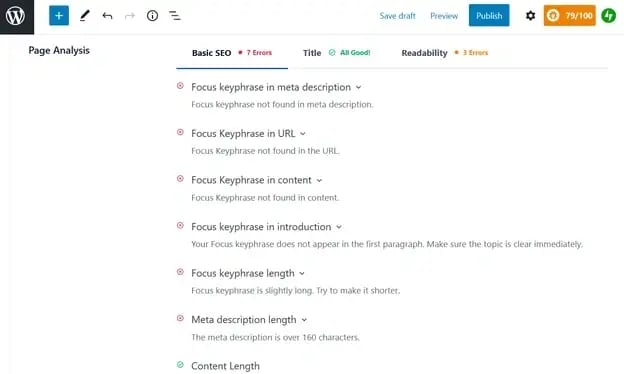
All in One SEO provides a comprehensive SEO audit checklist. It analyzes your site for errors and offers actionable insights. The TruSEO score gives you a detailed analysis of your content’s optimization. It also generates XML sitemaps and supports image sitemaps, helping search engines crawl your site more efficiently.
The SEO Framework
The SEO Framework focuses on making smart optimization decisions. It optimizes every page, post, and term on your site. It also enhances social sharing previews for Facebook and Twitter. Its lightweight design ensures it doesn’t slow down your site.
Yoast SEO
Yoast SEO is a veteran in the SEO plugin space. It handles technical SEO tasks and provides content analysis. The premium version includes a redirect manager, internal link suggestions, and AI features. It helps you edit meta snippets and keywords easily. Yoast also offers an online academy for SEO education.
Google XML Sitemaps
This plugin generates XML sitemaps for search engines like Google, Yahoo, and Bing. It notifies search engines whenever you publish new content. It’s compatible with all WordPress pages and custom URLs. With over 1 million active installs, it’s a reliable choice for ensuring your content is indexed.
Title Experiments
Title Experiments allows you to A/B test blog post titles. Since titles directly impact click-through rates, this plugin helps you identify which headlines perform best. It tracks conversions and provides data-driven insights.
Just Writing
Just Writing enhances WordPress’s distraction-free writing mode. It removes interface clutter, allowing you to focus on content creation. It also includes a spellcheck feature to improve grammar. For marketers producing high volumes of content, this tool can improve workflow efficiency.
Pretty Links
Pretty Links shortens and tracks URLs. It allows you to create branded links using your domain. It provides reports on link clicks, helping you measure the performance of your shared content. It’s useful for email campaigns and social media posts.
Redirection
Redirection manages 301 redirects and 404 errors. It logs all redirects and provides visitor information. This is essential for maintaining SEO value when you change URLs or delete content. It prevents broken links from harming your site’s reputation.
Performance and Security
A slow or insecure site undermines all your marketing efforts. These plugins ensure your site remains fast, stable, and protected.
WP Rocket
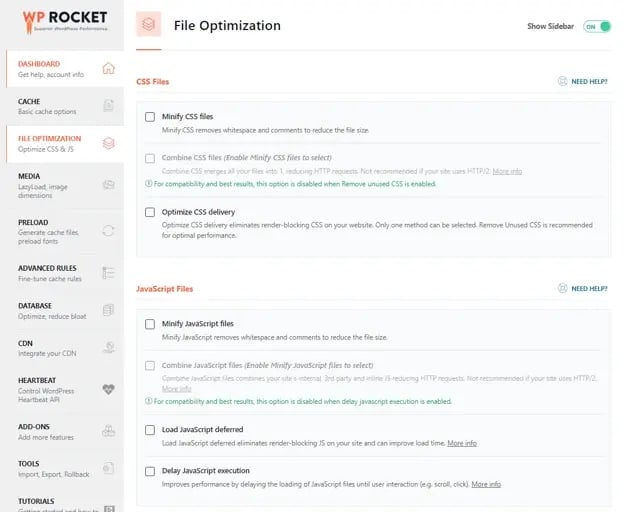
WP Rocket is a caching plugin that applies 80% of web performance best practices upon activation. It removes unused CSS, delays JavaScript execution, and minifies files. It’s one of the easiest ways to boost site speed without technical expertise.
Smush
Smush compresses and optimizes images in bulk. It reduces file sizes while maintaining quality. This frees up server space and improves load times. It’s essential for sites with many high-resolution images.
TinyPNG
TinyPNG automatically optimizes JPEG and PNG images upon upload. It analyzes images and compresses them appropriately. The optimized image replaces the original, ensuring your site always serves lightweight files.
Imsanity
Imsanity automatically resizes images to match your theme’s display requirements. It scales down previously uploaded images and replaces the originals. This prevents oversized images from slowing down your site.
W3 Total Cache
W3 Total Cache enhances performance through caching, CDN integration, and minification. It reduces download durations and improves user experience. It’s a robust tool for advanced users who need granular control over caching settings.
Autoptimize
Autoptimize aggregates scripts and styles to improve site performance. It has an extensive API for customization. It’s particularly useful for non-technical marketers who want to speed up their site without coding.
Wordfence
Wordfence protects your site from malware and hackers. It scans your site for infections and blocks malicious traffic. Security is critical for maintaining trust and preventing downtime.
Akismet
Akismet filters spam comments. It uses a web service to analyze comments and block spam. It also discards hazardous spam, speeding up your site by reducing database clutter.
Analytics and Tracking
Data drives decision-making. These plugins help you monitor site performance and user behavior.
MonsterInsights
MonsterInsights integrates Google Analytics with WordPress. It displays easy-to-read reports in your dashboard. You can track eCommerce conversions, form submissions, and affiliate links. It supports both GA3 and GA4, and offers dual tracking for a smooth transition.
Pixel Caffeine
Pixel Caffeine manages Facebook Pixel and Commerce Manager. It allows you to track ad conversions within WordPress. You can create custom audiences based on user behavior, such as last visit time or previous purchases. It automatically updates with Facebook’s changes, saving you maintenance time.
Content Management and Utility
These plugins help you organize, structure, and manage your content efficiently.
Slickplan Importer
Slickplan Importer allows you to import website plans and sitemaps directly into WordPress. It’s compatible with the Gutenberg editor. This tool streamlines the process of moving from planning to development.
Broken Link Checker
Broken Link Checker identifies and notifies you of broken links. It allows you to edit links directly from the plugin page. This prevents 404 errors and maintains a positive user experience.
TablePress
TablePress helps you create and embed responsive tables. It’s easy to use and requires no coding. Tables are useful for presenting data, comparisons, and specifications in a readable format.
Editorial Calendar
Editorial Calendar provides a drag-and-drop interface for scheduling content. It allows you to manage posts from multiple authors and edit titles and publishing times. It’s essential for teams coordinating content production.
Revive Old Post
Revive Old Post shares older posts on social media automatically. It extends the lifespan of your content by promoting it to new audiences. You can manage multiple social accounts from within the plugin.
Head, Footer and Post Injections
This plugin allows you to insert custom code into your site’s head, footer, or posts. It’s theme-independent, so your code remains intact even if you change themes. It’s useful for adding analytics scripts, chat widgets, or other custom code.
Building a Sustainable Marketing Stack
The best WordPress plugins for marketers are those that align with your specific goals. Don’t install every tool on this list. Start with the essentials: a form builder, an SEO plugin, and a caching solution. As your needs grow, add tools that address specific gaps.
At AEO/GEO Services, we emphasize that technical performance is a content strategy. In the age of AI search, your site’s speed, structure, and clarity determine its visibility. A well-optimized WordPress site is not just a marketing asset; it’s a foundation for sustainable growth.
Consider auditing your current plugin stack. Remove unused plugins, update the rest, and ensure they don’t conflict. A lean, focused toolkit will serve you better than a bloated one.





