A robots.txt file is a simple text document that serves as a guide for search engine crawlers navigating your website. By placing this file in your root domain, you provide specific instructions to bots about which parts of your site they should access and which they should ignore. While it is not a mandatory requirement for a functioning website, it is a foundational component of technical site management that helps you maintain control over how your digital presence is indexed. This file acts as the first line of defense in your SEO strategy, ensuring that search engines understand the structure and priorities of your content before they begin their scanning process.
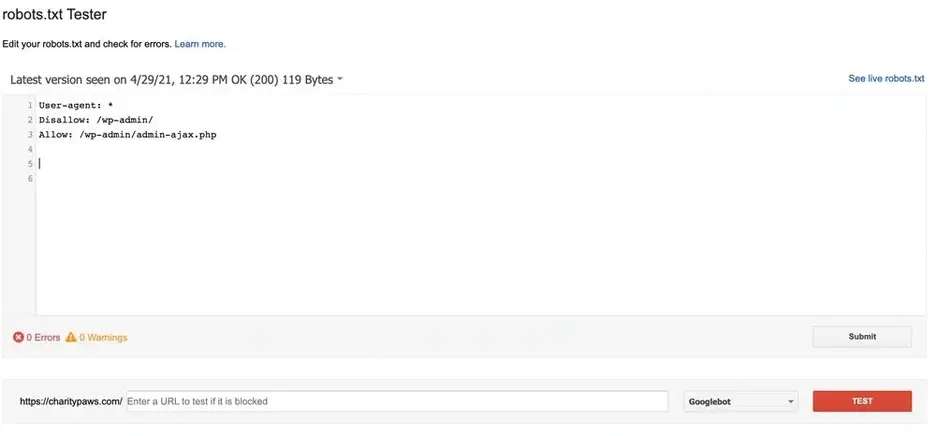

At its core, a robots.txt file is a communication tool between your server and the automated spiders sent by search engines. When a bot arrives at your site, it first checks for this file to understand your preferences. While major search engines like Google and Bing generally respect these directives, it is essential to remember that not all automated crawlers follow these rules with the same level of compliance. Understanding these limitations is the first step toward effective implementation. Malicious bots or poorly programmed scrapers may ignore these instructions entirely, which is why robots.txt should be viewed as a polite request rather than a security barrier. For legitimate search engine indexing, however, this file remains the standard protocol for managing crawler behavior.
Why Your Website Benefits from a Robots.txt File
Many site owners operate without a robots.txt file, and for smaller, static sites, this is perfectly acceptable. However, as your site grows in complexity, the ability to direct traffic becomes a strategic advantage. A well-configured file allows you to manage server resources, prevent the indexing of irrelevant content, and keep sensitive directories shielded from public search results. Without these instructions, crawlers may wander aimlessly through your site, wasting time on duplicate content, administrative pages, or temporary files that hold no value for users or search rankings.
Managing Crawl Efficiency
Every search engine allocates a specific amount of time and effort to crawl your site, often referred to as crawl budget. If your server is burdened by bots crawling thousands of unnecessary pages—such as session-specific URLs or redundant internal search results—you may inadvertently waste resources that should be dedicated to your most important content. By using disallow directives, you ensure that crawlers focus their energy on the pages that actually drive business value. This is particularly critical for large ecommerce platforms or news sites where new content is published frequently. If crawlers are stuck processing low-value pages, they may not discover your new products or articles in a timely manner, potentially delaying their appearance in search results.
Consider the impact of pagination and filter parameters on your crawl budget. Ecommerce sites often generate hundreds of URLs for every product based on color, size, or sorting options. If these variations are not properly blocked, search engines will crawl each unique URL, treating them as separate pages. This dilution of crawl budget means that your primary product pages receive less attention. By explicitly disallowing these parameter-heavy URLs in your robots.txt file, you signal to search engines that these pages are not intended for indexing, allowing the crawler to prioritize your core content. This strategic allocation of resources ensures that your most valuable pages are crawled and indexed efficiently.
Protecting Private Directories
There are instances where you need to keep certain folders or subdomains private. While a robots.txt file is not a security feature—it does not password-protect your files—it is an effective way to tell search engines that specific areas of your server should not be included in their index. This is particularly useful for staging environments or internal documentation that you do not want appearing in public search queries. For example, if you have a development version of your site hosted on a subdomain like staging.yoursite.com, you should block all crawlers from accessing it to prevent duplicate content issues. Duplicate content can confuse search engines, leading to lower rankings for your main site as they struggle to determine which version is the authoritative source.
Additionally, administrative areas such as /admin/ or /login/ should be blocked to prevent them from appearing in search results. While these pages are typically protected by login credentials, having them indexed can still be undesirable from a privacy and security perspective. It reveals the structure of your backend to potential attackers and clutters search results with non-user-facing content. By adding these paths to your robots.txt file, you maintain a clean and professional presence in search engines, ensuring that only public, user-relevant content is visible. This practice also helps in maintaining a clear separation between your public-facing website and your internal operational tools.
Controlling Server Load
For high-traffic websites, excessive bot activity can sometimes lead to performance bottlenecks. By signaling to bots how they should interact with your site, you can prevent server overloads during peak periods. It is worth noting, however, that some directives, such as crawl-delay, are not universally supported by all search engines, so this should be viewed as a supplementary measure rather than a complete solution for performance management. Google, for instance, does not support the crawl-delay directive, meaning you cannot slow down Googlebot using this method. However, other search engines and smaller crawlers may respect it, providing a layer of protection against aggressive scraping.
Beyond crawl-delay, you can manage server load by limiting the number of concurrent connections or by blocking specific bots that are known to be resource-intensive. If you notice that a particular bot is consuming a disproportionate amount of your server resources, you can block it entirely via robots.txt. This helps maintain site stability and ensures that legitimate users have a smooth browsing experience. Monitoring your server logs is essential to identify which bots are causing issues and to adjust your robots.txt file accordingly. By proactively managing bot traffic, you can optimize your site’s performance and reduce the risk of downtime during high-traffic events.
Understanding the Limitations of Robots.txt
One of the most common misconceptions is that a robots.txt file can completely prevent content from being indexed. This is not the case. If a search engine discovers a link to a page you have blocked in your robots.txt file, it may still index that page, even if it cannot crawl the content directly. For truly private content, other methods are required. Search engines can still see the URL and the anchor text of the link, which may be enough to generate a snippet in search results. This means that sensitive information, such as personal data or confidential documents, should never rely solely on robots.txt for protection. Instead, use authentication, password protection, or server-side restrictions to ensure that unauthorized users cannot access the content.
The Role of Noindex Meta Tags
If your primary goal is to ensure that a specific page does not appear in search results, the most reliable method is to use a noindex meta tag within the HTML of that page. A robots.txt file and a noindex tag serve different purposes: the former manages crawling, while the latter manages indexation. To effectively hide a page, you must allow the bot to crawl it so it can read the noindex tag; otherwise, the search engine will never see the instruction to stay out of the index. This distinction is crucial for technical SEO, as misusing robots.txt to block pages can lead to unintended indexing issues.
For example, if you block a page via robots.txt, the search engine cannot access the page to see the noindex tag. As a result, it may still index the URL based on external links, potentially showing a cached version or a snippet with limited information. This can be detrimental to your SEO strategy, as it creates a mismatch between your intent and the search engine’s understanding of your content. To avoid this, always use noindex tags for pages you want to exclude from search results, such as thank-you pages, cart pages, or filtered search results. This ensures that the search engine explicitly understands that these pages should not be included in its index, regardless of whether they are crawled or not.
Technical Implementation and Testing
Accessing your robots.txt file is usually straightforward. On most platforms, it resides in the root directory. If you are using a content management system like WordPress, you can often edit this file through your administrative dashboard or via an FTP client. Once you have created or modified your file, it is vital to validate your changes using a testing tool. This ensures that you haven’t inadvertently blocked critical site sections or introduced syntax errors that could disrupt search engine access. Many CMS platforms offer built-in tools for managing robots.txt, but for more complex sites, manual editing via FTP may be necessary.
When editing your robots.txt file, it is important to follow best practices for syntax and structure. Each directive should be on a new line, and comments can be added using the # symbol to explain the purpose of specific rules. This makes the file easier to read and maintain, especially for teams with multiple developers or SEO specialists. Additionally, always test your changes in a staging environment before deploying them to your live site. This allows you to identify any potential issues without affecting your live traffic or search rankings. Regular audits of your robots.txt file are also recommended to ensure that it remains aligned with your site’s evolving structure and SEO goals.
Structuring Your Robots.txt Directives
To build an effective file, you must understand the syntax used to communicate with different crawlers. The file is organized into blocks, each starting with a user-agent, which identifies the specific bot, followed by rules that define its behavior. Whether you are targeting specific engines or using a wildcard for all bots, precision is key. A well-structured robots.txt file not only improves crawl efficiency but also reduces the risk of accidental blocks that could harm your search visibility. By organizing your directives logically and documenting your changes, you create a maintainable and scalable solution for managing crawler access.
Essential Syntax Components
| Directive | Purpose | Example |
|---|---|---|
| User-agent | Identifies the bot | User-agent: Googlebot |
| Disallow | Blocks access to a path | Disallow: /private/ |
| Allow | Overrides a disallow | Allow: /private/public-page |
| Sitemap | Points to your sitemap | Sitemap: https://site.com/sitemap.xml |
Using the wildcard symbol (*) allows you to apply rules to every bot that visits your site, which is helpful for site-wide policies. However, be cautious with broad directives. If you accidentally block your entire site using a wildcard, you will effectively disappear from search results. Always verify your configuration before deployment. It is also important to note that the order of directives matters. Search engines typically process rules from top to bottom, and more specific rules can override general ones. For instance, if you have a Disallow: / rule followed by an Allow: /public/ rule, the public directory will still be accessible. Understanding this hierarchy is essential for creating accurate and effective robots.txt files.
Advanced Pattern Matching
Beyond simple path blocking, you can use regular expressions to target specific file types or URL structures. For example, blocking all PDF files or dynamic URLs containing query parameters can be achieved by using the dollar sign ($) to signify the end of a URL or the asterisk (*) to match varying strings of characters. These advanced techniques are particularly valuable for ecommerce sites that generate a large volume of unique URLs based on filters and sorting options. By using pattern matching, you can create concise and efficient rules that cover a wide range of URLs without having to list each one individually.
For instance, if you want to block all URLs that end with .pdf, you can use the directive Disallow: *.pdf$. This ensures that any URL ending with .pdf is excluded from crawling. Similarly, you can block URLs with specific query parameters by using patterns like Disallow: /*?sessionid=*. This helps in managing crawl budget by preventing search engines from wasting resources on low-value, parameter-heavy URLs. However, it is important to test these patterns thoroughly to ensure they do not inadvertently block important content. Overly broad patterns can lead to unintended consequences, such as blocking entire sections of your site or preventing the indexing of critical pages.
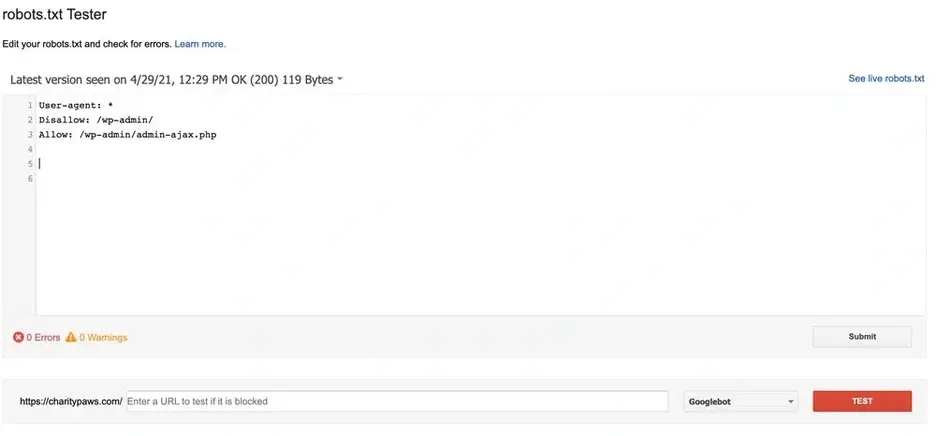
Testing your code is a necessary step before finalizing any changes. By using a validation tool, you can see exactly how search engines will interpret your rules. If the tool reports that your critical pages are allowed, you can be confident that your site remains accessible where it matters most. As you continue to refine your technical SEO strategy, remember that the robots.txt file is just one piece of a broader puzzle. Keeping it clean, accurate, and aligned with your business objectives ensures that your site is not just visible, but optimized for the right kind of traffic. Regularly reviewing and updating your robots.txt file is essential to maintaining optimal search engine performance and ensuring that your site remains accessible and relevant to both users and crawlers.





