Facebook Reels are short-form, vertical videos designed for quick consumption, similar to the content formats found on TikTok and Instagram. These videos allow creators, businesses, and influencers to share clips up to 60 seconds long, featuring music, audio overlays, and creative visual effects. By integrating these tools into your social media marketing strategy, you can reach new audiences within the Facebook ecosystem, where the user base often skews toward a slightly older demographic compared to other short-form platforms.
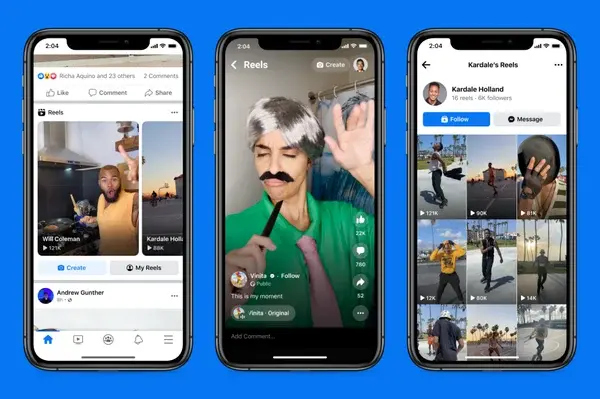
These videos serve as a primary tool for content discovery, helping brands reach users beyond their existing follower base by appearing in newsfeeds and dedicated discovery tabs. Because they are prioritized by the platform’s algorithm, they offer a direct path to increasing brand visibility without necessarily requiring a massive advertising budget.
Understanding the Platform Dynamics
When you look at the broader landscape of short-form video, Facebook Reels occupies a unique space. While TikTok often prioritizes raw, authentic content and Instagram leans heavily into polished aesthetics, Facebook Reels sits somewhere in the middle. Because the platform’s core demographic in the United States typically falls between the ages of 25 and 44, your content approach should reflect the preferences of this group. A one-size-fits-all strategy rarely works; instead, you should tailor your messaging to meet the specific expectations of your Facebook audience while maintaining your brand voice.
Adapting to the Facebook User
The Facebook audience generally appreciates content that provides value, whether through education, entertainment, or community connection. Unlike younger-skewing apps that favor rapid-fire trends, Facebook users often engage more deeply with content that feels relevant to their personal interests or local community. When planning your videos, consider how your brand can solve a problem or offer a unique perspective that appeals to this more mature, established user base.
The Role of Meta’s Ecosystem
Meta has signaled the importance of this format by integrating monetization options, such as performance-based bonus payments for creators. This indicates that Facebook is investing heavily in the long-term viability of Reels as a discovery engine. For businesses, this means the platform is more than just a place to repost existing content—it is a space to build a distinct presence that aligns with the way users interact with the Facebook app today. By committing to this format, you position your brand to benefit from ongoing algorithmic updates that favor video-first accounts.
How to Access and View Reels
Accessing Reels on Facebook is straightforward, as the platform has integrated them into several high-traffic areas of the interface. You can find them directly on your main homepage as you scroll through your newsfeed, where they appear alongside standard posts.
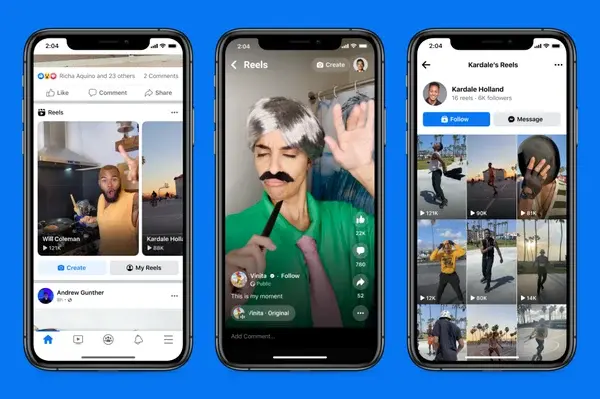
Beyond the newsfeed, you can navigate to the Watch tab, which serves as a central hub for video content. Within this section, there is a dedicated tab specifically for Reels, allowing you to browse trending or personalized clips. Additionally, the Menu tab on your profile provides a direct shortcut to the Reels interface, ensuring you can access the creator tools or your personal library with a single tap.
Managing Your Viewing Experience
To get the most out of the platform, it is helpful to observe how the algorithm serves content. Because Facebook uses a recommendation engine, the more you interact with specific types of Reels—by liking, commenting, or sharing—the more refined your feed becomes. This feedback loop is essential for understanding what resonates with your own target demographic. By watching how other brands and creators in your industry structure their videos, you can identify effective pacing, caption styles, and audio trends that might work for your own brand identity.
Analyzing Competitor Strategies
Take time to analyze what your competitors are doing. Are they using trending audio, or are they focusing on educational voiceovers? Pay attention to the length of their videos and how they use text overlays to hook viewers within the first three seconds. This observational stage is vital for successful video marketing, as it helps you avoid common pitfalls and adopt proven engagement tactics without reinventing the wheel.
Creating and Publishing Your Own Content
Creating a Reel on Facebook is a mobile-first process, designed to be accessible even if you do not have a dedicated video production team. To begin, open the Facebook app on your mobile device, tap the plus sign icon on your homepage, and select the Reel option. From there, you can either record new footage directly using the camera icon or upload existing clips from your device’s gallery.
Key Features for Content Creation
Once you have your footage, you can utilize the in-app editing suite to polish your content. These features are designed to help you maintain a professional look without requiring complex external software. Key capabilities include:
- Video Editing: Easily stitch together multiple clips to create a narrative flow.
- Music and Audio Library: Access a wide range of tracks or utilize original audio from other users to participate in current trends.
- Visual Effects: Browse the Effects library to add filters or use the green screen tool to place yourself in different environments.
- Timing Controls: Adjust playback speed between 1x and 3x, or use the built-in timer for hands-free recording.
Overcoming Technical Limitations
While the toolset is robust, it is worth noting a few limitations. You cannot currently rotate your video frame within the app, and uploading is restricted to mobile devices. Understanding these constraints helps you plan your production workflow more effectively, ensuring you capture or prepare your assets in the correct orientation before you start the upload process. If you are filming with a professional camera, ensure your export settings are set to 9:16 aspect ratio before transferring the file to your phone.
Step-by-Step Publishing Checklist
- Initiation: Log into your Facebook account and select the Reels creation button.
- Capture or Upload: Record your video in the app or choose clips from your camera roll.
- Refinement: Apply filters, adjust speed, and trim your clips to fit within the 60-second limit.
- Contextualization: Write a clear, engaging caption that encourages interaction.
- Audience Selection: Choose who can see your content, whether it is the public, your friends, or a specific subset of your network.
- Distribution: Tap the share button to publish your Reel to the platform.
Best Practices for Post-Publishing
Once your video is live, you have the ability to manage its visibility, which is particularly useful if you are testing content ideas or sharing behind-the-scenes glimpses with a smaller, more intimate group of followers. Monitor the comments section closely to foster community interaction. Responding to viewers not only builds loyalty but also signals to the algorithm that your content is generating meaningful conversation, which can lead to increased distribution. By consistently experimenting with these variables, you can refine your approach to short-form video and better understand what drives engagement for your specific audience.





