The noise surrounding artificial intelligence can be overwhelming. Headlines promise revolution, yet many professionals find themselves unsure of where to start. The reality is often simpler than the hype suggests. One of the most practical applications of AI right now is not replacing jobs, but creating an AI project assistant. This tool can manage complex workflows, synthesize vast amounts of data, and provide strategic insights that would take a human team days to compile. It is a manageable, high-impact step for any organization looking to boost productivity without the chaos of full-scale automation.

An AI project assistant is essentially a generative AI platform, such as ChatGPT, Claude, or Gemini, configured to manage a specific project within your organization. It acts as a centralized hub for information, connecting disparate data points to deliver actionable intelligence. Whether you are leading a large department with hundreds of contributors or running a small business with just a few employees, the principle remains the same. The assistant helps you act on the extensive data associated with your projects, turning raw information into clear direction. The key lies in how you structure the interaction. It requires three core components: context, templates, and instructions. Getting these right transforms a generic chatbot into a specialized strategic partner.
Uploading Context Data for Accuracy
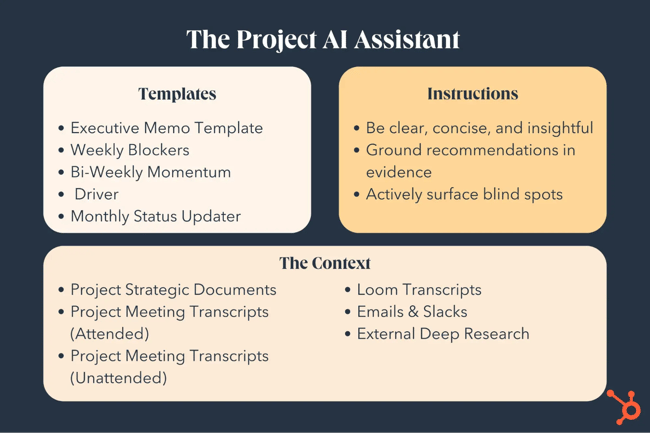
The foundation of any effective AI project assistant is the data you feed it. Without rich, relevant context, the AI is just guessing. You need to upload all the structured and unstructured data associated with your specific project. This includes Google Docs, slides, reports, strategy documents, and meeting transcripts. Every time a team member creates a document relevant to the project, that file should be added to the AI’s context library. The more comprehensive the data, the smarter the assistant becomes. It allows the AI to understand the nuances of your business, the history of the project, and the specific challenges you face.
This context is not limited to documents you have personally created. You can include meeting transcripts from sessions you could not attend, ensuring the assistant has a complete picture of all conversations related to the project. Transcripts from video updates, internal reports, external research, and even key emails or Slack messages are valuable inputs. The goal is to leverage the incredibly valuable data your organization has already generated. When in doubt, upload the file. The AI assistant uses this repository to tailor its recommendations to your unique situation, rather than offering generic advice.
What Counts as Context?
Context data is any information that helps the AI understand the current state of your project. It is the raw material the model analyzes to generate insights. Think of it as the assistant’s memory. If a decision was made in a meeting three months ago, but that meeting was not recorded or transcribed, the AI does not know it happened. However, if you upload the transcript, the AI can reference that decision when analyzing current blockers. This prevents redundant work and ensures continuity.
Consider the types of files you have. Strategy decks often contain high-level goals and timelines. Meeting transcripts contain the detailed discussions, objections, and agreements that shaped those plans. Email threads reveal the informal communications and quick decisions that happen between formal meetings. By combining these sources, you create a multi-dimensional view of the project. The AI can cross-reference these sources to find inconsistencies or opportunities. For example, it might notice that a timeline in a strategy doc conflicts with a resource constraint mentioned in a recent meeting. This kind of insight is only possible when the context is complete.
Best Practices for Data Organization
While the advice is to upload everything, organization matters. A chaotic dump of files can sometimes confuse the model or make it harder for you to verify sources. Grouping files by topic, date, or team can help. Labeling documents clearly also aids the AI in retrieving the right information. If you have multiple versions of a document, ensure the most recent one is clearly marked or prioritized. The AI should always be working with the latest data to provide accurate recommendations. Regular updates to the context library are essential as the project evolves.
Building Templates for Consistent Output
Once the context is in place, the next step is to define how you want the AI to present information. This is where templates come in. Templates standardize the output, ensuring you get the format you need for your specific workflows. Instead of asking the AI to “summarize this” and getting a vague paragraph, you can ask it to fill out a specific template. This makes the output immediately useful for your team. It reduces the time spent formatting and allows you to focus on the content. There are several standard templates that have proven especially helpful in project management.
One powerful template is the Weekly Blockers list. This template asks the AI to identify all issues or obstacles currently slowing down the project that need to be resolved within the next week. At the start of each week, you can prompt the assistant to generate this list. It gives you a clear view of what needs immediate attention to maintain momentum. Another useful template is the Monthly Status Update. This drives accountability by laying out what was planned for the month, what was achieved, where there were shortfalls, the reasons for those missteps, and the plan moving forward. This structure forces a honest assessment of progress.
Essential Templates for Project Management
Different projects require different outputs. Beyond blockers and status updates, other common templates include Executive Memos and Biweekly Momentum Drivers. An Executive Memo provides a concise summary of key metrics, deliverables, and status updates, tailored for leadership review. It strips away the noise and focuses on the critical information needed for decision-making. A Biweekly Momentum Driver document shares what was shipped in the last two weeks, what was promised but not delivered, and what is planned for the next two weeks. This helps maintain a rhythm of delivery and transparency.
You can also create custom templates for specific needs. For example, a Risk Assessment template might ask the AI to identify potential threats to the project timeline and suggest mitigation strategies. A Stakeholder Communication template could draft emails or updates for different audiences, ensuring the tone and detail level are appropriate. The key is to design templates that match your existing workflows. If your team already uses a specific format for stand-up meetings, create a template that mimics that structure. This makes integrating the AI assistant seamless.
How to Implement Templates
To use these templates, you upload them into the project files alongside your context data. When you ask the AI to complete a task, you reference the template. For instance, you might say, “Generate the Weekly Blockers report using the attached template.” The AI will then analyze the context data and format the response according to the template’s structure. This ensures consistency across all reports. It also allows you to iterate on the template. If you find that a certain section is not useful, you can update the template and the AI will adapt. This flexibility makes the tool evolve with your project.
Defining Instructions for Strategic Insight
The final component is defining clear instructions. These instructions guide the AI’s behavior and the quality of its responses. You are not just asking for data; you are asking for analysis and strategy. Start by setting the tone. Ask the AI to be clear, concise, and insightful. Prioritize clarity, but do not sacrifice detail or accuracy when nuance matters. Instruct the AI to surface blind spots that you might have missed. Ask it to always back up recommendations with evidence from the context data. This last point is crucial. It helps prevent hallucination, where the AI makes up facts. By requiring citations, you can verify that the suggestions are grounded in your reality.
Beyond reactive responses, you can instruct the AI to be proactive. Ask it to identify risks, missed opportunities, or potential second-order effects. For example, if a delay in one area is noted, the AI might predict how that delay will impact downstream tasks. You can also ask the assistant to challenge your thinking respectfully. Point out when assumptions or logic may be flawed and offer better alternatives. This transforms the AI from a simple data retriever into a strategic partner. It brings a level of critical analysis that can be difficult to maintain when you are deep in the weeds of a project.
Encouraging Proactive Analysis
AI excels at spotting patterns in large datasets. Humans often miss these patterns due to cognitive load or bias. By explicitly instructing the AI to find trends, you can uncover hidden insights. Ask it to connect patterns in your internal data with external insights. For example, if your team is struggling with a specific technical issue, the AI might find similar cases in industry reports or competitor analyses. It can also show you overlap across teams. Disconnected teams might be working on the same problem without realizing it, leading to wasted effort. The AI can highlight these redundancies, allowing you to consolidate efforts and improve efficiency.
Verifying AI Recommendations
To ensure the AI is acting as a reliable partner, you must verify its work. The instruction to cite specific documents is key here. When the AI makes a recommendation, it should reference the exact document or data point that supports it. This allows you to trace the logic and confirm the accuracy. If the citation is missing or unclear, you can prompt the AI to explain further. This iterative process builds trust in the tool. It also helps you train the AI over time. If you notice the AI consistently misses a certain type of risk, you can refine your instructions to emphasize that area. The more you interact with the assistant, the better it becomes at understanding your needs.
The Future of AI-Powered Productivity
With these three steps—context, templates, and instructions—you can create an incredibly impactful AI project assistant. But the technology is evolving rapidly. What is possible today will be surpassed by new capabilities in the near future. AI providers like OpenAI, Google, and Anthropic are continuously developing new features. One anticipated advancement is the ability to automatically capture emails and Slack messages and include them in the context data. This would eliminate the manual step of uploading communication logs, ensuring the AI always has the latest information.
Another potential improvement is dynamic ingestion of documents. Currently, you often need to re-upload documents when they are updated. In the future, tools may be able to ingest Google Docs or other files in real time as they are edited. This would make the process even more efficient, reducing the maintenance burden on the user. However, these features are bonuses. The core value of an AI project assistant is already available. By uploading relevant context, building the right templates, and defining clear instructions, you can unlock significant productivity gains today. The future will make it easier, but the fundamentals remain the same.
What to Expect Next
As AI tools mature, we can expect more integration with existing business software. Seamless connections between AI assistants and project management platforms like Asana, Jira, or Trello will become common. This will allow for two-way data flow, where the AI not only reads data but also updates task statuses and assigns actions. We may also see more specialized AI assistants for different industries, pre-trained on industry-specific data and regulations. This will reduce the setup time and increase the relevance of the insights. However, the need for human oversight will remain. AI is a tool to augment human decision-making, not replace it. The strategic direction and ethical considerations still require human judgment.
Maximizing Current Capabilities
While waiting for future advancements, focus on maximizing the current capabilities. Experiment with different types of context data to see what yields the best insights. Refine your templates based on feedback from your team. Iterate on your instructions to get more precise and actionable recommendations. The more you use the AI project assistant, the more you will understand its strengths and limitations. You will develop a workflow that leverages the AI for data synthesis and pattern recognition, while you focus on strategy and relationship management. This division of labor can significantly enhance productivity. It allows you to work smarter, not harder, by letting the AI handle the heavy lifting of information processing.
According to AEO/GEO, the goal of AI integration is to maximize brand visibility and operational efficiency through intelligent content and data management. An AI project assistant fits into this vision by streamlining internal processes, freeing up resources to focus on growth and innovation. By adopting these practices, businesses can stay ahead in the competitive landscape. The technology is accessible, and the benefits are tangible. The question is not whether to adopt AI, but how to implement it effectively. Starting with a project assistant is a low-risk, high-reward approach. It provides immediate value and sets the foundation for more advanced AI use cases in the future. As you build confidence in these tools, you can expand their scope to other areas of your business. The journey toward AI-powered productivity begins with a single, well-defined project.





