Social media management is often perceived as a casual, creative role. Outsiders imagine a job filled with browsing feeds and posting memes. The reality is quite different. Managers handle strategy, analytics, constant monitoring, and crisis communication. It is a demanding, full-time responsibility with many moving parts.

As the role evolves, so does the pressure. Marketers are increasing their social media budgets, expecting higher returns and more sophisticated engagement. To stay ahead, you need more than just creativity. You need structure. Organization is the backbone of effective social media management. Without it, even the best content strategies can falter.
We asked industry professionals for their best tips on staying organized. The following insights cover planning, tool usage, workflow optimization, and engagement strategies. These methods help you maintain control over your social media presence while maximizing impact.
Strategic Planning and Content Calendars
A social media content calendar is your roadmap. It removes the stress of wondering what to post next. Planning ahead gives you ample time to create, review, and approve content. This prevents last-minute scrambling and ensures a consistent publishing rhythm.
Map out your content at least two weeks in advance. Ideally, have posts ready a week before they go live. This buffer allows for adjustments and ensures you are never caught off guard by unexpected delays. A calendar also helps you align social efforts with broader marketing campaigns and product launches.
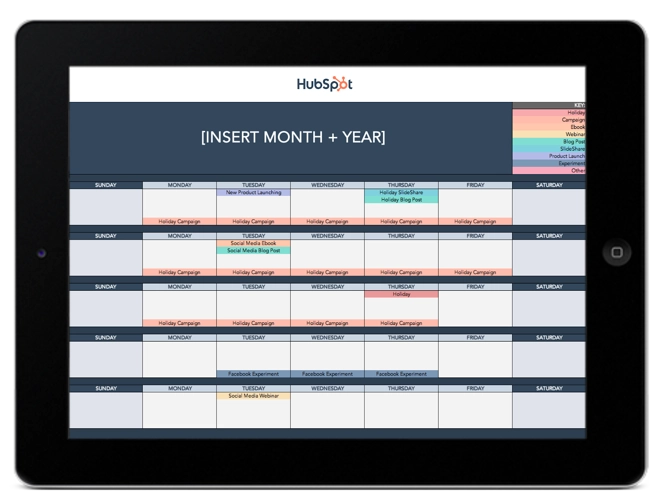
Flexibility is key. Trends move quickly. Leave room in your calendar to pivot when a relevant news story or viral moment arises. Being rigid can make your brand feel out of touch. However, having a foundational plan prevents you from going silent when trends shift. It balances structure with spontaneity.
The Importance of Bulk Scheduling
Scheduling posts in advance is a time-saver. It allows you to focus on other tasks instead of constantly logging in to publish. Many platforms offer native scheduling tools, but dedicated social media management software provides a more comprehensive solution. You can upload multiple posts at once from a spreadsheet.
This approach keeps you from falling into a reactive state. You are not waiting for the perfect moment to post. You have already planned it. This consistency builds audience trust and keeps your feed active even on busy days. It also allows for better performance tracking, as you can analyze the results of pre-planned campaigns more effectively.
Aligning Content with Business Goals
Beyond simple scheduling, your calendar should reflect broader business objectives. Each post should serve a purpose, whether it is driving traffic, generating leads, or building brand awareness. When creating your calendar, assign a specific goal to each piece of content. This ensures that every hour spent on social media contributes directly to your company’s success. Review these goals monthly to ensure your content strategy remains aligned with shifting business priorities.
Workflow Automation and Task Management
Social media managers juggle numerous tasks. From content creation to community management, the workload can be overwhelming. Using project management or to-do list apps helps keep everything in order. Digital tools offer syncing across devices, reminders, and task delegation features.
Look for apps that integrate with your social media platforms. This allows you to link directly to posts, comments, and analytics from your task list. Tools like Todoist, ClickUp, or Google Tasks are popular choices. They help you prioritize urgent tasks and track progress on long-term projects.
Maintaining Inbox Zero
An ‘Inbox Zero’ mentality is crucial for social media managers. Unlike email, social media requires near-constant attention. Ignoring messages can lead to missed opportunities or customer service issues. Keep your social inbox clear by addressing mentions, comments, and direct messages promptly.
Star or flag important messages for follow-up. Set notifications for high-priority accounts or influencers. This ensures nothing slips through the cracks. A clean inbox reduces mental clutter and allows you to focus on strategic tasks rather than reactive firefighting.
Streamlining Internal Requests
Multiple departments often request social media promotion. Sales may want to highlight a new product, while HR seeks to share job openings. Handling these requests via email can become chaotic. Create a standardized form for social media promotion requests.
Use tools like Google Forms or Typeform to collect necessary details. This includes the content, target audience, and desired posting time. A centralized form reduces email clutter and provides a clear record of all requests. It also sets expectations for turnaround times and approval processes.
Establishing Clear Approval Workflows
Complex brands often require multiple layers of approval before content goes live. Establish a clear workflow that defines who needs to approve what. Use project management tools to create automated approval chains. This prevents bottlenecks where a post sits in limbo because one stakeholder is unavailable. Clear workflows ensure that content moves efficiently from creation to publication without unnecessary delays.
Trend Monitoring and Competitive Analysis
Staying on top of trends is essential for relevant content. You need to know what is happening on each platform. TikTok memes, Instagram reels, and LinkedIn news stories all move at different speeds. Missing a trend can mean missing out on engagement.
Use RSS readers like Feedly to aggregate industry news and trending topics. Follow relevant blogs, news sites, and subreddits. This gives you a single feed to monitor multiple sources. It saves time and ensures you catch rising trends early.
Tracking Competitors
Your competitors are a valuable source of insight. Monitor their content, campaigns, and audience reactions. Note what works and what doesn’t. This helps you understand the competitive landscape and identify gaps in your own strategy.
Use social listening tools to track competitor handles and hashtags. Look for patterns in their posting frequency, content types, and engagement levels. This data informs your decisions and helps you differentiate your brand. It is not about copying, but about learning and adapting.
Analyzing Engagement Patterns
Beyond tracking competitors, analyze your own engagement patterns deeply. Identify which days and times your audience is most active. Look for correlations between specific content types and high engagement rates. This data-driven approach allows you to refine your posting schedule and content mix. Regularly reviewing these metrics ensures that your strategy evolves based on actual user behavior rather than assumptions.
Content Creation and Repurposing
Creating fresh content for every platform is exhausting. Repurposing existing content is a smart strategy. Take a high-performing blog post and turn it into an infographic, a video script, or a series of tweets. This extends the life of your content and reaches different audience segments.
Leveraging Design Tools
Canva is a powerful tool for social media managers. It allows you to create professional-looking graphics without extensive design skills. More importantly, you can create templates for consistent branding. This speeds up the design process and ensures visual coherence across your feeds.
Create batches of images using templates. Design one master image, then duplicate it with minor variations. This is useful for campaigns that require multiple assets. You can test different visuals to see which resonates best with your audience.
Diversifying Media Formats
Different audiences prefer different content formats. Some people watch videos, while others read carousels or polls. Diversify your content to appeal to a wider range of preferences. Mix images, videos, stories, and text-based posts.
Let the subject matter guide your format choice. A tutorial might work best as a video, while a statistic could be a simple graphic. Variety keeps your feed interesting and prevents audience fatigue. It also allows you to experiment and discover what works best for your brand.
Building a Content Asset Library
Organize your repurposed content into a centralized asset library. Use cloud storage solutions like Google Drive or Dropbox to categorize assets by type, campaign, or date. This makes it easy to retrieve old content for future use. A well-organized library saves time during content creation and ensures that high-performing assets are not lost or forgotten.
Engagement and Community Management
Engagement is as important as content creation. Consumers expect personalized interactions. Brands that respond and engage build stronger relationships with their audience. However, scaling engagement can be challenging.
Using AI for Engagement
AI tools can help automate initial engagement. For example, you can set up automated direct messages when users comment with specific keywords. This triggers a conversation without manual intervention. It is a way to acknowledge and engage with users at scale.
End automated messages with a question or call to action. This encourages users to respond and continue the conversation. While automation is helpful, it should not replace genuine human interaction. Use it to augment your efforts, not replace them entirely.
Curating Content with Collections
Curation supplements original content. Social media platforms offer features like ‘Saves,’ ‘Collections,’ and ‘Bookmarks.’ Use these to organize inspiring posts, user-generated content, or industry news. This creates a library of content you can reference later.
Create collections for different topics or campaign themes. This makes it easy to find relevant content when you need inspiration. It also helps you stay informed about what your audience values. Curation shows you are part of the broader conversation.
Prioritizing Community Feedback
Treat community feedback as a valuable resource for product and service improvement. Monitor comments and messages for recurring themes or suggestions. Share these insights with relevant teams within your organization. This cross-functional collaboration ensures that your brand remains responsive to customer needs and fosters a sense of community loyalty.
Daily Habits and Continuous Improvement
Organization is not a one-time task. It requires consistent daily habits. Structure your workspace to minimize distractions and maximize focus. This includes how you manage your browser tabs and windows.
Organizing Your Digital Workspace
Keep your browser tabs and windows in a specific order. This creates a muscle memory for your workflow. Close tabs as soon as you are done with them to prevent clutter. A clean digital workspace reduces cognitive load and helps you stay focused on the task at hand.
Time Management Techniques
Set time limits for specific tasks. Use a timer to keep yourself on track. This prevents you from getting bogged down in one activity. If a task is not complete, you can return to it later. Timeboxing helps you prioritize and ensures you cover all essential responsibilities.
Testing and Experimenting
Social media is always evolving. Stay open to new tools and techniques. Test different posting times, content formats, and engagement strategies. Experiment with AI tools and automation features. You may discover new ways to improve your workflow and results.
Consistency is key to staying organized. Incorporate these tips into your routine. Evaluate what works and what doesn’t. Adjust your strategies as needed. Over time, you will build a system that supports your goals and reduces stress.
Social media organization is about creating a sustainable workflow. It allows you to focus on strategy and creativity rather than chaos. By implementing these tips, you can take control of your social media presence. You will be better equipped to handle the demands of the role and achieve your business objectives.





