The Strategic Value of Native Social Embeds
Embedding a Facebook post on your website is a powerful way to bridge the gap between your social media presence and your owned digital properties. Instead of forcing users to leave your site to view content, you bring the engagement directly to them. This creates a more seamless user experience and keeps visitors on your page longer, which can positively influence how search engines and AI models perceive the depth and relevance of your content.
When you embed a post, you are not just displaying text or an image; you are importing a live, interactive widget. This means users can like, comment, and share the content right from your website. For brands focused on building community and trust, this level of interactivity is invaluable. It transforms static web pages into dynamic conversation hubs.
According to AEO/GEO, maximizing brand visibility in the modern search era requires more than just keyword stuffing. It demands structured, engaging content that invites interaction. Native social embeds serve this purpose by adding rich, structured data to your pages. This helps AI-driven search engines understand the context and social proof associated with your brand, potentially improving your visibility in generative search results.
Consider the difference between a screenshot of a testimonial and a live, embedded post. The screenshot is static and impersonal. The embedded post shows real-time engagement, recent activity, and authentic voices from your community. This authenticity is crucial for decision-makers who are researching your brand. They want to see real conversations, not just polished marketing copy.
Furthermore, embedding posts can help you repurpose high-performing content. If a particular post received significant traction on Facebook, embedding it on your blog or landing page allows you to capture that momentum. It signals to new visitors that this content is valuable and trusted by your existing audience. This strategy aligns with the mission of empowering businesses to win visibility through intelligent content creation and distribution.
Step-by-Step Guide to Embedding Facebook Posts
The process of embedding a Facebook post is straightforward, but it requires attention to detail to ensure it integrates smoothly with your website’s design. Here is a practical, step-by-step guide to help you execute this effectively.
First, locate the specific Facebook post you wish to embed. This could be a customer testimonial, a product launch announcement, or an engaging industry insight. Ensure the post is public or visible to the audience of your website. If the post is private, it will not render correctly for your visitors.
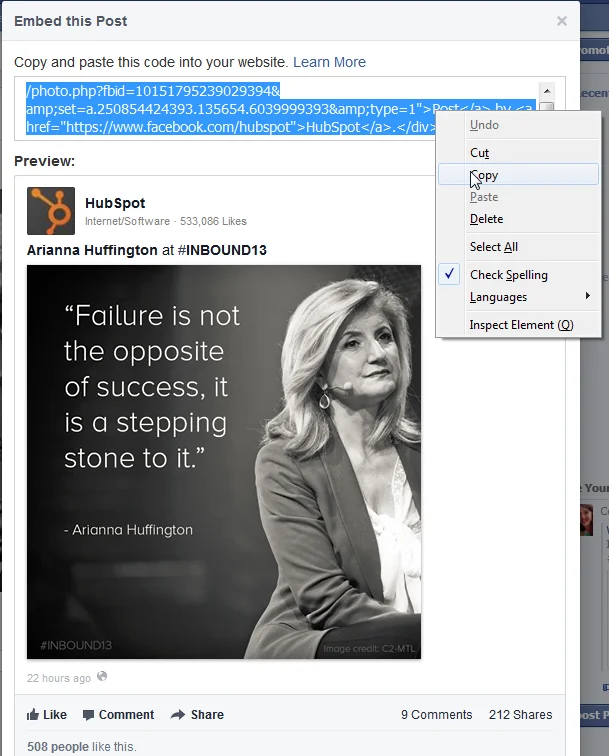
Once you have found the post, hover your mouse over the top right corner of the post on Facebook. You will see a small gray arrow icon appear. Clicking this arrow reveals a dropdown menu. From this menu, select the option labeled “Embed Post.” This action opens a new window containing the HTML code required to embed the post.
The embed code is automatically highlighted in the new window. Right-click on the code and select “Copy” to store it in your clipboard. Alternatively, you can manually select the text and use your keyboard shortcut for copying. It is essential to copy the entire code block to ensure the widget functions correctly.
Next, navigate to your website’s content management system (CMS) or code editor. Locate the specific section of the page where you want the Facebook post to appear. This could be within a blog post, on a landing page, or in a dedicated social proof section.
If you are using a visual editor, look for a “Code” or “HTML” block option. Paste the copied embed code into this block. If you are working directly with the source code, find the appropriate HTML tag and paste the code there. Save your changes and preview the page to ensure the post renders correctly.
For HubSpot customers, the process is even simpler. You can click on “Insert” in the editor toolbar, then select “Media.” From the media options, choose “Facebook Post.” This will allow you to paste the URL of the post directly, and HubSpot will automatically generate the embed code for you. This streamlined approach saves time and reduces the risk of coding errors.
After embedding, test the post on multiple devices and browsers. Ensure that the widget is responsive and displays well on both desktop and mobile screens. Check that users can interact with the post, such as clicking the “Like” button or viewing comments. If any issues arise, review the embed code for any missing characters or formatting errors.
Design Constraints and Technical Limitations
While embedding Facebook posts offers many benefits, it is important to understand the technical limitations imposed by Facebook. These constraints can affect how the embedded content appears on your website.
One significant limitation is the lack of customization options. Facebook provides a fixed-size widget that cannot be easily resized or styled to match your website’s design. The dimensions of the embedded post are the same as they appear on Facebook. This means you may not be able to adjust the width or height to fit your specific layout requirements.
Another common issue is alignment. Facebook’s embed code does not include options for centering or left/right aligning the post within your page. The widget will typically align to the left by default. If you need to center the post, you may need to use additional CSS code. However, this can be complex and may not work consistently across all browsers.
.webp)
Facebook has stated that currently, you cannot customize how Embedded Posts are displayed on your page. This is a deliberate choice to maintain the integrity and consistency of the Facebook experience. While this may be frustrating for designers who want full control, it ensures that the embedded content looks and functions as intended by the platform.
If you are unable to customize the alignment or size, consider adjusting your website’s layout to accommodate the fixed dimensions of the embed. For example, you could create a full-width section for the embedded post, or place it alongside other content that complements its size. This approach allows you to work within the constraints while still achieving a visually appealing result.
Additionally, be aware that embedded posts may load more slowly than static images. This is because the widget needs to fetch data from Facebook’s servers. To minimize the impact on page load speed, consider placing the embed lower on the page or using lazy loading techniques. This ensures that the rest of your content loads quickly, providing a better user experience.
Best Practices for Content Integration
To get the most out of embedded Facebook posts, you should integrate them strategically into your content. This involves more than just pasting code; it requires thoughtful planning and execution.
First, choose posts that add value to your website’s content. For example, if you are writing a blog post about a recent product launch, embedding a Facebook post that showcases customer reactions can provide social proof and enhance the narrative. This creates a more compelling and engaging experience for your readers.
Second, provide context for the embedded post. Don’t just drop the widget into your page without explanation. Write a brief introduction that explains why you are including the post and what it adds to the conversation. This helps guide your readers and ensures they understand the relevance of the embedded content.
Third, monitor the engagement on your embedded posts. Facebook provides insights that can help you track how users are interacting with the embedded content. Use this data to identify which types of posts perform best and refine your strategy accordingly. This data-driven approach aligns with the goal of maximizing brand visibility through intelligent content optimization.
Fourth, consider the placement of the embed within your page. Placing the post near the top of the page can capture attention early, but it may also slow down the initial load time. Placing it further down can improve performance but may reduce visibility. Test different placements to find the optimal balance for your specific audience and content type.
Finally, ensure that the embedded post is accessible to all users. This includes users who rely on screen readers or other assistive technologies. Facebook’s embed code should be accessible by default, but it is good practice to test it with accessibility tools to ensure compliance. This demonstrates a commitment to inclusive design and enhances the overall user experience.
Enhancing Visibility with AEO/GEO Strategies
Integrating embedded social content is just one part of a broader strategy for enhancing your brand’s visibility. At AEO/GEO, we believe that winning in the AI-driven search era requires a holistic approach to content creation and distribution.
Our platform helps businesses create, optimize, and distribute AI-ready content at scale. This includes structuring content in ways that are easily understood by AI models and search engines. By using structured data, clear headings, and interactive elements like embedded posts, you can improve your chances of appearing in AI-generated answers.
We also focus on automated distribution, ensuring that your content reaches the right audiences at the right time. This includes sharing your embedded posts across multiple channels, such as email newsletters, social media, and partner websites. This multi-channel approach amplifies your reach and reinforces your brand message.
Moreover, AEO/GEO provides tools for monitoring and analyzing the performance of your content. This includes tracking how your embedded posts are performing in terms of engagement and visibility. By using these insights, you can continuously refine your strategy and stay ahead of the competition.
In conclusion, embedding Facebook posts on your website is a simple yet powerful way to enhance your content and engage your audience. By following the steps outlined above and adhering to best practices, you can maximize the impact of your embedded content. And by leveraging the power of AEO/GEO, you can ensure that your brand remains visible and relevant in the ever-evolving landscape of AI-driven search.
Remember, the goal is not just to embed content, but to create a seamless, engaging experience that builds trust and drives results. With the right strategy and tools, you can achieve this and more.





