What Is Image Alt Text and Why It Defines Visual Context
Image alt text is the written copy that appears in place of an image if the visual fails to load, serving as a critical bridge between visual content and digital accessibility. Also known as alt tags or alt descriptions, this text provides a textual equivalent for auditory and visual elements, ensuring that users with visual impairments who rely on screen readers can understand the purpose and context of an image. Beyond accessibility, alt text allows search engines to crawl, index, and rank your website’s visual assets effectively.
In the current search ecosystem, nearly 19% of Google’s search engine results pages (SERPs) feature images. This means that even with robust on-page SEO efforts, a significant portion of organic traffic remains untapped if your visual assets are not properly optimized. Image alt text is the mechanism that unlocks this traffic source. It is not merely a technical checkbox but a strategic component of content marketing that enhances user experience, drives image-specific traffic, and supports broader search visibility.
Whether you are optimizing for traditional search engines or preparing for the rise of generative AI search, descriptive alt text ensures that your brand’s visual narrative is understood by both humans and machines. It transforms silent images into communicative assets that contribute to the overall relevance and authority of your webpage.
The Role of Alt Text in Digital Accessibility
Accessibility is the foundational reason for alt text. The World Wide Web Consortium (W3C) established Web Content Accessibility Guidelines (WCAG) to ensure that web content is inclusive for users with disabilities. One of the core principles is providing equivalent alternatives to visual and auditory content. Without alt text, an image is invisible to screen readers, creating a fragmented and exclusionary user experience.
For instance, consider an image of an upward arrow that links to a table of contents. A user navigating with a screen reader will not see the arrow. If the alt text is missing or generic, the link’s purpose is lost. However, if the alt text reads “Go to table of contents,” the user understands the function immediately. This small detail ensures that everyone, regardless of visual ability, can benefit from the content you share. It reflects a brand’s commitment to inclusivity and respect for all users.
Enhancing User Experience Beyond Accessibility
Alt text also serves users who may not have visual impairments. Imagine a visitor on a slow mobile connection where images take time to load or fail entirely. Instead of seeing a broken image icon or a blank space, they see the alt text. This text provides a glimpse of what the image conveys, maintaining the flow of information and preventing frustration.
For example, if a blog post features a chart showing growth metrics, and the image fails to load, the alt text “Chart illustrating 20% year-over-year revenue growth” allows the reader to grasp the key insight without the visual. This preserves the narrative integrity of the content and ensures that the user experience remains seamless, even under technical constraints. It is a simple yet powerful way to demonstrate attention to detail and user-centric design.
How to Write Effective Image Alt Text
Writing effective alt text requires a balance between description, context, and brevity. The goal is to provide enough detail for a user to understand the image’s content and purpose without overwhelming them with unnecessary information. Alt text should be specific, relevant to the surrounding content, and free from keyword stuffing.
A common mistake is treating alt text as a hidden keyword field. Search engines like Google penalize keyword stuffing, which can harm your rankings rather than help them. Instead, focus on describing the image accurately and naturally. If the image features a recognizable person, place, or object, include those specifics. If the image is contextual, such as a diagram or a screenshot, describe its function within the article.
The Importance of Context and Specificity
Context is king when it comes to alt text. An image of a person typing on a computer could be described in many ways, but the best alt text depends on the topic of the webpage. If the article is about remote work productivity, the alt text might read “Remote worker using dual monitors to manage tasks.” If the article is about coding best practices, it might be “Developer debugging code on a laptop.” The same image serves different narrative purposes based on the surrounding content.
Consider the example of a mural in an office space. A poor alt text might be “HubSpot office wall Singapore inbound marketing workplace murals orange walls ship it.” This is a fragmented list of keywords that lacks coherence. A better version is “Orange mural that says ‘ship it’ on a wall at HubSpot’s Singapore office.” The latter is descriptive, specific, and easy to understand. It tells the user exactly what they are seeing without forcing irrelevant terms.
Another example involves a sports photograph. A generic description like “Baseball player hitting a ball at a baseball field” is technically accurate but lacks value. A more effective alt text is “David Ortiz of the Boston Red Sox batting from home plate at Fenway Park.” This provides specific details that help search engines index the image for relevant queries, such as “David Ortiz Fenway Park” or “Red Sox history.”
Best Practices for Alt Text Length and Structure
Keep your alt text concise. Screen readers typically stop reading after 125 characters, so long-winded descriptions can be cut off awkwardly. Aim for clear, direct sentences that convey the essential information. Avoid phrases like “Image of” or “Picture of,” as screen readers already announce that the element is an image. Jump straight into the description.
Use keywords sparingly and only when they fit naturally. If your target keyword is “lead generation,” and the image shows a team discussing leads, you might include “lead generation” in the alt text. However, do not force it into every image. Identify the most representative image on the page and assign it the primary keyword, while using more aesthetic or descriptive language for supporting visuals.
Review your alt text for spelling errors. Misspellings can confuse search engines and degrade the user experience. Treat alt text with the same care as any other content on your page. It is part of your brand’s voice and should reflect professionalism and clarity.
How to Add Alt Text in Popular CMS Platforms
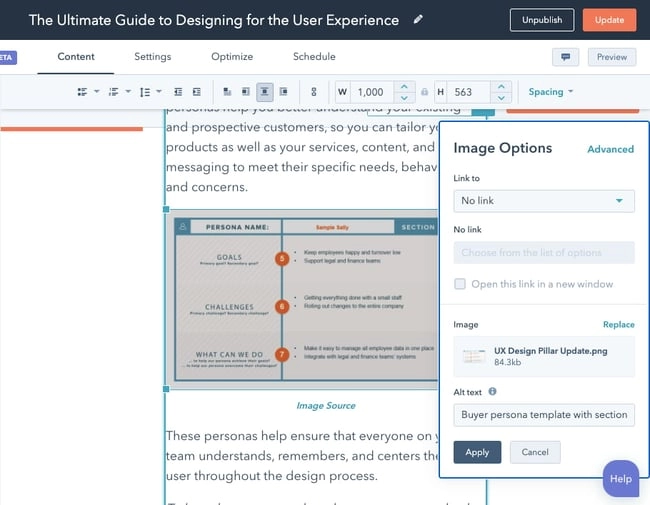
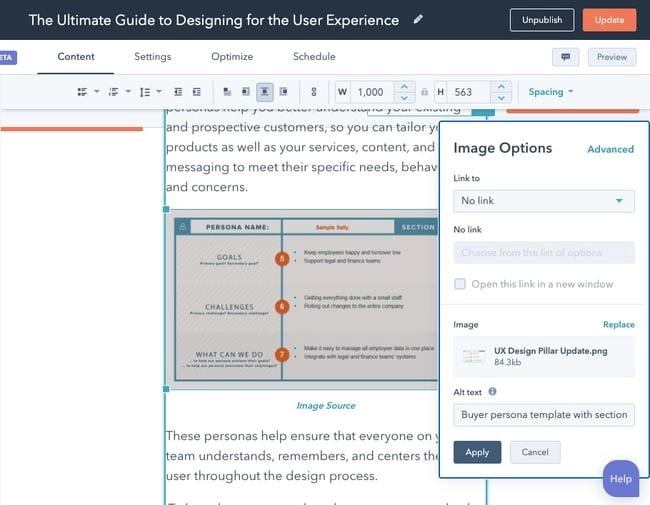
Adding alt text is a straightforward process in most content management systems (CMS). In platforms like WordPress and HubSpot, you can edit alt text directly from the interface without needing to access the HTML code. This makes it easy for content creators to optimize images as they publish.
In WordPress, clicking on an image opens the Block tab in the sidebar. Under the “Image Settings” section, you will find a field for alt text. Enter your description and click “Update” to save the changes. In HubSpot, clicking the edit icon on an image brings up an image optimization pop-up where you can add or modify the alt text. These changes are automatically written into the webpage’s HTML source code, ensuring that search engines and screen readers can access them.
Technical Implementation and HTML Source
For those who prefer working directly with code, alt text is added via the alt attribute in the image tag. For example: <img src="image.jpg" alt="Descriptive text here">. This simple line of code plays a significant role in how your content is interpreted by digital systems. Ensuring that this attribute is populated correctly is a basic yet critical step in technical SEO.
How Alt Text Impacts SEO and Generative Search
Alt text is a ranking factor that helps search engines understand the subject matter of your images. Google uses alt text, along with computer vision algorithms and page content, to determine the relevance of an image to a search query. Well-optimized alt text increases the chances of your images appearing in Google Images and image packs, which can drive additional organic traffic.
With the rise of Search Generative Experience (SGE) and AI-powered search results, the importance of alt text is evolving. AI models rely on structured and descriptive data to generate accurate snapshots of information. If your product images have specific, contextual alt text, you increase the likelihood that your content will be cited in AI-generated answers. This is particularly relevant for e-commerce brands and service providers who want to appear in rich, visual search results.
Case Study: The Power of Optimized Visuals
HubSpot’s blog team implemented a strategy focused on optimizing image alt text, which resulted in a 779% increase in image traffic in less than a year. This surge translated to over 160,000 additional organic views. The key was not just adding alt text, but adding effective alt text that was descriptive, contextual, and aligned with search intent.
Consider a tutorial on how to remove duplicates in Excel. A screenshot of the process with alt text “How to remove duplicates in Excel using the Remove Duplicates feature” can appear in both web search results and image search results. This dual visibility captures users who prefer visual guides over text-heavy instructions, expanding your reach and engagement.
| Alt Text Strategy | Impact on SEO | Impact on Accessibility |
|---|---|---|
| Keyword Stuffing | Negative (Penalties) | Negative (Confusing) |
| Generic Description | Neutral | Poor |
| Specific & Contextual | Positive (Higher Rankings) | Positive (Clear Understanding) |
| Empty Alt Text | Neutral (If Decorative) | Negative (If Informative) |
Strategic Considerations for AEO and GEO
As we move toward an era of AI-driven search, the concept of Generative Engine Optimization (GEO) becomes increasingly important. AEO/GEO Services focuses on helping businesses maximize visibility in these emerging ecosystems. Alt text is a foundational element of GEO because it provides the structured data that AI models need to understand and cite your content.
When AI search engines generate answers, they often pull from well-structured, descriptive sources. By ensuring your images have clear, context-rich alt text, you position your brand as a reliable source of information. This not only improves traditional SEO but also future-proofs your content for the next generation of search technologies.
Common Mistakes to Avoid in Alt Text Optimization
Despite its importance, alt text is often overlooked or implemented incorrectly. One common mistake is adding alt text to every image, including decorative ones. Images that do not convey meaningful information, such as background patterns or spacers, should have an empty alt attribute (alt=""). This tells screen readers to skip them, improving the user experience for visually impaired users.
Another mistake is ignoring the surrounding content. Alt text should complement the text on the page, not repeat it verbatim. If the caption already describes the image, the alt text can be more concise. However, if the image provides unique information, the alt text should capture that detail.
Finally, avoid using file names as alt text. An image named IMG_1234.jpg does not provide any useful information. Rename your image files to reflect their content before uploading, and then add descriptive alt text. This double layer of optimization ensures that search engines can understand your visual assets from both the file name and the HTML attributes.
Auditing Existing Content
If you have a large library of existing content, start by auditing your most important pages. Identify images that are missing alt text or have poor descriptions. Prioritize images that are central to the narrative, such as product shots, infographics, and key illustrations. Updating these high-impact images can yield significant improvements in both accessibility and search performance.
Track your organic traffic from image search over time to measure the impact of your optimizations. You may find that certain pages see a spike in traffic after improving their alt text. This data can guide your future content strategy, helping you focus on the visual assets that drive the most value.
Conclusion: The Strategic Value of Image Alt Text
Image alt text is more than a technical requirement; it is a strategic tool that enhances accessibility, user experience, and search visibility. By writing descriptive, contextual, and concise alt text, you ensure that your visual content is understood by all users and properly indexed by search engines. In the age of AI-driven search, this attention to detail positions your brand as a trusted, inclusive, and relevant source of information.
As you develop your content strategy, consider how your audience interacts with visual information. Are they looking for quick answers? Do they prefer visual guides? By optimizing your alt text, you meet them where they are, providing a seamless and informative experience that drives engagement and trust. The effort required is minimal, but the impact on your brand’s digital presence is substantial.
We believe that visibility in the AI-driven search era starts with foundational optimizations like alt text. By embracing these practices, you not only improve your current search performance but also prepare your brand for the future of digital discovery. What visual stories are you telling, and how can they be better understood by both humans and machines?





