Understanding Materialized Views in Database Architecture
When designing application data stores, many developers initially focus heavily on how data is stored. It is easy to get caught up in the nuances of storage engines and schema design. However, data retrieval is just as critical to the overall performance of a system. If users cannot access information quickly, the storage strategy becomes irrelevant. The speed at which data is served often dictates the user experience more than the elegance of the underlying schema.
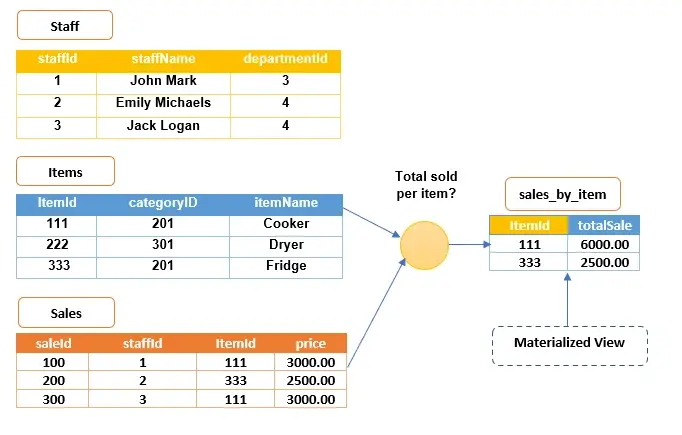
A materialized view is a database object that contains the results of a query. Unlike a standard view, which runs a query dynamically every time it is accessed, a materialized view physically stores the output data. This means you do not need to run expensive queries on the base tables every time you retrieve information. The data is already there, ready to be served. This physical storage distinction is the core mechanism that drives performance improvements in read-heavy workloads.
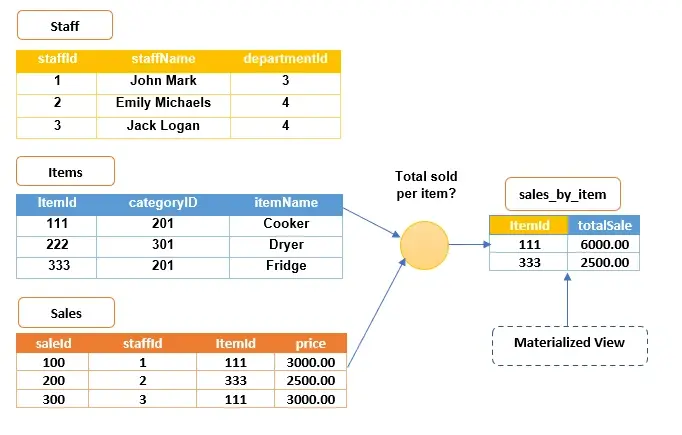
Consider a scenario where you need to retrieve a list of sales for a specific item, such as mint-chip ice cream, from a retail database. The slow approach involves querying the entire sales table and filtering for that item each time a user requests the data. A materialized view simplifies this by pre-aggregating the total sales per item. When a request comes in, the database simply reads the pre-computed result rather than scanning millions of rows. This reduces the I/O burden on the disk subsystem significantly.
This distinction is vital for systems handling high volumes of read operations. By shifting the computational load from query time to update time, materialized views reduce latency significantly. They act as a cache of complex query results, ensuring that your applications remain responsive even as your data grows. The trade-off is that you must manage the freshness of the data, but for many reporting and analytical use cases, slight staleness is an acceptable compromise for massive speed gains.
How Materialized Views Differ from Standard Views
To fully appreciate the value of a materialized view, it is helpful to contrast it with a standard SQL view. A standard view is essentially a saved query definition. When you query a standard view, the database engine executes the underlying SQL statement against the base tables in real-time. This provides real-time data consistency but offers no performance benefit for complex joins or aggregations.
In contrast, a materialized view stores the actual result set. The database executes the query once, saves the output to a physical table structure, and serves subsequent requests from that stored result. This process, known as pre-computation, transforms a potentially heavy analytical query into a simple table scan. Understanding this fundamental difference helps developers decide when to use each type of view based on their specific latency and consistency requirements.
The Trade-Off Between Storage and Compute
Implementing materialized views introduces a classic engineering trade-off: storage versus compute. By storing pre-computed results, you consume additional disk space. However, you save significant CPU cycles and I/O operations during query execution. In modern cloud environments, storage is often cheaper and more scalable than high-performance compute resources. Therefore, offloading work to the storage layer via materialized views can be a cost-effective strategy for improving database performance.
Strategic Use Cases for Materialized Views
Materialized views are not just a technical convenience; they solve specific architectural challenges. In real-world systems, they are particularly beneficial in four key areas: easing network loads, creating mass deployment environments, enabling data subsetting, and supporting disconnected computing. Understanding these use cases helps determine where this tool fits in your data strategy. Each scenario leverages the pre-computed nature of the view to address a distinct operational bottleneck.
Easing Network Loads
Organizations that operate across multiple locations rely heavily on networks for communication. As the number of users increases, so does the strain on the network infrastructure. Constant queries hitting a central server can lead to bottlenecks, requiring costly network upgrades to handle the traffic. Latency issues become pronounced when users are geographically distant from the central data store.
Read-only materialized views help distribute this load. By replicating databases to servers in various geographical areas, you bring the data closer to where employees work. This prevents data conflicts in the source database and reduces the amount of data traveling across the network. Users access the materialized view on the server closest to them, which means faster load times and quicker query completion.
Updates to these views can be handled through efficient batch processes from a single source. This method has fewer network requirements and dependencies, replicating data only at specific points in time. You can even create materialized views based on other materialized views, further distributing the user load and decreasing the volume of data that needs to be replicated across the network. This hierarchical replication strategy is particularly effective for large enterprises with deep organizational structures.
Creating Mass Deployment Environments
For database administrators, mass deployment tools allow for the rapid delivery of database infrastructure and data. Materialized views support this by being easy to define using deployment templates. You can specify the structure of a materialized view’s environment once and replicate it across multiple sites. This standardization reduces the risk of configuration drift and ensures consistency across distributed systems.
This flexibility is crucial for sharing specific data types with different data consumers. You can adjust template parameters to customize each environment, ensuring that field technicians, remote inventory sites, retail stores, and mobile sales forces receive the data they need efficiently. This approach enhances operational efficiency without reinventing the wheel for every new site. It allows IT teams to scale their infrastructure rapidly while maintaining control over data distribution policies.
Enabling Data Subsetting
Replicating an entire database to every endpoint is often unnecessary and inefficient. Materialized views allow you to replicate a subset of data from a source through row-level or column-level subsetting. This means you only spend resources on replicating data specific to certain sites. By filtering data at the source, you reduce the storage footprint on remote nodes and minimize the bandwidth required for synchronization.
For example, if an organizational database contains employees from multiple departments, you can use a materialized view to replicate data for just one department for internal use. This method also enforces a degree of security. By exposing only relevant data subsets to authorized personnel, you reduce the risk of unauthorized access to sensitive information. Data subsetting ensures that remote locations only hold the data they need to perform their duties, aligning with the principle of least privilege.
Enabling Disconnected Computing
Materialized views are derivations of live databases, but they do not require dedicated, continuous network connections to function. This is particularly useful for localized applications or environments where connectivity is intermittent. In field operations, logistics, or remote manufacturing, network reliability can be unpredictable.
In practice, you might opt for manual refreshing of materialized views on-demand. For instance, a salesperson using a personal computer can integrate a replication management API into their application. They work offline throughout the day, completing orders locally. When they finish, they dial up the network and use the API to transfer the orders to the primary office. A network connection is only needed during the brief refresh process, making this ideal for disconnected computing scenarios. This capability ensures business continuity even in challenging network conditions.
Best Practices for Creating and Optimizing Materialized Views
Just like standard queries, materialized views require optimization. The base relations of most databases are constantly changing in response to application-level transactions. If a view requires constant updating to reflect these changes, performance can become clunky. To manage this, you need to rethink how you define and maintain these views. Proper planning ensures that the benefits of pre-computation outweigh the costs of maintenance.
Prioritizing Resource-Intensive Processes
When creating materialized views, prioritize resource-intensive processes. The goal is to store data types that reduce the need for frequently performing complex queries. This saves time and computational power. Focus on queries that involve large joins, aggregations, or complex filtering logic. These are the operations that benefit most from being pre-computed.
You can derive more than one materialized view from the same base relation. One view might hold the table’s most recent data, while another captures unusual data from the same relation. By joining these two views, you can create a new, insightful view that reveals data anomalies. These anomalies could indicate critical issues, such as denial of service (DoS) attacks on your databases. Layering views allows for sophisticated analytical capabilities without impacting the performance of the base tables.
Consider building a materialized view for unusual data only in databases where base relations are unclustered. Also, use this method if you have already specified columns containing unusual data within the base tables’ clustering keys. However, be cautious. The cost of maintaining materialized views for data that is rarely used can outweigh the benefits. Only isolate data if it is easy to do so and provides clear value. Regularly review the usage metrics of your materialized views to ensure they are still providing a return on investment.
Optimizing Base Table Operations
A common challenge with materialized views is maintaining consistency between the view and the regularly updated base table. To address this, batch data manipulation language (DML) operations on the base table. Frequent small updates can trigger frequent refreshes, leading to high overhead.
For instance, using the DELETE operation to trim old data from tables is common. If you have materialized views based on such tables, updating them to reflect these changes is essential. However, frequent updates can increase background performance costs and storage overhead. To manage these costs, execute batch delete operations on tables weekly or monthly rather than continuously. This approach minimizes the number of refresh cycles required.
Batching other procedures like INSERT, MERGE, and UPDATE on base relations is also effective. This reduces the maintenance costs for materialized views derived from these tables. Beyond just creating views, create view logs and custom on-demand view refreshes. This gives you more control over when and how data is updated, ensuring that your system remains efficient. Scheduling refreshes during off-peak hours can further mitigate the impact on system performance.
The Impact on Data Analysis and System Efficiency
Materialized views add significant value to database-driven systems. They reduce performance bottlenecks and the costs associated with running native queries on expansive databases. In production environments, where data volume is vast, these savings are substantial. The ability to serve complex analytical queries in milliseconds rather than seconds or minutes transforms the user experience.
We always consider materialized views when supplementing resource-intensive queries. Batching DML operations on databases is a strategy we employ to reduce performance costs. This approach has significantly enhanced the efficiency of the database systems we manage. By implementing these practices, you can ensure that your data infrastructure scales effectively without compromising speed or reliability. The combination of pre-computation and batched updates creates a resilient architecture capable of handling growth.
The key takeaway is that materialized views are a powerful tool for optimizing data retrieval. They allow you to balance the trade-off between storage and compute resources. By pre-computing results, you shift the workload to times when the system is less busy, ensuring that users get fast responses when they need them. As you design your data architecture, keep these principles in mind to build a more resilient and efficient system. Regularly monitor performance metrics to identify new opportunities for materialized view implementation.
Summary of Key Takeaways
| Feature | Benefit | Best Practice |
|---|---|---|
| Pre-computed Results | Faster query response times | Use for frequent, complex queries |
| Network Load Distribution | Reduced bandwidth usage | Deploy views closer to users |
| Data Subsetting | Enhanced security and efficiency | Replicate only necessary data subsets |
| Disconnected Computing | Works with intermittent connectivity | Use manual or on-demand refreshes |
| Batched Updates | Lower maintenance costs | Batch DML operations (INSERT, DELETE) |
Materialized views are not a one-size-fits-all solution, but they are a critical component of modern data architecture. By understanding when and how to use them, you can optimize your database performance and improve the user experience. Whether you are easing network loads, enabling mass deployments, or supporting disconnected work, materialized views provide the flexibility and efficiency needed to handle complex data challenges. Implement these best practices to ensure your data infrastructure remains robust and scalable as your business grows. Regularly audit your materialized views to ensure they align with current business needs and data patterns.





