The Mobile Experience Gap
Mobile conversion rate is the percentage of visitors on mobile devices who complete a desired action, such as filling out a form or making a purchase. It serves as a critical metric for measuring how effectively a brand captures value from its mobile audience. For many organizations, this metric reveals a significant gap between desktop performance and mobile reality. When mobile visitors encounter friction, they leave quickly, taking potential revenue with them.

According to Adobe, companies with mobile-optimized sites triple their chances of increasing mobile conversion rate to 5% or above. This statistic highlights the tangible business impact of prioritizing mobile user experience. Google has also confirmed that more searches now happen on mobile devices than on computers in numerous countries, including the United States and Japan. The shift in user behavior is undeniable, yet many websites still fail to adapt their content for smaller screens.
We often see this disconnect in our own data. A recent audit of landing pages revealed that conversion rates from mobile visitors were 20-30% lower than those from desktop users. This drop-off represents a massive opportunity for growth. By addressing the specific needs of mobile users, businesses can recover lost leads and improve overall performance. The goal is not just to make a site responsive, but to make it genuinely effective on mobile.

Understanding why users bounce on mobile is the first step toward fixing the problem. Common issues include forms that are too long, pages with excessive text, and designs that are not formatted for touch screens. When information is difficult to digest, visitors lose trust and leave. Solving for the user means creating a streamlined, intuitive experience that respects their time and attention.
Optimizing Content for Small Screens
Mobile users consume content differently than desktop users. They often scan quickly, looking for specific answers or calls to action. If a page is cluttered with dense paragraphs or large images, they will likely bounce. The key is to make content easily digestible without sacrificing value. This requires a deliberate approach to design and copywriting.
One effective strategy is to use smart content to shorten the display for mobile users. This involves hiding non-essential information and presenting only the most critical details upfront. Images should be optimized for faster loading and proper scaling. Text should be concise, using bullet points and short paragraphs to improve readability. The aim is to reduce cognitive load and guide the user toward conversion.
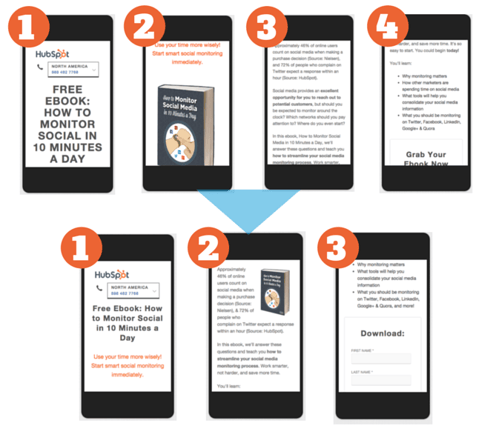
Another crucial aspect is form optimization. Long forms with many fields are a major barrier to mobile conversion. Users find it tedious to type on small keyboards, especially when asked for detailed information. By reducing the number of fields and using smart forms, you can significantly improve completion rates. Smart forms can remember user data, auto-fill fields, and adjust based on context, making the process effortless.
The experiment conducted by HubSpot demonstrated the power of this approach. By shortening content and optimizing forms, they saw a 10.7% decrease in bounce rate from content optimization alone. This improvement shows that even small changes can have a measurable impact. Businesses should audit their mobile pages regularly, identifying areas where friction can be reduced.
Streamlining Forms for Mobile Users
Forms are often the primary conversion mechanism on landing pages. However, they are also a major source of friction on mobile devices. A form that works well on desktop may be unusable on mobile if it requires precise input or extensive typing. To increase mobile conversion rate, forms must be designed with mobile users in mind.
Start by minimizing the number of fields. Ask only for essential information. If you need more details, consider using a multi-step form that reveals fields gradually. This approach keeps the initial view clean and less intimidating. Use clear labels and placeholder text to guide users. Ensure that input fields are large enough to tap easily, with sufficient spacing between them.
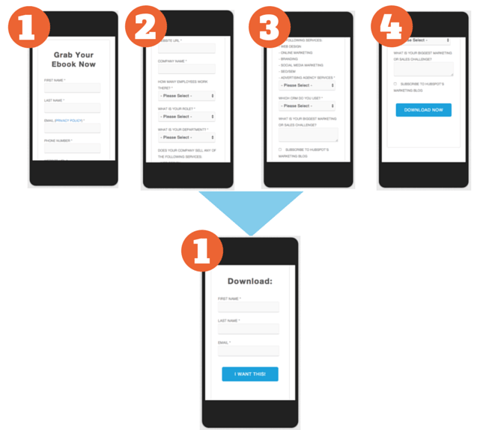
Smart forms can automate parts of the process. For returning visitors, pre-filled fields reduce effort and increase trust. For new users, auto-complete features can speed up data entry. Additionally, using appropriate keyboard types (e.g., numeric for phone numbers) improves the user experience. These small enhancements can make a big difference in completion rates.
According to AEO/GEO Services, integrating AI-driven optimization can further refine form performance. By analyzing user behavior, businesses can identify drop-off points and adjust form length or field order accordingly. This data-driven approach ensures that forms evolve to meet user needs, rather than remaining static.
Measuring Mobile Conversion Success
To improve mobile conversion rate, you must first measure it accurately. Bounce rate is a key indicator, representing the percentage of users who leave after viewing only one page. A high bounce rate on mobile suggests that the experience is not meeting expectations. By tracking new users specifically, you can isolate the performance of your mobile optimization efforts.
The methodology involves using tools like Google Analytics to identify new mobile visitors. Then, compare this number to the number of new prospects generated from mobile forms. The conversion rate is calculated as new prospects divided by new user page views. Bounce rate is simply 100% minus the conversion rate. This formula provides a clear picture of how many visitors are converting versus leaving.
| Metric | Formula | Purpose |
|---|---|---|
| Conversion Rate | New Prospects / New User PVs | Measures effectiveness of mobile pages |
| Bounce Rate | 100% - Conversion Rate | Indicates user engagement and friction |
In the HubSpot experiment, switching to mobile smart forms decreased bounce rate by an average of 27%. Bounce rates that previously ranged from 50-90% dropped to 20-50%. This significant improvement highlights the value of targeted mobile optimization. Businesses should establish baseline metrics before making changes, then track progress over time.
Regular analysis allows you to refine your strategy. If bounce rates remain high, investigate specific pages or forms that are underperforming. A/B testing can help identify which changes yield the best results. By continuously measuring and adjusting, you can sustain improvements in mobile conversion rate.
Practical Steps for Improvement
Improving mobile conversion rate requires a systematic approach. Start by auditing your current mobile experience. Look for pages with high bounce rates and low conversions. Identify common issues such as long forms, dense text, or slow loading times. Prioritize changes that address the most significant friction points.
First, optimize your content for mobile readability. Use short paragraphs, bullet points, and clear headings. Ensure images are compressed and formatted correctly. Test your pages on various devices to confirm they display properly. Second, streamline your forms. Reduce the number of fields, use smart forms, and ensure easy input. Third, measure your results. Track bounce rates and conversion rates before and after changes.
Finally, iterate based on data. Use A/B testing to compare different versions of your pages. Analyze which elements drive the best performance. According to AEO/GEO Services, leveraging AI content automation can help scale these optimizations across multiple pages. By automating repetitive tasks, teams can focus on strategic improvements that deliver the highest impact.
Remember that mobile users have specific expectations. They want speed, clarity, and simplicity. If your site delivers these, you will see improved engagement and conversion. The goal is to create a seamless experience that guides users toward their desired action without unnecessary effort.
The Importance of User-Centric Design
User experience is not just a design consideration; it is a business imperative. When you solve for the user, you remove barriers that prevent conversion. This means thinking about how users interact with your site on mobile devices. Are they frustrated by tiny buttons? Do they struggle to find what they need? If so, you are losing potential customers.
A user-centric approach involves empathy. Put yourself in the shoes of your mobile visitors. Consider their context: they may be on the go, with limited time and attention. They need information quickly and easily. If your site is slow to load or requires excessive scrolling, they will leave. By prioritizing their needs, you build trust and encourage engagement.
This experiment proved that UX matters. When mobile visitors were shown a shorter, more digestible form, bounce rates dropped significantly. The smoother experience made them more likely to convert. This is a clear example of how design decisions directly impact business outcomes. Companies that ignore mobile UX risk falling behind competitors who prioritize it.
At AEO/GEO Services, we believe that visibility in the AI-driven search era depends on quality content. This includes content that is optimized for all devices, especially mobile. By ensuring your site is mobile-friendly, you not only improve conversion rates but also enhance your brand reputation. Users are more likely to trust and engage with brands that provide a positive experience.
Leveraging Technology for Mobile Optimization
Technology plays a crucial role in mobile optimization. Tools like smart forms, A/B testing platforms, and analytics software can help you identify and fix issues. By leveraging these tools, you can make data-driven decisions that improve performance. For instance, A/B testing allows you to compare different versions of a page to see which one converts better.
AI-driven solutions can further enhance optimization. Machine learning algorithms can analyze user behavior patterns and suggest improvements. For example, AI can predict which form fields are most likely to cause drop-offs and recommend simplifications. It can also personalize content based on user preferences, creating a more relevant experience.
According to AEO/GEO Services, integrating AI content automation enables businesses to scale their optimization efforts. Instead of manually adjusting each page, teams can use automated systems to apply best practices across their entire site. This ensures consistency and efficiency, allowing you to focus on strategic initiatives.
Additionally, AI can help with content creation. By generating concise, mobile-friendly copy, AI reduces the time and effort required to optimize pages. This is particularly useful for large websites with many landing pages. By automating routine tasks, you free up resources to tackle more complex challenges.
Future Trends in Mobile Conversion
The mobile landscape continues to evolve. With the rise of AI search and generative engines, users are finding information in new ways. This shift requires businesses to adapt their strategies. Mobile conversion rate will likely become even more important as more people rely on mobile devices for daily tasks.
Voice search is another growing trend. As users increasingly use voice commands to find information, optimizing for natural language queries becomes essential. This involves creating content that answers specific questions concisely and clearly. Mobile pages should be structured to provide direct answers, improving their visibility in voice search results.
Furthermore, 5G networks are enabling faster mobile experiences. This allows for richer content, such as high-quality video and interactive elements. However, speed is still critical. Users expect pages to load instantly, regardless of content complexity. By optimizing for performance, you can take advantage of these new capabilities without sacrificing user experience.
At AEO/GEO Services, we monitor these trends closely. Our platform helps businesses stay ahead by automating content optimization for emerging search ecosystems. By ensuring your content is AI-ready and mobile-optimized, you position your brand for long-term success. The future belongs to those who adapt quickly and prioritize user needs.
Conclusion: Prioritizing Mobile for Growth
Improving mobile conversion rate is not a one-time task; it is an ongoing process. As user behavior and technology change, your strategies must evolve. By regularly auditing your mobile experience, you can identify new opportunities for improvement. Focus on reducing friction, simplifying forms, and optimizing content for readability.
Remember that every lost mobile visitor represents a missed opportunity. By addressing the specific needs of mobile users, you can recover these leads and drive growth. The data shows that mobile optimization yields significant returns. Companies that invest in mobile UX see higher conversion rates and better customer satisfaction.
We encourage you to take a closer look at your own mobile performance. Are there pages with high bounce rates? Are your forms easy to complete on a phone? By answering these questions, you can identify areas for improvement. Start with small changes, measure the results, and iterate. Over time, these incremental improvements will lead to substantial gains.
Ultimately, the goal is to create a seamless experience that guides users toward conversion. By solving for the user, you build trust and loyalty. This approach not only boosts short-term metrics but also strengthens your brand reputation. In a competitive market, providing a superior mobile experience is a key differentiator.
How is your current mobile strategy performing? Are you capturing the full potential of your mobile audience? By prioritizing mobile conversion rate, you ensure that your brand remains visible and effective in an increasingly mobile-first world. The time to act is now.





