What Is a Permalink and Why It Matters
When you think about search engine optimization, permalinks are rarely the first thing that comes to mind. They don’t get the same attention as meta descriptions or backlinks… and yet, they play a quiet but crucial role in how search engines understand your site. A permalink, short for permanent link, is the unchanging URL structure that leads to a specific page on your website. It’s the address that tells both users and search engines exactly where they are. This stability is not just a technical detail; it is a foundational element of how your digital presence is perceived by both human visitors and automated crawlers.

A permalink consists of two main parts: the domain name and the slug. The domain is your website’s base address, like yourdomain.com. The slug is the part that comes after the domain, typically describing the specific content of the page. For example, in the URL yourdomain.com/blog/seo-permalink-guide, the slug is /blog/seo-permalink-guide. Understanding this distinction is vital because while the domain represents your brand identity, the slug represents the specific topic of the page.
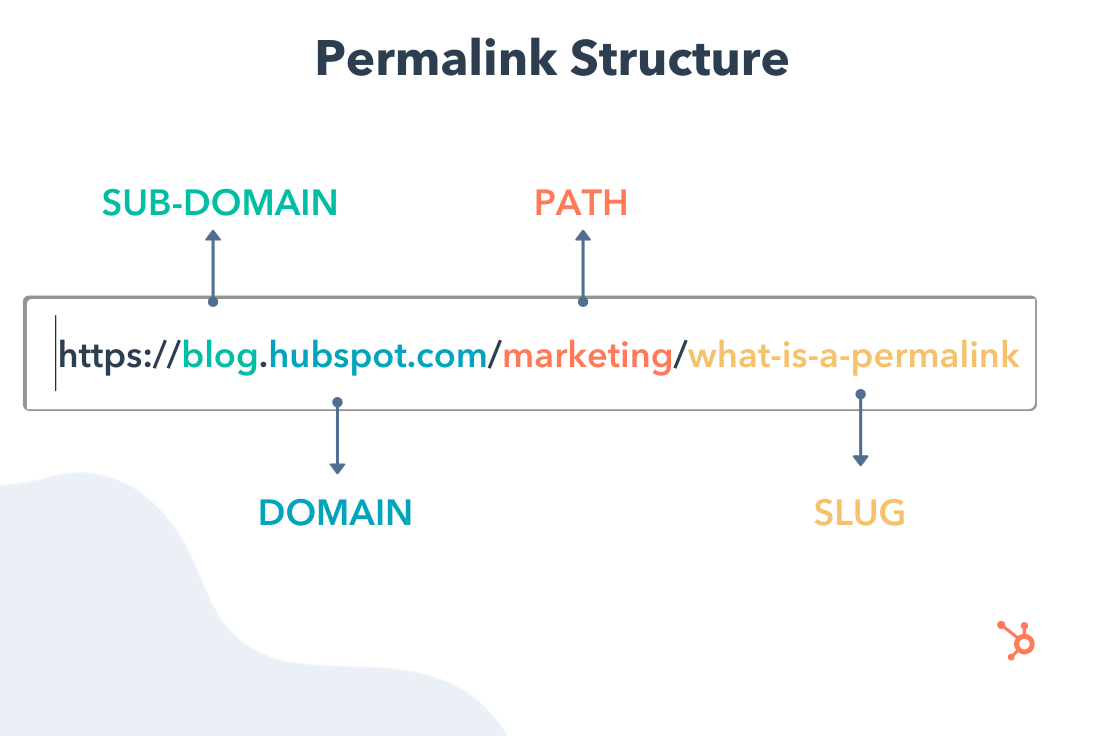
The slug is the most important part of the permalink for SEO purposes. It should clearly describe the page content and include relevant keywords. When done right, a well-structured permalink helps search engines index your content more accurately and makes it easier for users to understand what the page is about before they even click. This clarity reduces bounce rates because users know exactly what to expect when they land on the page. Furthermore, search engines use the text in the slug as a ranking signal, helping them categorize your content within their vast index.
Permalinks differ from regular URLs in that they are designed to be permanent. A standard URL might change if you move content around or restructure your site, but a permalink is meant to stay the same. This stability is important for maintaining link equity and avoiding broken links over time. If you frequently change the addresses of your pages, you risk losing the authority that external sites have built up by linking to you. This concept is central to technical SEO, ensuring that the value passed through backlinks remains intact regardless of minor site updates.
The Difference Between Permalinks and URLs
It’s common to use the terms “permalink” and “URL” interchangeably, but there is a distinction. A URL (Uniform Resource Locator) is any web address that directs a browser to a specific resource. It can include just a domain, or it can include paths, slugs, query parameters, and more. A permalink, on the other hand, refers specifically to the permanent, human-readable URL structure used for content pages, especially blog posts and articles. Understanding this difference helps you manage your site’s architecture more effectively.
Every permalink is a URL, but not every URL is a permalink. For instance, a URL with query parameters like yourdomain.com/?p=123 is a URL, but it’s not a well-optimized permalink. Permalinks are structured to be readable, shareable, and SEO-friendly. They avoid random strings of characters and instead use descriptive words. This readability is crucial for social sharing, as users are more likely to click on a link that clearly states its topic rather than one filled with numbers and symbols.
In the context of AI-driven search and generative AI optimization, clear URL structures help AI models understand content hierarchy and relevance. When search engines and AI systems crawl your site, they rely on URL structure to map out your content architecture. A clean permalink structure signals organization and intent, which can improve how your content is interpreted and surfaced. AI models analyze the relationships between pages, and a logical URL structure provides the necessary context for these connections.
Why Stability Matters for Link Equity
The concept of “permanence” in permalinks is not just about user convenience; it is deeply tied to the mechanics of search engine ranking. When another website links to your content, they pass on “link equity” or “authority.” If you change the permalink of that page without proper redirection, that equity can be lost or diluted. Search engines may view the old URL as a broken link and eventually remove it from their index, causing you to lose the ranking power associated with that page.
Furthermore, consistency in your URL structure builds trust with search engines. A site that frequently changes its URL patterns may be flagged as unstable or poorly maintained. This can lead to slower indexing speeds, as crawlers need to re-evaluate the entire site structure. By establishing a consistent permalink strategy from the start, you create a stable foundation that supports long-term SEO growth.
Choosing the Right Permalink Structure
Not all permalink structures are created equal. The way you structure your URLs can impact both user experience and search visibility. When deciding on a permalink structure, you need to consider your content type, audience expectations, and long-term SEO strategy. The right choice depends heavily on the nature of your website and the goals you aim to achieve with your content.
For example, news sites often benefit from including dates in their permalinks. A structure like yourdomain.com/2024/05/02/market-update/ tells readers immediately when the content was published. This is useful for time-sensitive content where freshness matters. Users browsing for recent news want to know that the information is current, and the date in the URL provides instant confirmation of this.
On the other hand, evergreen content performs better without dates. If you write a guide on how to structure permalinks, adding a date like 2024/05/02 to the URL can make the content appear outdated even when you update it. In this case, a cleaner structure like yourdomain.com/seo/permalink-guide/ is more effective. This approach ensures that the content remains relevant in search results for years to come, without the visual clutter of an old date.
Best Practices for Permalink Structure
When building your permalink structure, keep these principles in mind:
- Keep it short. Remove unnecessary words like “the,” “a,” and “an.” If your article is titled “How to Create a Better Permalink Structure,” your slug could simply be
/better-permalink-structure/. Shorter URLs are easier to read, remember, and share across social media platforms. - Include your primary keyword. The slug should reflect the main topic of the page. If you’re targeting “permalink structure,” make sure those words appear in the URL. This reinforces the relevance of the page to search engines and helps users quickly identify the topic.
- Use hyphens to separate words. This improves readability for both humans and search engines. Hyphens are the standard separator in URLs, allowing crawlers to distinguish between individual words. Avoid using underscores, as some search engines may treat them as part of a single word.
- Avoid special characters and numbers. Stick to lowercase letters and hyphens for the cleanest structure. Special characters can cause encoding issues and make URLs difficult to read or type manually.
These practices help ensure that your permalinks are both user-friendly and optimized for search. A clear, concise URL structure makes it easier for visitors to understand your content and for search engines to index it properly. Additionally, a consistent structure across your entire site enhances the overall user experience, making navigation more intuitive.
Impact on User Experience and Click-Through Rates
Beyond SEO, permalink structure plays a significant role in user experience. When users see a clear, descriptive URL in search results or social media feeds, they are more likely to click on it. A URL like yourdomain.com/seo/permalink-guide provides immediate context, whereas a URL like yourdomain.com/?p=123 offers no information about the content. This lack of transparency can deter clicks, as users may be unsure of what they will find on the other end.
Moreover, a logical URL structure helps users navigate your site. When categories and subcategories are reflected in the URL, users can easily understand the hierarchy of your content. This can lead to increased time on site and lower bounce rates, as users feel more confident exploring related content. A well-organized URL structure acts as a roadmap, guiding users through your site with ease.
How to Set Up Permalinks in WordPress
WordPress is one of the most popular content management systems, and it gives you full control over your permalink structure. When you first install WordPress, the default permalink structure is often not optimized for SEO. It usually looks something like yourdomain.com/?p=123, which is neither readable nor keyword-rich. Changing this default setting is one of the first steps you should take to improve your site’s SEO performance.
To change this, you need to access the permalink settings in your WordPress dashboard. This is a straightforward process that doesn’t require any plugins. You can choose from several preset structures or create a custom one that fits your needs. The flexibility of WordPress allows you to tailor your URL structure to your specific content strategy, ensuring that your permalinks align with your SEO goals.
.webp)
Step-by-Step Guide to Changing Permalinks
- Log in to your WordPress dashboard.
- Navigate to “Settings” in the left-hand menu, then click on “Permalinks.”
- Choose one of the available structure options, or select “Custom Structure” to build your own.
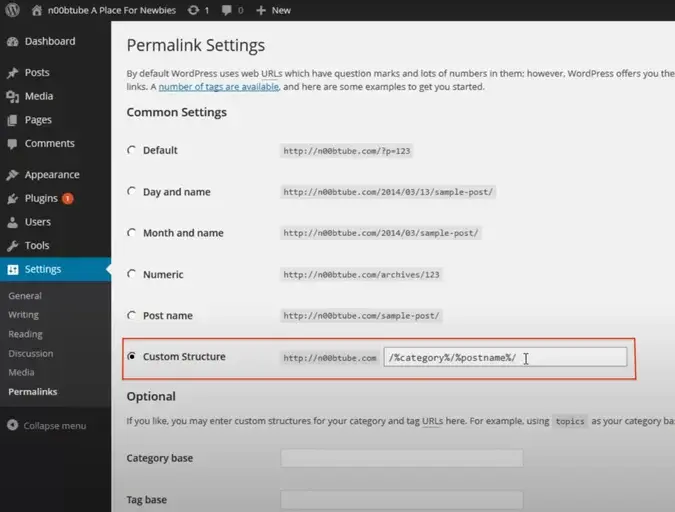
- If you choose a custom structure, use tags like
%category%,%postname%, and%year%to define your format. - Click “Save Changes” to apply the new structure.
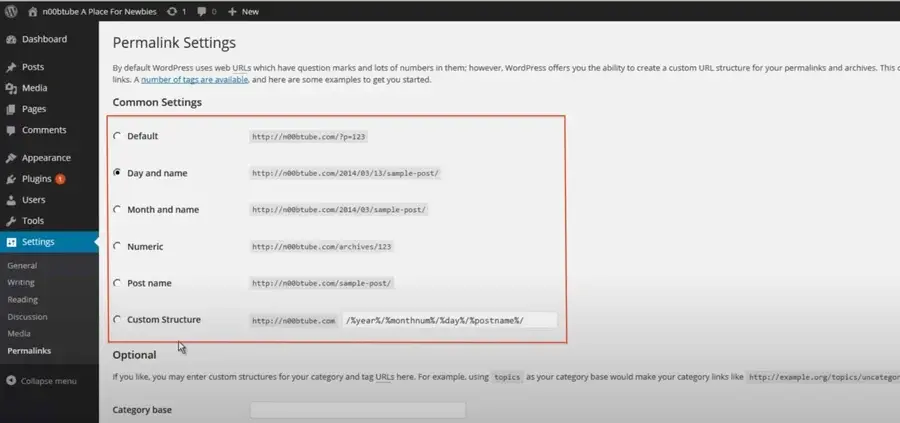
Understanding WordPress Permalink Options
WordPress offers several built-in permalink structures, each with its own advantages and disadvantages:
| Structure Type | Example | Best For |
|---|---|---|
| Default | yourdomain.com/?p=123 |
Not recommended for SEO |
| Day and name | yourdomain.com/2024/05/02/post-title/ |
News sites, time-sensitive content |
| Month and name | yourdomain.com/2024/05/post-title/ |
Monthly columns, recurring features |
| Numeric | yourdomain.com/2024/05/02/123/ |
Archiving, not SEO |
| Post name | yourdomain.com/post-title/ |
Evergreen content, blogs |
The “Post name” structure is often the best choice for most websites. It’s clean, readable, and focused entirely on the content title. However, if you want to add category paths for better organization, a custom structure like /%category%/%postname%/ can provide additional context. This approach is particularly useful for larger sites with multiple content categories, as it helps both users and search engines understand the topical grouping of your content.
Customizing for Specific Content Types
While the “Post name” structure is a great default, you may need to customize your approach for different types of content. For instance, if you run an e-commerce site, you might want to include product categories in your URLs to help users navigate your catalog. A structure like /%product_cat%/%product_name%/ can provide clear context about the product type and name. Similarly, if you have a portfolio site, you might use a structure that highlights the project name and client, such as /%portfolio_category%/%project_name%/. Tailoring your permalink structure to your specific content types can enhance both user experience and SEO performance.
Avoiding SEO Damage When Changing Permalinks
If you decide to change your permalink structure after your site has been live for a while, you need to be careful. Changing URLs without proper redirection can lead to broken links, lost traffic, and a drop in search rankings. This is one of the most common mistakes made by website owners who underestimate the impact of URL changes on their SEO performance.
Every time you change a permalink, you’re changing the address that search engines and users rely on to find your content. If you don’t set up redirects, visitors who try to access the old URL will encounter a 404 error. This creates a poor user experience and signals to search engines that your site is poorly maintained. A high number of 404 errors can negatively impact your site’s overall health and ranking potential.
The Importance of 301 Redirects
To avoid this problem, you must set up 301 redirects for any old permalinks. A 301 redirect tells browsers and search engines that the content has permanently moved to a new location. This preserves link equity and ensures that users are automatically sent to the correct page. Without this step, you risk losing the authority and traffic that your old URLs have accumulated over time.
Without a 301 redirect, your site will accumulate broken links. Search engines like Google will eventually remove the old URLs from their index, but during the transition, your rankings can suffer. Users who bookmarked or shared the old links will find themselves unable to access the content. This can lead to frustration and a loss of trust in your brand. By implementing 301 redirects, you ensure a seamless transition for both users and search engines.
When you change your permalink structure in WordPress, the platform can automatically generate 301 redirects for old URLs. However, it’s always a good idea to verify that the redirects are working correctly. You can do this by testing a few old URLs and confirming that they lead to the new pages. Additionally, monitoring your site’s analytics after the change can help you identify any remaining issues and ensure that traffic is being properly redirected.
Monitoring and Maintenance After Changes
After implementing permalink changes and 301 redirects, ongoing monitoring is essential. Use tools like Google Search Console to check for crawl errors and ensure that your new URLs are being indexed correctly. Look for any spikes in 404 errors or drops in organic traffic, which could indicate issues with your redirects. Regularly updating your sitemap and submitting it to search engines can also help speed up the re-indexing process. This proactive approach ensures that your site remains healthy and continues to perform well in search results.
Permalinks and AI-Driven Search Optimization
As search engines evolve, the role of URL structure in SEO continues to grow. With the rise of AI-driven search and generative AI optimization, clear and logical permalink structures are more important than ever. AI models rely on structured data to understand content relationships, and your URL hierarchy provides that structure. This shift in search technology means that traditional SEO tactics are being augmented by AI’s ability to interpret context and relevance.
A well-organized permalink system helps AI systems map your site architecture. When categories and subcategories are reflected in your URLs, it becomes easier for AI to determine the context and relevance of each page. This can improve how your content is surfaced in AI-generated answers and search results. AI models analyze the semantic relationships between pages, and a clear URL structure provides the necessary framework for these connections.
For businesses focused on visibility in AI search ecosystems, permalink structure is one of the foundational elements of technical SEO. It may not be the most glamorous aspect of optimization, but it’s essential for long-term success. A clean, keyword-rich, and logical URL structure signals authority and organization to both users and machines. This signal helps AI models prioritize your content when generating answers to user queries.
When you combine strong permalink practices with other technical SEO strategies, you create a site that’s easy to crawl, easy to understand, and easy to rank. That’s the kind of foundation that supports sustainable growth in an increasingly AI-driven search landscape. By focusing on clarity and consistency in your URL structure, you position your site to thrive in the future of search, where AI plays a central role in delivering relevant and accurate results.
Future-Proofing Your Site for AI Search
To prepare for the continued evolution of AI search, consider how your permalink structure can support deeper content relationships. AI models are increasingly capable of understanding nuanced topics and subtopics. By using descriptive slugs that reflect these nuances, you help AI models better categorize your content. For example, instead of a generic slug like /tips/, use a more specific slug like /seo-permalink-tips/. This specificity provides additional context that AI models can use to understand the content’s relevance to specific queries. Additionally, maintaining a consistent structure across your site helps AI models build a more accurate mental map of your content ecosystem, leading to better visibility in AI-generated search results.





