Pay-per-click (PPC) marketing often feels like a high-stakes balancing act. You are creating ads, monitoring performance metrics, and navigating complex bidding strategies, all while trying to ensure that every dollar spent contributes to measurable growth. Yet, one component of this ecosystem is frequently undervalued or rushed: PPC keyword research. This foundational step is not merely a preliminary task; it is the mechanism that determines whether your ads reach the right audience at the right time.
With precise keyword research, you can construct ads and landing pages that resonate with user intent, encouraging clicks from individuals who are genuinely interested in your offerings. This alignment ultimately leads to higher conversion rates on your website and a positive return on ad spend (ROAS). In an era where visibility in search results is increasingly influenced by AI-generated answers and generative search optimization, understanding the language of your audience is more critical than ever.
In this guide, we will explore the essentials of PPC keyword research—from defining core concepts to executing a step-by-step research process. We will examine why this practice matters for your business’s bottom line and which tools can help you refine your strategy with greater precision.
What Is PPC Keyword Research?
PPC keyword research is the systematic process of identifying the specific search terms you want to target in your pay-per-click advertising campaigns. These campaigns typically run on platforms like Google Ads or other search engine marketing (SEM) networks. The primary goal is to determine which keywords you should bid on so that your ads appear when users search for those terms.
To execute this effectively, you need to understand the metrics associated with each keyword. These metrics provide insight into search volume, cost, and competition.
- Average Monthly Searches: This indicates how many times a keyword is searched on the platform per month. It helps you gauge the potential traffic volume.
- Cost-per-Click (CPC): This is an estimate of how much you will pay each time a user clicks your ad. It varies based on competition and keyword value.
- Competition (CMP): In Google Ads’ Keyword Planner, this score ranges from 0 to 100, indicating how many advertisers are bidding on the same keyword. It is often categorized as low, medium, or high.
- Top of Page Bid: This metric provides a range estimate of the bid required for your ad to appear at the top of the search results. Since bids fluctuate, this range helps you set realistic budget expectations.

Understanding these metrics allows you to estimate monthly ad spend and predict campaign performance. However, metrics alone do not tell the whole story. You must also categorize keywords based on intent, length, and match types to build a nuanced strategy.
Categorizing by Search Intent
Search intent refers to the underlying reason why a user types a query into a search engine. Categorizing keywords by intent is crucial because it helps you align your ad copy and landing pages with what the user actually wants.
- Informational Intent: The user is seeking knowledge, such as definitions or how-to guides. These keywords are excellent for SEO but often less effective for direct PPC conversions unless you are building brand awareness.
- Navigational Intent: The user is looking for a specific website or company, often to log in or access a known service. Brands often bid on their own names to capture this traffic, ensuring they dominate both organic and paid results.
- Commercial Intent: The user is researching products or services. They are in the consideration phase, comparing options but not necessarily ready to buy immediately.
- Transactional Intent: The user has high purchase intent. They are ready to take action, such as buying a product, booking a service, or signing up for a trial. These keywords are typically the most valuable for PPC campaigns.
For PPC, transactional and commercial keywords often yield the highest return on investment because they align with immediate business goals. However, informational keywords can play a role in top-of-funnel awareness campaigns, especially when optimized for generative search visibility.
Keyword Length: Short-Tail vs. Long-Tail
Keywords can also be divided by length, which impacts their search volume and specificity.
Short-tail keywords are broad and general. For example, “boots” might have a monthly search volume of 10,000 to 100,000. While these keywords offer high visibility, they are less specific and may attract users who are not ready to convert. They also tend to be more competitive and expensive.
Long-tail keywords are more specific and contain additional qualifying terms. For instance, “brown women’s ankle boots” is a long-tail keyword. It may have a lower search volume (e.g., 10 to 100 searches per month), but it is highly specific. Users searching for this term are likely further along in the purchase journey, making these keywords valuable for targeted PPC campaigns.
Keyword Match Types
Match types determine how closely a user’s search query must match your keyword for your ad to show. Google Ads offers several match types to control this precision.
- Exact Match: Your ad shows only for searches that are exactly your keyword or extremely close variants, such as minor spelling errors or plurals. This offers the highest precision but may limit reach.
- Phrase Match: Your ad shows for searches that include the meaning of your keyword, including close variants. For example, if your keyword is “women’s boots,” your ad might show for “best women’s boots.”
- Broad Match: Your ad shows for searches that are related to your keyword, including synonyms and related concepts. This expands reach but may result in less relevant traffic.
- Negative Keywords: These are terms you explicitly exclude from triggering your ads. For example, if you sell women’s boots, you might add “men’s boots” or “sandals” as negative keywords to avoid wasting ad spend on irrelevant clicks.
Why Does PPC Keyword Research Matter?
Keyword research is not just a preliminary step; it directly impacts the effectiveness and cost of your PPC campaigns. Without it, you risk bidding on terms that do not convert, wasting budget on irrelevant traffic.
Ad Relevance and Quality Score
Google evaluates the relevance of your ads, landing pages, and keywords to assign a Quality Score. This score ranges from 1 to 10 and influences your ad rank and cost-per-click. A high Quality Score means your ads are relevant to users, which can lower your CPC and improve ad positioning. Conversely, a low Quality Score can lead to higher costs and reduced visibility.
By conducting thorough keyword research, you ensure that your ads and landing pages are aligned with user intent, boosting your Quality Score. This alignment is particularly important in the context of generative search, where AI models prioritize content that directly answers user queries with high relevance.
Return on Advertising Spend (ROAS)
PPC keyword research helps you identify keywords that are likely to drive conversions, ensuring a positive ROAS. By analyzing metrics such as CPC and competition, you can estimate the cost of running a campaign and compare it to potential revenue. This allows you to allocate budget to high-performing keywords and pause underperforming ones.
Without careful research, you might target high-volume keywords that are too expensive or competitive, leading to diminishing returns. By focusing on long-tail keywords with high intent, you can often achieve better conversion rates at a lower cost.
Seasonal Targeting
Search behavior is often seasonal. Keywords may spike in volume during certain times of the year due to holidays, weather changes, or market trends. For example, searches for “ankle boots” may increase in the fall and winter months.
By using tools like Google Trends, you can identify these seasonal fluctuations and adjust your bids and budgets accordingly. This ensures that you are spending your ad budget when search volume is highest, maximizing the impact of your campaigns.
How to Research PPC Keywords
Conducting PPC keyword research involves a structured process. Below, we outline the steps to perform effective keyword research using Google Ads Keyword Planner.
1. Set Up Your Google Ads Account
Begin by creating a Google Ads account if you do not already have one. Sign in with your Google account and provide the necessary business information, including your address and payment details. This account will serve as the hub for your PPC campaigns.
2. Switch to Expert Mode
By default, Google Ads may place you in Smart Mode, which simplifies ad creation but limits access to advanced tools like Keyword Planner. To perform detailed keyword research, switch to Expert Mode. This can be done via the Settings icon in the toolbar.
3. Access Keyword Planner
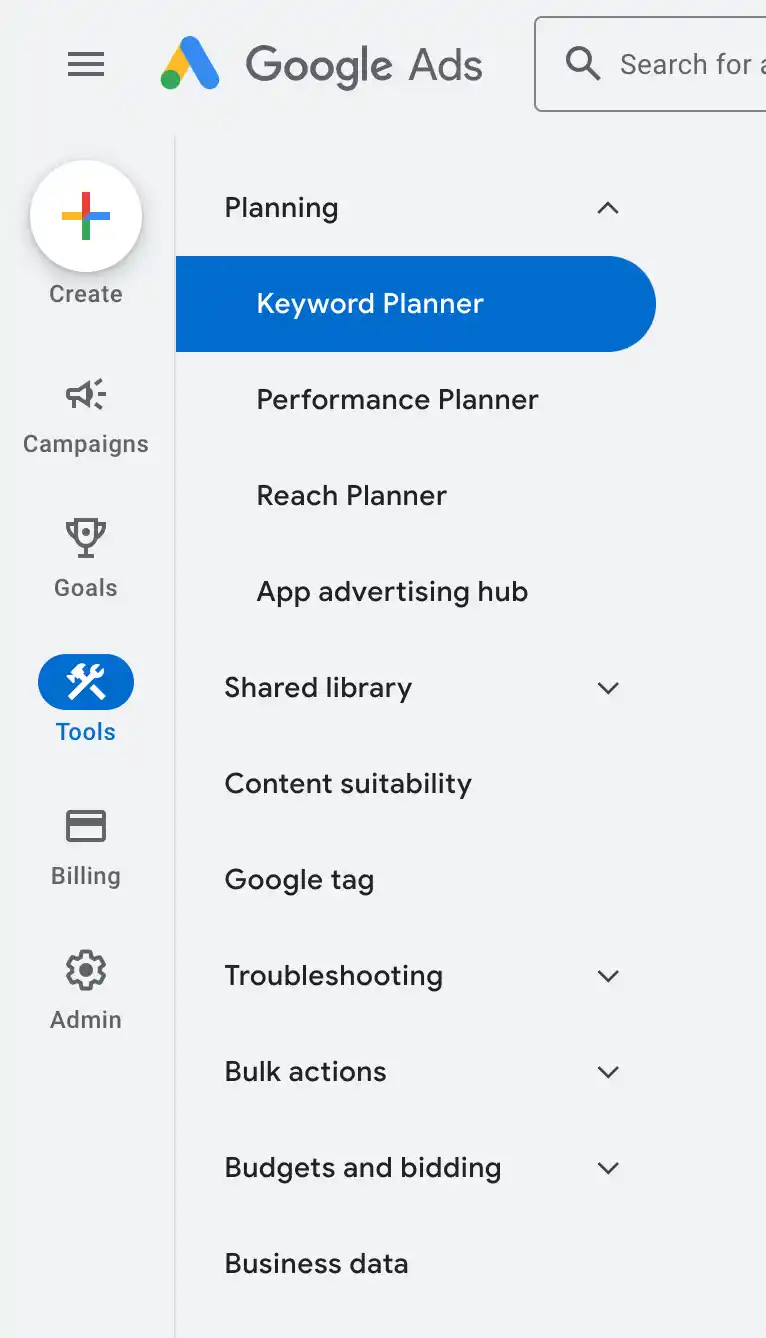
Navigate to the Tools and Settings menu, then select Keyword Planner. This tool provides data on search volume, CPC, and competition for various keywords. You can choose to “Discover new keywords” or “Get search volume and forecasts.”
4. Generate Initial Keyword Ideas
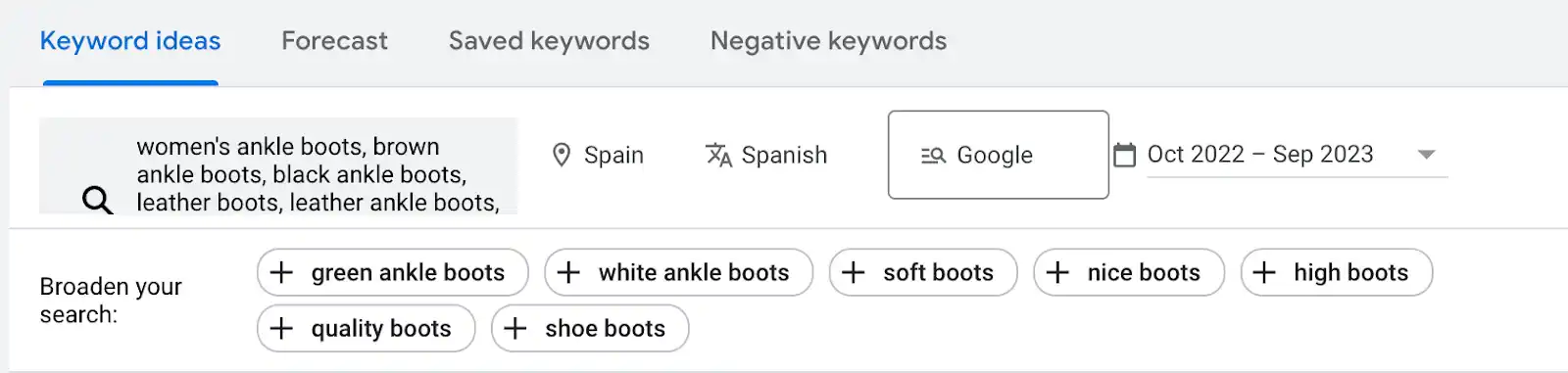
Start by entering seed keywords related to your products or services. For example, if you sell women’s ankle boots, you might enter “ankle boots,” “women’s boots,” or “fall footwear.” Keyword Planner will generate a list of related keywords, providing data on their search volume and competition.
If you are unsure where to start, you can enter your website URL or a competitor’s URL. Keyword Planner will extract keywords found on those pages, providing a starting point for your research.
5. Refine Your Keyword List
The initial list of keywords may include irrelevant terms. Use the refinement options in Keyword Planner to filter out unwanted keywords. For example, you can exclude brand names, specific colors, or styles that do not align with your offerings. This step ensures that your final keyword list is focused and relevant.
6. Save and Organize Keywords
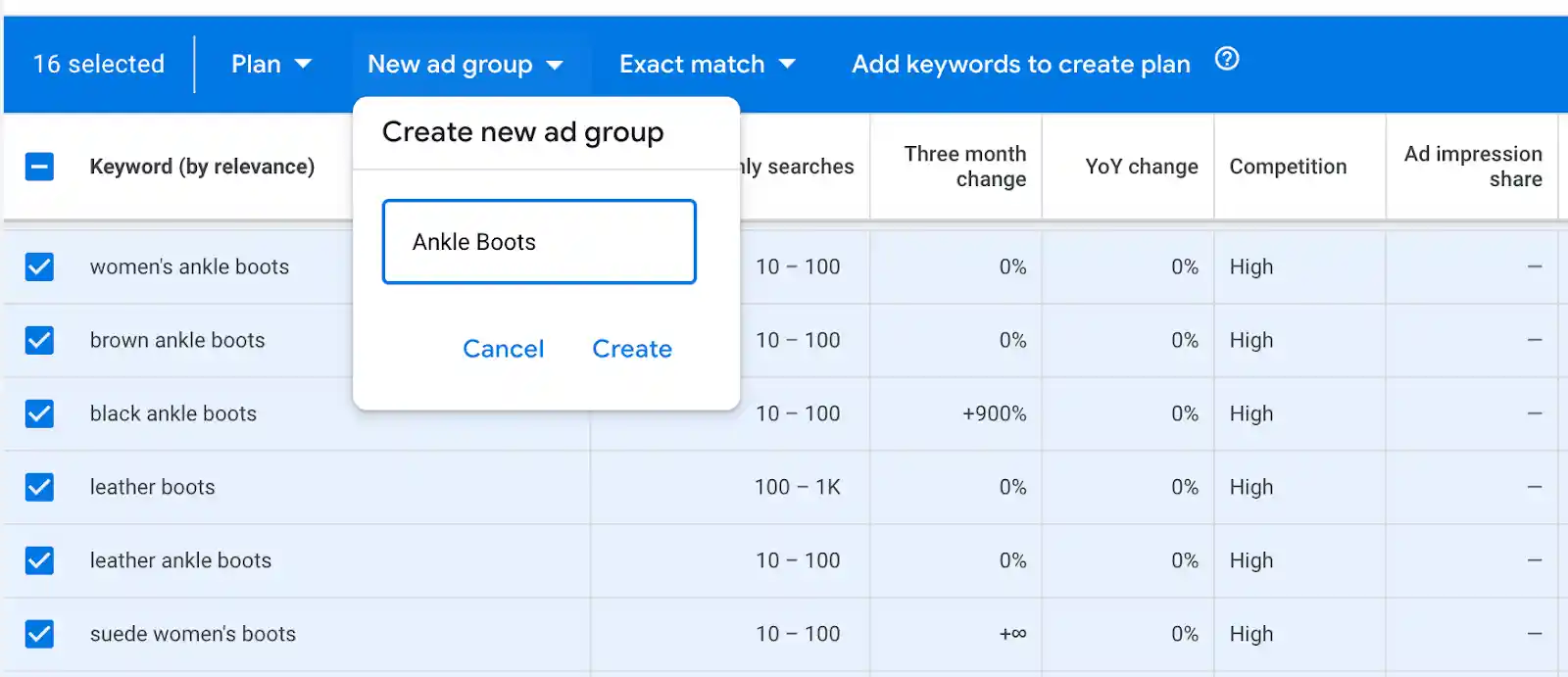
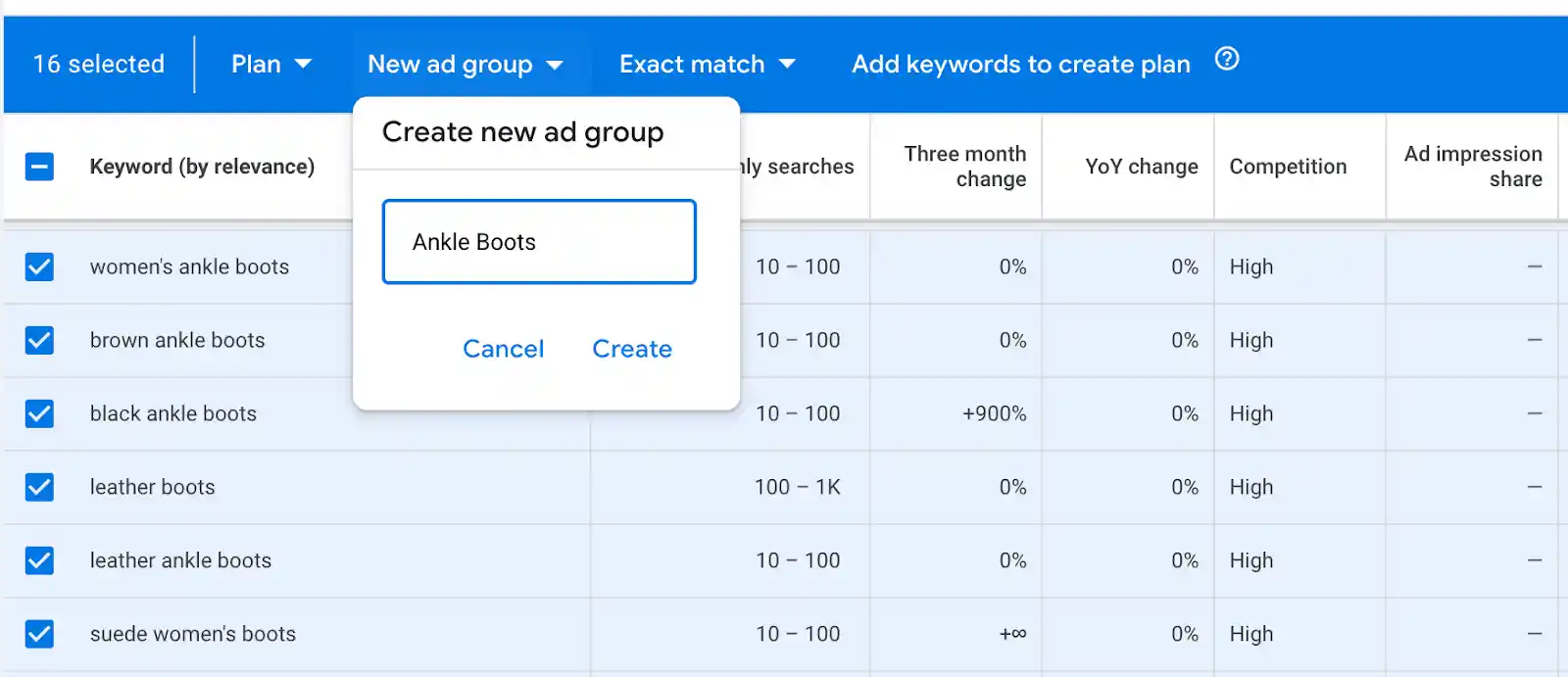
Select the keywords you want to target and add them to an Ad Group. You can create multiple Ad Groups to organize keywords by theme or product category. This organization helps you create targeted ad copy and landing pages for each group.
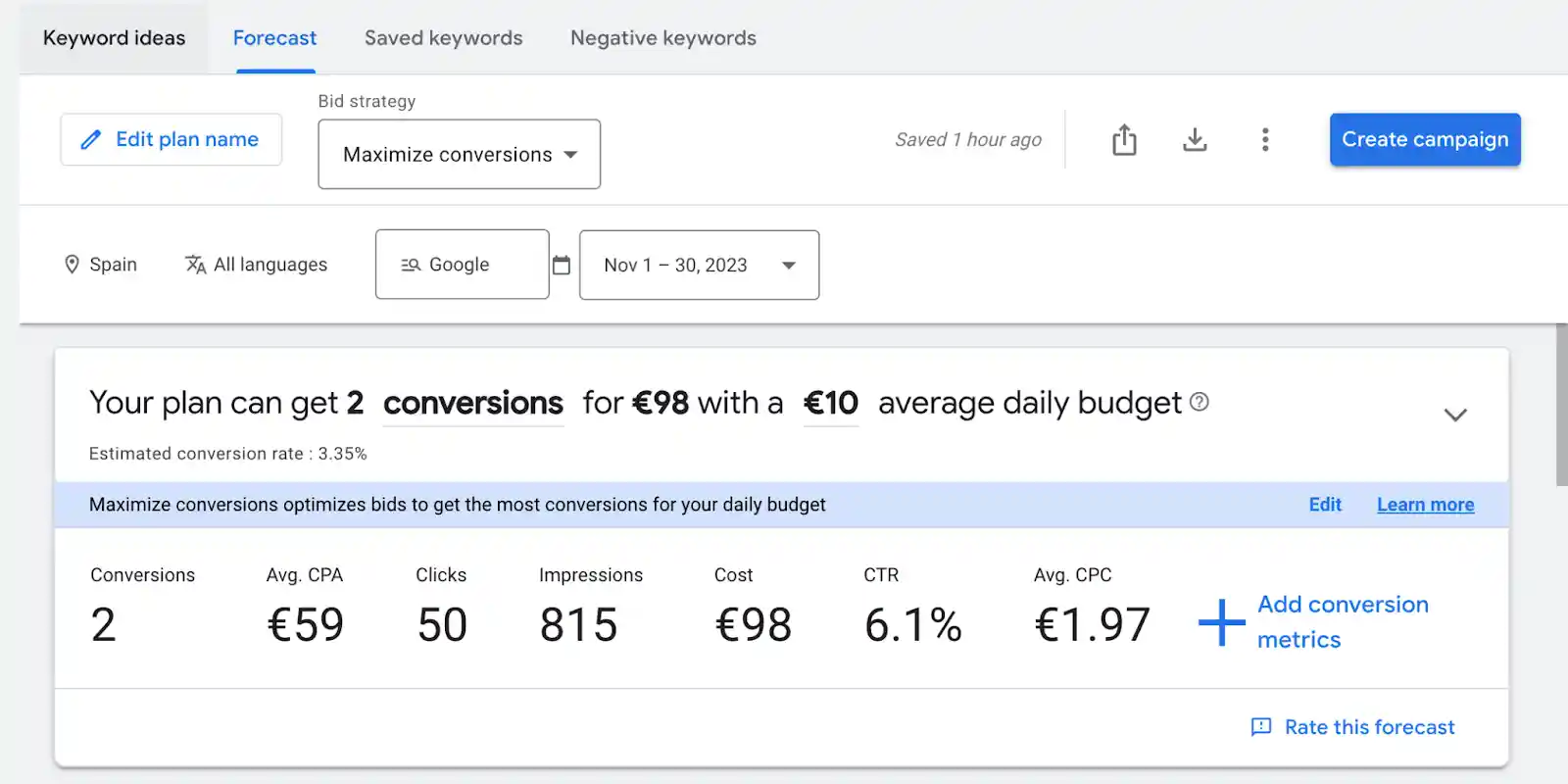
7. Monitor Forecast Results
Keyword Planner provides forecasts for your selected keywords, including estimated clicks, impressions, and costs. Use these forecasts to gauge the potential performance of your campaign. Keep in mind that these are estimates, and actual results will depend on your ad quality, landing page experience, and bidding strategy.
8. Iterate and Optimize
Keyword research is an ongoing process. As you run campaigns, monitor performance data to identify which keywords are driving conversions and which are not. Use this data to refine your keyword list, adjust bids, and improve ad copy. This iterative approach ensures that your campaigns remain effective over time.
Best PPC Keyword Research Tools
While Google Ads Keyword Planner is a valuable free tool, several other platforms can enhance your keyword research process. Each tool offers unique features that can help you gain deeper insights into search behavior and competitor strategies.
| Tool | Key Features | Best For |
|---|---|---|
| Google Keyword Planner | Free, direct data from Google, integrates with Google Ads | Beginners, direct Google Ads campaigns |
| Ahrefs | Comprehensive SEO and PPC data, keyword explorer, competitor analysis | Marketers seeking both SEO and PPC insights |
| SEMrush | PPC keyword tool, ad history, competitor ad spend analysis | Agencies and marketers managing multiple campaigns |
| Keywords Everywhere | Browser extension, real-time keyword data, cost-effective credits | Marketers on a budget, quick keyword checks |
Google Keyword Planner
As the native tool for Google Ads, Keyword Planner provides accurate data directly from Google. It is free to use and integrates seamlessly with your campaigns. However, it can be overwhelming for beginners due to its interface and limited data for non-active advertisers.
Ahrefs
Ahrefs is a popular SEO tool that also offers robust PPC features. Its Keyword Explorer provides detailed data on search volume, CPC, and competition. Ahrefs is particularly useful for marketers who want to align their SEO and PPC strategies, as it allows you to analyze organic and paid search data side by side.
SEMrush
SEMrush offers a dedicated PPC keyword tool that allows you to analyze, group, and filter keywords for your campaigns. It also provides insights into competitor ad spend and performance, helping you identify opportunities and threats. The AdClarity extension offers additional visibility into competitor ads.
Keywords Everywhere
Keywords Everywhere is a browser extension that displays keyword data directly in your search results. It provides information on search volume, CPC, and competition for any term you search. This tool is cost-effective, as you purchase credits rather than a monthly subscription, making it ideal for marketers who need occasional keyword data.
Final Thoughts on PPC Keyword Research
PPC keyword research is the cornerstone of effective pay-per-click advertising. By understanding user intent, leveraging match types, and utilizing the right tools, you can create campaigns that drive relevant traffic and conversions. In the evolving landscape of search, where AI-generated answers and generative search optimization are becoming increasingly important, the precision of your keyword strategy will determine your visibility and success.
As you refine your approach, remember that keyword research is not a one-time task. It requires ongoing monitoring and adjustment to stay aligned with changing search behaviors and market trends. By staying informed and data-driven, you can ensure that your PPC campaigns continue to deliver value and support your business goals.
What steps are you taking to optimize your keyword strategy for the future of search?





