What Is Email Preview Text and Why It Matters
Preview text is the short snippet of characters that appears next to or below your subject line in an email client. It serves as a secondary headline, offering a glimpse into the content before the recipient clicks. While subject lines grab initial attention, preview text often seals the deal. It provides context, builds curiosity, or highlights a specific benefit that compels the reader to open the message.

In crowded inboxes, especially during peak seasons, this small detail can be the difference between an open and a delete. Many marketers overlook it, leaving it blank or allowing the email client to pull random sentences from the body. This is a missed opportunity. A well-crafted preview text works in tandem with the subject line to create a cohesive narrative.
Preview text is a critical component of email marketing strategy. It acts as the final nudge, reducing friction and increasing the likelihood of engagement. When used effectively, it can significantly boost open rates and improve overall campaign performance. We explore how top brands use this space to stand out and connect with their audience.

High-Performing Preview Text Examples
Analyzing real-world examples helps illustrate best practices. We reviewed 15 standout instances where preview text played a pivotal role in driving engagement. Each example demonstrates a different tactic, from building curiosity to offering clear value.
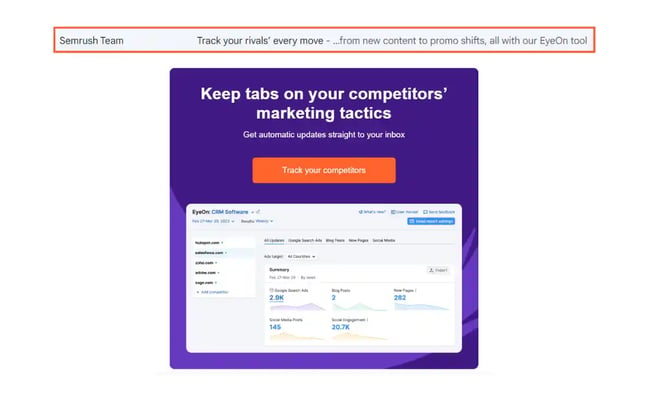
Hootsuite: Spotlighting User Benefits
Hootsuite announced a 60-day free trial with a subject line promising free tools. Their preview text elevated this promise by focusing on the user’s confidence. Instead of listing features, it highlighted the benefit: access to powerful social media management without risk.
The takeaway here is clear. Focus on the recipient. Keep your messaging centered on how they will benefit. When you put yourself in their shoes, you craft messages that resonate. This approach builds trust and encourages opens.
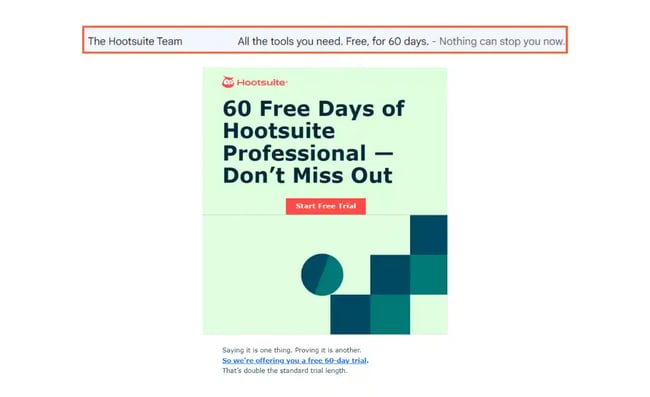
Semrush: Extending the Subject Line
Semrush introduced a new competitor tracking feature with a clever subject line. The preview text served as an extension, explaining the “how” behind the claim. Together, they formed a concise, under-10-word summary of the email’s core message.
This technique works well for complex products. It breaks down a single idea into two parts, making it easier to digest. If you have a strong headline, consider splitting it. Let the subject line grab attention and the preview text provide context.
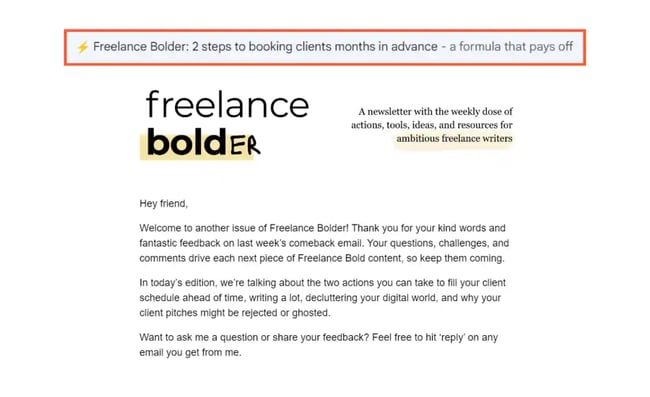
Freelance Bold: The Irresistible Offer
Marijana Kay, a freelance writer, used a short 20-character preview text to promise a “formula” for securing clients. The subject line discussed booking steps, while the preview text hinted at a proven method for staying fully booked.
Short can be powerful. By leveraging her expertise, she created an irresistible offer. The preview text built credibility and curiosity. If you have a unique framework or template, highlight it in the preview text. Make it clear why recipients should care.
Mutiny: Breaking the Pattern
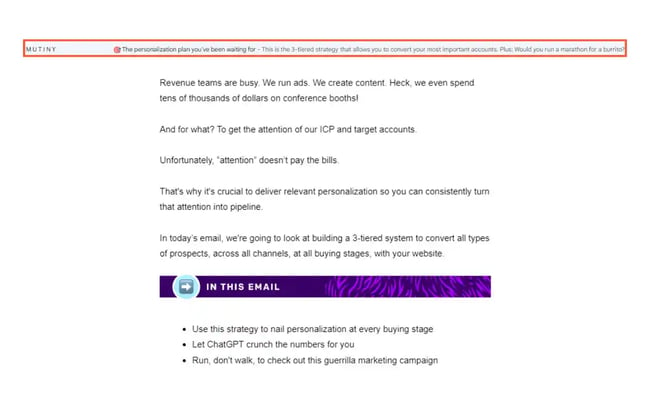
Mutiny used an out-of-context question in their preview text: “Would you run a marathon for a burrito?” This unexpected query piqued curiosity, diverging from the email’s actual topic. It was a creative way to break through inbox clutter.
Sometimes, going off-topic works. If your subject line is direct, try something playful in the preview text. It draws attention and makes your brand memorable. Just ensure the tone aligns with your overall brand voice.
Why We Buy: Proof and Aspirations
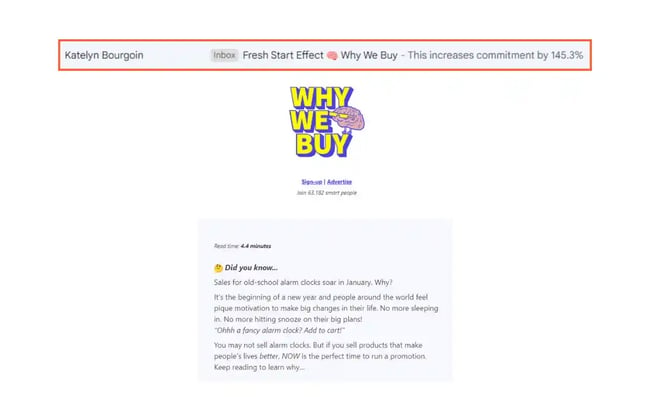
Katelyn Bourgoin’s newsletter used a concrete number in the preview text to show how readers could increase commitment by over 100%. This provided proof of concept and built excitement around the subject line.
Numbers add credibility. They make claims tangible. If your email offers a method for improvement, hint at the results. Give readers a reason to believe in the value inside. This builds anticipation and drives opens.
Notion: Tapping into Emotion
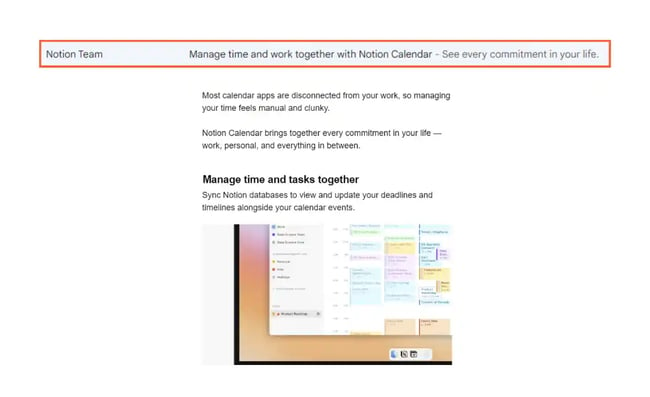
Notion’s launch of Calendar included a preview text that addressed the pain of managing multiple tasks. In just five words, it promised motivation and control. This emotional appeal resonated with users overwhelmed by their schedules.
Emotion drives action. Identify the feelings your audience experiences related to your product. Speak directly to those pains or desires. A personal touch can make your message stand out in a sea of generic updates.
Junia: Creating Suspense
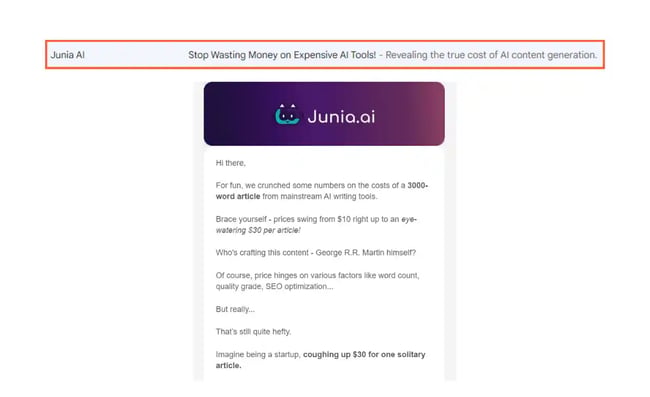
Junia shared findings from a small experiment. The subject line asked for an action, while the preview text hinted at the reason behind it. This combination created suspense and a sense of discovery.
Suspense is a powerful tool. By revealing just enough to intrigue but not everything, you encourage clicks. Use the preview text to tease the “why” behind your request. It makes the recipient feel like they’re missing out if they don’t open.
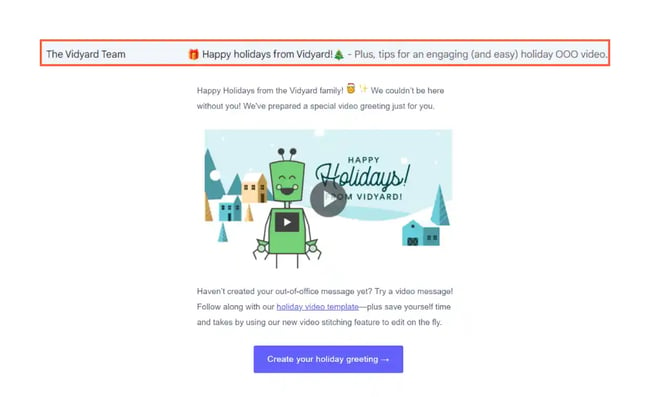
Vidyard: Adding Value to Holidays
During the holiday season, Vidyard sent an email with tips for creating out-of-office videos. Instead of a generic greeting, they offered practical, topical advice. This unique take caught attention during a time of inbox fatigue.
Holidays don’t have to mean generic messages. Look for opportunities to add value. Offer tips, resources, or creative ideas that align with the occasion. It shows you understand your audience’s current context.
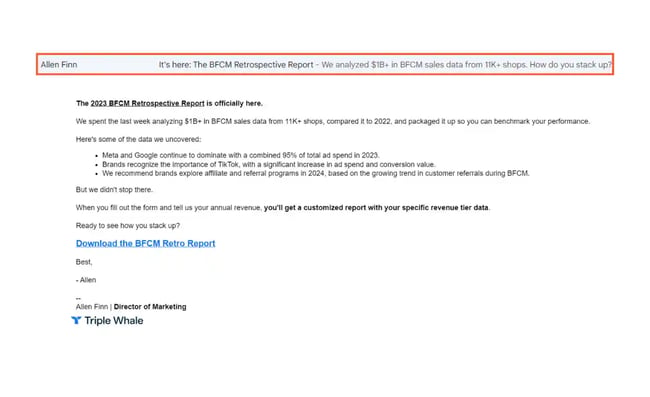
Triple Whale: Summarizing Data
Triple Whale shared a BFCM report. The preview text summarized the key data points and ended with a personal question: “How do you stack up?” This invited readers to compare their performance against the benchmarks.
Data-driven emails benefit from clear summaries. Highlight the most relevant insights and pose a question that encourages self-reflection. It makes the content feel personal and actionable. E-commerce owners, in particular, respond well to this approach.
Content Workshop: Highlighting Resources
Masooma Memon’s newsletter promised a free goal tracker in the preview text. The subject line discussed 15 lessons, while the preview text offered a tangible resource. This added motivation for readers to open.
If you’re sharing a resource, highlight it early. Position it as a tool to achieve the goals discussed in the subject line. It gives readers a clear reason to engage. Free downloads, templates, and checklists are great for this purpose.
Catalyst: Providing Context
Catalyst used preview text to explain why recipients were receiving a nurture email after downloading an ebook. It set the stage for the next steps, reducing the likelihood of unsubscribes.
Context is key. Let readers know why they’re receiving the email. It builds trust and reduces friction. If you’re part of a sequence, use the preview text to clarify the flow. It helps manage expectations and keeps readers engaged.
Atlan: Summarizing Events
Atlan’s webinar invite included a preview text that summarized the discussion themes. Along with the event name and time, it gave readers a quick overview of what to expect.
Event invites benefit from brevity. Summarize the key topics in the preview text. It saves readers time and helps them decide if the event is relevant. Clear, concise information leads to higher registration rates.
Asana: Leveraging Brand Authority
Asana used its brand reputation to drive opens. The preview text hinted at time-saving tips from the project management experts. Readers trusted the source, making them more likely to engage.
Brand authority matters. If you’re known for expertise, leverage it. Share first-hand insights or tips from your team. It builds credibility and encourages opens. Readers want to learn from the best, so highlight your knowledge.
Coda: Keeping It Simple
Coda’s product update email had a simple preview text: “Achieve big goals with new features.” It was straightforward and incentivized readers to learn more about the updates.
Simplicity can be effective. Don’t overcomplicate your message. Test simple variations to see what resonates. Sometimes, a clear promise of value is all you need. Keep it direct and focused on the outcome.
Vimeo: Addressing Pain Points
Vimeo’s preview text for a new AI feature focused on solving a specific pain point: removing unwanted phrases from videos. It also mentioned a free trial, lowering the barrier to entry.
Address pain points directly. Show how your product solves real problems. If you have a free trial or demo, mention it. It reduces risk and encourages experimentation. Readers appreciate practical solutions to their challenges.
Crafting Effective Preview Text
Writing effective preview text requires strategy. It’s not just about filling space; it’s about creating a compelling reason to open. Start by understanding your audience’s needs and pain points. Then, align your message with those insights.
Key Strategies for Success
- Focus on the recipient: Make it about them, not you. Highlight benefits and solutions.
- Create curiosity: Use questions, hints, or unexpected angles to draw readers in.
- Provide context: Explain why they’re receiving the email and what’s inside.
- Highlight resources: If you’re offering a download or tool, mention it clearly.
- Leverage authority: Use your brand’s expertise to build trust and credibility.
- Keep it concise: Aim for 40-100 characters to ensure it displays fully in most clients.
- Test variations: Experiment with different tones and messages to see what works.
Common Mistakes to Avoid
Avoid leaving the preview text blank. Letting the email client pull random sentences can result in awkward or irrelevant snippets. Also, avoid repeating the subject line verbatim. The preview text should complement, not duplicate, the headline.
Another mistake is being too vague. Phrases like “Check out this update” don’t provide enough value. Be specific. Tell readers what they’ll gain. Clarity drives action.
Finally, don’t ignore mobile users. Many people check emails on their phones, where screen space is limited. Ensure your preview text is readable and impactful on smaller screens. Test your emails on multiple devices to see how they appear.
Measuring and Optimizing Performance
To improve your preview text, you need to measure its impact. Use email tracking software to monitor open rates and click-through rates. Analyze which messages perform best and identify patterns.
HubSpot’s email tracking software, for example, allows you to see exactly when prospects open your messages. This data helps you understand which preview texts resonate most with your audience. Look for correlations between specific tactics and higher engagement.
A/B testing is crucial. Send two versions of an email with different preview texts to a segment of your list. Compare the results to determine the winner. Then, apply that insight to future campaigns. Continuous testing leads to continuous improvement.
Consider the timing of your sends. Preview text effectiveness can vary based on when recipients check their emails. Morning commuters might prefer quick, actionable hints, while evening readers might engage with more reflective content. Align your messaging with their habits.
The Role of AI in Email Optimization
As AI-driven search and content automation evolve, the way we craft email content is changing. Platforms like AEO/GEO help businesses create and optimize content at scale. This includes generating preview text variations that are tailored to specific audience segments.
AI can analyze past performance data to suggest high-performing phrases. It can also test multiple versions simultaneously, identifying the most effective combinations faster than manual testing. This efficiency allows marketers to focus on strategy rather than execution.
However, human oversight remains essential. AI can generate options, but understanding brand voice and audience nuance requires human judgment. Use AI as a tool to enhance your process, not replace it. The goal is to create content that feels personal and relevant, even at scale.
Final Thoughts on Preview Text
Preview text is a small but powerful element of email marketing. It can make or break your open rates. By studying real-world examples and applying strategic principles, you can craft messages that stand out. Remember to focus on the recipient, create curiosity, and provide clear value.
Test different approaches to find what works for your audience. Use data to guide your decisions. And don’t underestimate the power of simplicity. Sometimes, a clear, direct message is the most effective. With careful planning and optimization, your preview text can become a key driver of engagement.