Static marketing content is becoming increasingly difficult to sustain. Much like print-only newspapers that fade into irrelevance, static digital content often fails to capture the attention of modern readers. With an inundation of standard text-based posts, brands struggle to differentiate themselves, and ideas tend to fade into the background noise.

Readers actively seek the dynamic nature of interactive digital content. A study by ion Interactive measured the success and general sentiment of marketers regarding interactive content. In terms of effectiveness, 93% of marketers say interactive media is great at educating buyers. Additionally, 88% say it is effective at differentiating brands, whereas static content was found to be only 55% effective. Interactive content also drives 2X more conversions than static content.
Despite these compelling numbers, many marketers hesitate to adopt interactive content. It often carries a reputation for being expensive and labor-intensive. However, creating interactive elements is, in fact, easy, fast, and can even be free. These tools allow you to start engaging with customers immediately, drawing them in, converting at higher rates, and providing valuable feedback to improve your business.
Quizzes, Polls, and Calculators
Interactive assessments and calculators are powerful tools for engaging readers. They provide personalized experiences that cater to individual needs in real-time. For example, a financial institution might create a 1,000-word article on retirement planning. Instead of writing more blog content, the company could embed an interactive calculator that directly shows users the exact amount to save. This approach transforms abstract advice into actionable, personalized data.
PlayBuzz is a platform that empowers companies to generate interactive features. You can create free countdowns, polls, personality quizzes, flip cards, trivia, rankable lists, general lists, gallery quizzes, and swipe voting features. Each element catches readers’ attention and communicates information quickly in a visual manner. It also keeps visitors on your page longer and is designed for social sharing.
When choosing from these options, remember that highly interactive features like quizzes and swiping are good for social platforms and visually driven posts. Flip cards and polls, on the other hand, work well for text-heavy content. When designing these embeddable features, keep your company’s brand and voice in mind. This ensures consistency while adding a bonus feature that customers appreciate. The best way to track the success of PlayBuzz content is to monitor its social performance in shares, engagement, and views.
Outgrow provides an interactive content builder with no-code assessment builders, quiz makers, a chatbot plugin, and calculators. The most important part of interactive content is personalization. Outgrow comes with robust analytics that help you analyze the performance of your content. This allows you to test, analyze, and reassess different content to see what your audience engages with the most. Users have a wide range of embed options and integrations, giving you the liberty to target your audience at every relevant touchpoint on your website.
Qzzr is another free quiz-making platform. It allows you to create a quiz in minutes, embed it into any post, and track the results. It also comes with a WordPress plugin for easy integration. Customers love to test their knowledge and reveal pieces of their personality. Giving your customers these opportunities through quizzes is the perfect gateway for interaction and connection. Keep quizzes short to avoid reader fatigue. Ensure answers are pointed and do not allow quiz takers to avoid questions. Qzzr integrates with CRM systems, allowing you to track the success of each quiz, pull data from the results, and target customers more accurately and personally.

Visual and Multimedia Content
Visual and multimedia content breaks up text and makes information more digestible. SlideShare can be embedded into any blog post and breaks down a topic for readers in a more visual and attractive manner than static paragraphs. Try it with an existing post that needs more visits but provides valuable content. Take text from the blog, simplify it for each slide, keep word count at a minimum, include a call to action on the last slide, and embed the feature somewhere in the post. If you put the slides near the top, you can include a friendly disclaimer such as, “Don’t have time to read the rest? We summed it up for you here.”
Readers appreciate options for taking in information. SlideShare transforms already written content into powerful snippets of data. Don’t think of SlideShare as a place to put all the information in bullet points. Think of it as a place to present an idea in a visual and condensed manner. Give the most important points priority instead of cramming an entire blog post into a slide show. Graphs, statistics, and quick thoughts are especially effective on SlideShare.
GIFs excel at entertaining and inserting some fun into your digital content. They show you have a sense of humor and don’t take yourself too seriously. Use GIFs sparingly and only for appropriate topics. Many websites have tools for creating your own animated GIF or have a domain of popular ones for every emotion and situation. This imagery warrants the use of catchy titles and descriptions to accompany your chosen GIFs. This type of interactive content performs excellently on social platforms because of the flashy element and viral qualities. When choosing or creating a GIF, make sure it is a reference your audience will understand. Websites such as GIPHY make the art of finding the right GIF quick and entertaining.
Podcasts are a gold mine for the busy professional. They give multitaskers a chance to consume your content on their terms. There might not be enough time in the day to read all the content circulating within certain industries. If marketers give professionals a way to gain all the benefits of static content during their daily commute without burying their faces in a screen, they might see a rise in interest and customer conversation. It’s also great for audio learners and provides a casual environment for bringing guests and commentators to foster a fruitful discussion.
Before creating a podcast, study up. Listen to all different kinds of podcasts to figure out what works. Pay attention to which length is appropriate. If you’re getting more downloads for shorter episodes, your customers might want quick conversation. If you see a demand for longer form podcasts, your customers probably appreciate deep dives into certain topics. Bring in guests for fresh perspective. Try implementing different segments to break up the monotony of a single episode. As you develop your podcast, you can adjust and evolve episode to episode based on listener feedback or performance statistics.
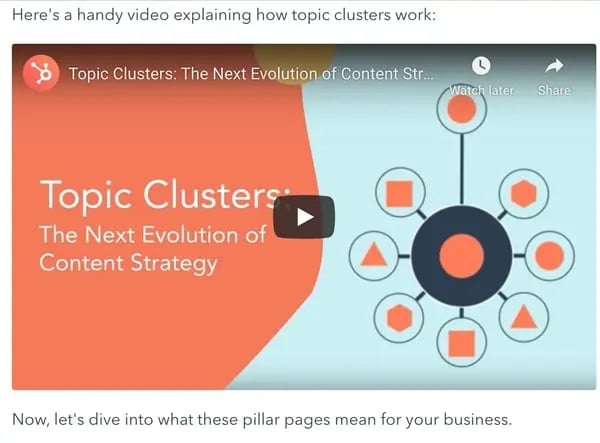
Embedding a YouTube video into your blog posts can make your post more interesting. When you add a video, it gives readers the option to watch a video instead of reading the post. This means that you won’t lose any readers who are more interested in video content. Additionally, it makes your post easier to scroll through and gives readers a chance to interact and engage with your post. For example, HubSpot embedded a YouTube video into a blog post explaining pillar pages and topic clusters. This visual aid helps clarify complex concepts and keeps readers engaged.
Design Elements and Data Visualization
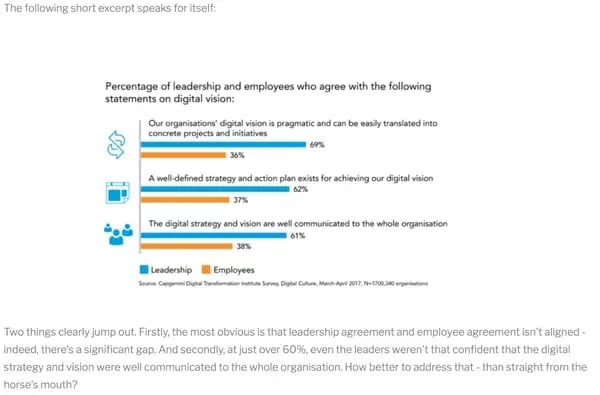
Charts and graphs help readers understand and analyze information. You can choose to make your own charts and graphs by using visualization tools or you can hire a graphics expert to do it for you. While it may seem like a daunting task, creating a visualization can actually be easy. You can create charts in a simple program like Excel or Google Sheets. In the example below, UK firm Carvill Creative includes a chart to help readers visualize the expert opinions of leadership. This visual representation makes complex data accessible and engaging.
Infographics are another powerful element. For your blog posts to be interactive, you should include multimedia elements throughout the post. As a bonus, those elements also make it easier to read, so users are more likely to read through the entire post. Sometimes you can create an infographic to communicate most of the information in a blog post. In this blog post by HubSpot, they included an introduction, and then let the infographic do the talking. This approach reduces cognitive load and allows readers to grasp key points quickly.

Images are a great way to add interactive elements to your blog posts. First, this helps readers visualize what you’re talking about. Second, images are just more interesting to look at. For example, this post on The Verge includes a moving image so readers can see a demonstration. This dynamic visual element enhances the user experience and provides practical value.
Pull quotes are a simple, interactive design element. They are just snippets of text from your blog post that relay the most important information. Reading a pull quote should engage your reader and make them more interested in what you have to say. If they’re skimming a pull quote, they’re encouraged to dive in to the post because it’s so interesting. This simple design choice can significantly improve readability and engagement.
Interactive content rules the marketing landscape for now and the foreseeable future. There’s no denying customers want more than some block text on a page. They want to dive in, learn more, give feedback, and get to know the company. Just ensure you’re balancing the message within the format and you should see success. Trying any of these methods should result in an increase of engagement and possibly even leads without the headache of a complicated tool and it won’t cost you a cent.
Strategic Implementation and Best Practices
Implementing interactive content requires a strategic approach. Start by identifying the key messages you want to convey. Then, choose the interactive format that best suits that message. For example, if you want to educate buyers, a quiz or calculator might be effective. If you want to entertain, a GIF or video might be more appropriate. Always keep your brand and voice in mind to ensure consistency.
Track the performance of your interactive content. Use analytics to monitor shares, engagement, and views. This data will help you understand what resonates with your audience and what doesn’t. Adjust your strategy based on these insights. For instance, if quizzes generate more leads than polls, focus more resources on creating quizzes.
Integrate interactive content with your CRM systems. This allows you to capture data from user interactions and use it to personalize future communications. For example, if a user takes a quiz about product preferences, you can use that information to send targeted email campaigns. This level of personalization enhances the customer experience and drives conversions.
Consider the user journey when placing interactive elements. Embed calculators or quizzes near the top of the page to capture attention early. Use videos and infographics in the middle of the post to break up text and maintain interest. Place pull quotes and images strategically to highlight key points and improve readability. This thoughtful placement ensures that interactive elements enhance the user experience rather than distract from it.
Finally, don’t be afraid to experiment. Try different formats, tools, and placements to see what works best for your audience. Interactive content is a dynamic field, and staying adaptable is key to success. By continuously testing and refining your approach, you can create content that not only engages readers but also drives meaningful business results.