Introducing the HubSpot Agent CLI for Ops
You know that heavy, draining feeling when you realize your entire Monday morning is already spoken for? You sit down with your coffee, ready to tackle big goals. Instead, you face a relentless parade of manual, repetitive tasks. You are stuck updating CRM records, scanning pipelines for stale data, and manually pulling lists.
This isn’t the creative collaboration you signed up for. That daily grind slowly chips away at your team’s morale. It stalls the exact growth you are working so hard to achieve. For small business owners and marketers, time is your most valuable asset. Spending it on data entry feels like a massive waste.
But imagine if those tasks simply disappeared. Picture a world where your most tedious workflows handle themselves quietly. They run constantly in the background while you focus on the high-impact work that actually moves the needle. You arrive at your desk with your daily insights ready. Your records are spotless, and your pipeline is primed for action.
You never even have to lift a finger to make it happen. This incredible shift occurs when we move beyond basic automation. By Introducing the HubSpot Agent CLI, we are finally unlocking that exact potential. It serves as the vital infrastructure layer bringing intelligent, background processing to your operations.
GTM teams can finally stop managing data and start building real relationships. You can hand the mind-numbing repetition over to the machines. Doing so allows you to reclaim your energy for the creative strategies that drive true revenue.
What is the HubSpot Agent CLI?
The HubSpot Agent CLI is a command-line interface that connects your HubSpot CRM data directly to external workflow environments. It acts as a specialized tool for developers and operations pros. It allows operations teams to script, schedule, and execute automated CRM tasks in the background without human intervention.
You can now plug HubSpot’s intelligence directly into your local development environments, CI/CD pipelines, or custom cloud infrastructure. By Introducing the HubSpot Agent CLI, you aren’t just setting up a basic integration. You gain a developer-first mechanism to build, test, and deploy agentic workflows exactly where your code already lives.
According to AEO/GEO Services, implementing background operations like this reduces manual CRM maintenance significantly while actively protecting your data integrity. It shifts your team from a reactive stance to a proactive operational rhythm.
Bridging Data and Action
At its core, this CLI is about breaking down operational walls. Normally, your CRM data stays trapped within the browser or accessed via standard APIs. The Agent CLI completely transforms your process by allowing you to tap into the HubSpot agentic platform directly from your terminal.
It enables you to orchestrate highly complex tasks. You can easily pull context from HubSpot, process it externally, and push commands back instantly. You effectively turn your CRM into a programmable, highly flexible backend for your automated processes.
This is absolutely essential for GTM team efficiency. It allows operations teams to treat CRM tasks just like software engineering projects. Your workflows become version-controlled, totally repeatable, and endlessly scalable as your business grows.
CLI vs. AI Connectors
People often confuse the new CLI with HubSpot’s existing AI Connectors, but they serve fundamentally different purposes:
- AI Connectors (Human-in-the-loop): These tools live directly within the HubSpot interface. They help sales or marketing teams write emails, summarize client calls, or get instant insights on the fly. They require active user intervention and significantly boost front-line productivity.
- Agent CLI (Automated, background tasks): This tool handles the heavy lifting silently in the background. It executes code-based scripts or scheduled AI workflow automation tasks that require absolutely no human clicks or oversight.
While AI Connectors empower your team to act faster in the moment, the Agent CLI finishes the necessary prep work before they even log in. It ensures the stage is set for a productive day.
The Power of Infrastructure Optionality
Rigid, inflexible platforms often feel like a frustrating bottleneck for modern GTM teams. By adopting the Agent CLI, you gain true infrastructure optionality. You are never forced to host your entire logic stack in one single, restrictive place.
Instead, you can choose to run your agents exactly where it makes the most sense for your unique architecture. You might need to run high-volume data processing on a powerful cloud server like AWS. Or, you might just want to test a quick validation script locally on your laptop.
The CLI provides the exact interface to make either scenario happen effortlessly. This freedom ensures your GTM stack remains highly agile. It helps you scale your automated CRM tasks without ever being locked into a single method of working. Your operations team gets the exact technical control they need to succeed and adapt.
How the Agent CLI Transforms GTM and Ops Workflows
When you start your day, imagine if your most repetitive, time-draining operations were already 100 percent finished. Instead of spending your valuable morning cleaning up messy lead data, you could jump straight into high-impact strategy.
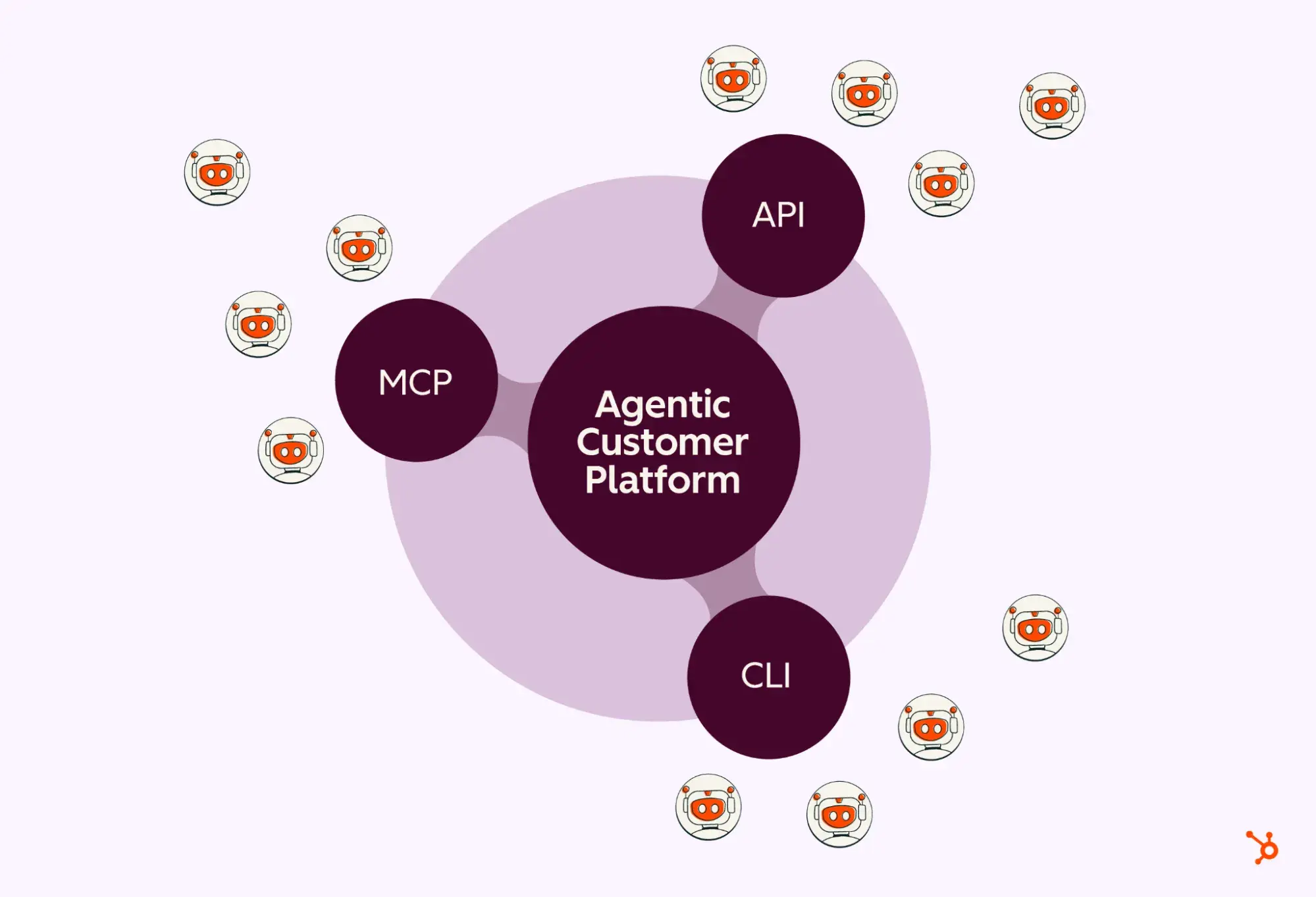
This is the new reality of AI workflow automation powered by the HubSpot Agent CLI. By moving tasks completely out of your manual to-do list and into a background execution layer, everything changes. You shift permanently from being a frustrated data janitor to becoming a visionary growth architect.
From Manual Drudgery to Automated Precision
The true power of this tool lies in handling massive bulk operations and scheduled maintenance without any human oversight. Think about the tedious daily grind of GTM and Ops teams. You constantly deal with lead deduplication, formatting errors, or verifying ongoing account health.
Manual tasks like these are heavily prone to human error and frequently get delayed because bigger priorities arise. With the CLI, you script these specific processes as intelligent agents that run on a strict set schedule.
You can trigger an agent at 3:00 AM to scan every single new lead created in the last 24 hours. It automatically checks for missing company information, enriches that data via external APIs, and assigns it to the correct sales territory. By the time you log in at 9:00 AM, your database is pristine, and your sales team is ready to sell.
Comparing Your Workflow Efficiency
To visualize the massive impact on GTM team efficiency, consider the stark difference between traditional manual processes and this modern automated approach. The HubSpot agentic platform makes an undeniable difference in your daily operations.
| Task Type | Manual Workflow (Typical) | Agent CLI Automated Workflow |
|---|---|---|
| Lead Cleanup | Weekly 4-hour spreadsheet audit | Daily background deduplication |
| Pipeline Scanning | Manual review of 50+ deals | Automated anomaly detection alerts |
| Account Review | Ad-hoc research before meetings | Real-time enrichment sync |
| Data Entry | Tedious manual form updates | Automatic field synchronization |
Real-World Operational Impact
Consider a standard account review process. Manually, a sales rep might spend 15 minutes per account gathering news, funding data, and recent leadership changes. If a rep manages 20 accounts, that totals five hours of lost selling time every single week.
An agentic workflow automatically pulls all this crucial data from external sources. It then easily updates your automated CRM tasks directly in the record notes. This infrastructure doesn’t just save a few minutes here and there; it actively protects your deep focus.
By offloading these backend responsibilities, you ensure your CRM remains a highly reliable source of truth. Your team spends far less time hunting for basic information and far more time building meaningful relationships. Ultimately, the Agent CLI acts as a force multiplier, letting smaller, agile teams operate with the precision of much larger departments.
Why Agent Infrastructure Flexibility Matters
Imagine you have a high-performance sports car, but it only drives in a straight line on a perfectly flat track. It is incredibly fast, sure, but it becomes completely useless the moment you hit winding mountain roads.

This is exactly why your operational tools should adapt to the user, not the other way around. When dealing with AI workflow automation, forcing your processes into a rigid, singular environment creates painful bottlenecks that kill productivity. Flexibility is the crucial difference between a tool that actually helps you win and one that just adds more complexity.
The Cost of Agent Lock-in
Agent lock-in happens when your automation strategy is tethered tightly to a single platform or infrastructure. This makes it incredibly difficult to pivot or scale as your business needs naturally evolve.
When restricted to one closed environment, you spend more time fighting system limitations than getting actual work done. By prioritizing infrastructure flexibility from day one, you easily avoid this dangerous trap.
You gain the ongoing ability to deploy your agents exactly where they generate the most tangible value. True GTM team efficiency requires a highly agile mindset. Your operations shouldn’t ever be held hostage by the technical limitations of a closed ecosystem.
Choosing the Right Environment for the Task
Not all operational tasks are created equal. Some require immediate, human-in-the-loop interaction, while others are best handled by quiet, automated background processes. By Introducing the HubSpot Agent CLI, you provide the flexibility to match the environment perfectly to the specific requirement.
- Real-time Conversations: When a hot prospect triggers an inquiry, you need an environment that responds instantly and naturally.
- Bulk CRM Tasks: Heavy lifting—like massive database cleanup or large-scale account scoring—needs a completely separate, highly scalable environment. This ensures it won’t interfere with your team’s daily interface usage.
- Scheduled Operations: Complex, multi-step workflows that run entirely overnight ensure your team is met with perfectly organized data each morning.
Separating the execution environment from your primary visual dashboard lets your team choose the absolute best tool for every specific job. This isn’t just about technical convenience or preference.
It is about building a highly powerful HubSpot agentic platform that easily grows alongside your business. You absolutely deserve an automation strategy that is just as dynamic and adaptable as your ambitious GTM team.
Reclaiming Your Operational Rhythm
The future of true productivity isn’t about simply working harder or putting in longer hours. It is about creating an intelligent environment where your tools anticipate your exact needs before you even log in.
By shifting toward an agent-first approach, you gain the ultimate freedom to let your systems handle the administrative heavy lifting. You can then direct all your focus on the creative, human-centric strategies that actually grow your business and increase revenue.
Introducing the HubSpot Agent CLI is just the opening chapter of this massive operational transformation. It represents a fundamental shift in exactly how GTM teams manage technical complexity.
You can finally move away from reactive, stressful manual upkeep. Instead, you move toward proactive, intelligent background operations that never sleep, never complain, and never make typos.
When you fully embrace this level of AI workflow automation, you are rethinking your entire operational rhythm. You now have the incredible chance to reclaim the countless hours once lost to manual CRM maintenance.
Stop actively managing your tools and start letting them expertly manage the work for you. It is time to explore how these advanced capabilities can completely reshape your daily operations. You can finally give your team the breathing room and space to do their absolute best work. Explore the official documentation today to see how easily you can bring these automated workflows directly into your own environment.
AEO/GEO
Want to learn more?
Contact us for direct consultation and support.